A/B test email quality gates without hurting signup growth
Learn how to A/B test email quality gates with the right metrics, segments, and gradual rollout so stricter validation improves quality without slowing growth.
Contents
- Why email quality gates can hurt growth if you change them fast
- Define your email quality gate and what “stricter” means
- Metrics to track: growth, quality, and safety (with guardrails)
- Choose segments that make your results trustworthy
- Step-by-step: design a clean A/B test for validation strictness
- Gradual rollout tactics that reduce surprises
- Keep the signup experience smooth while you tighten the gate
- Common mistakes that make tests misleading
- Quick pre-launch checklist
- Example: tightening disposable email rules without tanking trials
- Next steps: make stricter validation a stable part of your growth system
- FAQ
Why email quality gates can hurt growth if you change them fast
Email quality gates protect your product, but they sit right in the middle of signup. If you make validation stricter overnight, you can lose real users along with the bad ones. The tricky part is that the damage looks like “growth slowing,” even when your email list is getting cleaner.
The biggest growth risk is false positives. A strict rule can block someone using a new domain, a corporate mail server with unusual settings, or a valid address that fails a real-time check for a temporary reason. That user doesn’t see “better data quality.” They see “signup failed” and leave.
Stricter checks can also add friction. Extra steps like re-typing an email, waiting for verification, or seeing a confusing rejection message can slow onboarding. Even small delays matter when someone is trying your product for the first time.
At the same time, email quality directly affects cost. More invalid addresses means more bounces, worse deliverability, and more risk to your sender reputation. It also wastes sales and support time on accounts that will never activate. Disposable emails and spam traps are especially painful because they can look like signups but rarely become real users.
A good rollout balances growth and safety. Before you run a test, agree on what “success” means. Usually that’s signup conversion staying within a guardrail, downstream quality improving (activation, trial-to-paid, verified email rate), risk dropping (bounces, disposable domains, suspicious signups), and the experience staying fast.
Example: if you tighten disposable email detection with an API like Verimail, expect a visible dip in raw signups. The question is whether paid conversions and deliverability improve enough to justify it, without blocking legitimate users who just want to try the product.
Define your email quality gate and what “stricter” means
Before you test anything, write down what your “gate” does today in plain words. If you don’t define it clearly, you’ll end up testing a mix of policy, UI copy, and user intent all at once.
A simple way to frame the gate is by what happens when an email looks risky:
- Soft gate: allow signup, but show a warning or flag the account for review.
- Verify gate: allow signup only after the user confirms the address (for example, via a code or confirmation email).
- Hard block: deny signup until the user enters a different email.
Next, list what you can actually detect with your current tooling. Most teams start with obvious failures and then add higher-signal risk checks: invalid syntax, domain problems, missing MX records, disposable domains, and known traps or high-risk patterns (often from blocklists).
Where the gate lives matters as much as the rule. A block at the signup form changes growth more than the same block later in an invite flow, checkout, or lead form. Pick one location for the test so you know what caused the change.
Finally, define “stricter” from the user’s point of view. Strictness isn’t just detection. It’s the experience: the message you show, whether you allow retries, and how easy it is to get help.
A concrete example: you might keep syntax and MX checks as hard blocks, but treat disposable email detection as a verify gate first. With a validator like Verimail, you can separate “invalid” from “disposable” and choose different outcomes for each instead of turning everything into a blunt deny screen.
Metrics to track: growth, quality, and safety (with guardrails)
Pick one primary metric and treat everything else as supporting evidence. Otherwise you can “win” on paper while quietly breaking signup.
Start with a growth metric that reflects real success, not just form submits. For most teams that’s signup completion rate by variant. If your product has a fast “first value” moment, activation rate (for example, verified email plus the first key action within 24 hours) is often better.
Quality is where stricter validation should pay off. Track downstream email outcomes that matter to your sender reputation: bounce rate on your first email, deliverability (inbox vs spam if you have it), complaint rate, and unsubscribe rate. These usually move slowly, so define a measurement window up front (for example, 7-14 days after signup) and stick to it.
Safety metrics tell you whether you’re blocking the right people. Watch abuse and fraud signals that cost time and money: duplicate accounts per user, suspicious signups from the same device or IP range, spammy behavior after signup, and support tickets related to account access or “I never got the email.” If you sell anything, add chargebacks or refund rate.
Business metrics keep the test honest. A stricter gate can reduce top-of-funnel signups but improve qualified leads and trial-to-paid conversion. If paid conversion takes too long, use a proxy like sales accepted leads, product-qualified leads, or first-week retention.
Set guardrails so you stop the test early if the experience breaks. Watch page load time and added latency at the email step, form error rate (especially “email rejected”) by device, drop-off on the email field compared to the prior step, help requests about validation or verification emails, and an overall signup completion rate floor (your “do not cross” line).
Example: if you tighten disposable email detection with a tool like Verimail, you might accept a small drop in raw signups, but only if activation and early retention rise and abuse reports fall, without a spike in form errors.
Choose segments that make your results trustworthy
If you test a stricter gate on “everyone,” the result can be misleading. Different users bring different email habits, risk levels, and patience for extra friction. Segmentation helps you see where a policy is improving quality and where it’s quietly blocking good signups.
Pick a few segments you’ll report every time. Keep it small so you don’t end up cherry-picking the best-looking slice. A good default is to segment by how people arrive, where they are, and how risky the signup looks.
Segments that usually explain the biggest swings include acquisition channel (paid, organic, partners, in-product invites), region and language, new vs returning users, high-risk vs low-risk cohorts (based on your existing signals), and business vs personal email addresses (if your product treats them differently).
Be explicit about what “high-risk” means for your business. Common signals are very fast repeat signups, many signups from the same device or IP range, unusual referral patterns, or a history of chargebacks and abuse tied to similar profiles. If you already score signups for fraud, use that score to split the readout.
A concrete example: paid traffic in one country might over-index on a few local mailbox providers. A stricter rule that flags certain domains (or aggressively blocks disposable emails) may look fine overall, but it can crater conversions in that region only. This is exactly the kind of issue you catch by segmenting early.
If you use an email validation API like Verimail, keep segmentation separate from the validation decision itself. Run the same validation checks across variants, but change only the policy (allow, warn, or block) so your segment comparisons stay clean.
Step-by-step: design a clean A/B test for validation strictness
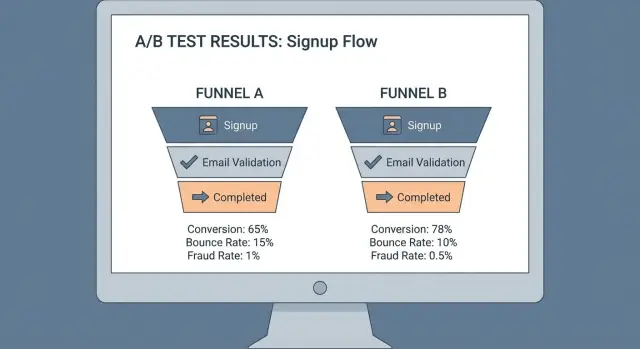
A clean test starts with one sentence you can defend: what exactly gets stricter, and what should improve because of it. For example: “If we block disposable emails at signup, we will reduce bounce rate and fake trials, while keeping paid conversions within 1% of today’s level.” That makes the trade-off clear.
1) Define the variants (what users actually experience)
Keep the difference between groups small and easy to explain.
- Control: current policy (baseline)
- Soft warning: allow signup, but prompt to use a work/personal inbox (one click to continue)
- Hard block: prevent signup until a different email is used
- Step-up verification: require an extra step (like confirming an email) only for risky addresses
If you use a validator like Verimail, write down which signals trigger the stricter path (disposable provider match, invalid domain, missing MX, known spam trap risk) so the variants stay stable.
2) Lock in assignment and handle retries
Assign at the user level, not the session. A simple rule is: the first time you see an email (or user ID/cookie), you pin them to a variant for the whole test.
Decide how you treat retries up front. If someone tries three different emails, keep them in the same variant and log each attempt so you can measure “friction” (extra attempts) separately from true drop-off.
3) Set run length and guard against calendar noise
Run long enough to include weekday and weekend behavior, and ideally one full marketing cycle if you run campaigns. If you launch a big promo mid-test, note it and consider extending the test so both variants see a similar traffic mix.
4) Decide stopping rules and what “winning” means
Before you start, define pass/fail rules per segment, not just overall. You’ll usually want a quality win (lower bounces, fewer disposable signups, fewer chargebacks or fraud flags), a growth guardrail (signup completion rate can’t fall more than X%), a revenue guardrail (trial-to-paid or activation can’t fall more than Y%), and a safety guardrail (support tickets or “can’t sign up” errors can’t spike beyond Z%). Also set a minimum sample so you don’t call a result too early.
This keeps you from “winning” on quality while losing the customers you actually want.
Gradual rollout tactics that reduce surprises
If you change validation rules overnight, you learn one thing fast: your support inbox gets louder than your metrics dashboard. A gradual rollout gives you the same learning with fewer surprises.
Start with a canary cohort before you run a clean split. Pick a small slice of new signups (for example, 1% of traffic or one low-risk region) and apply the stricter gate there. Watch the basics for a full day cycle: signup completion, verification email delivery, and complaint volume. If something breaks, you have a small blast radius.
After the canary looks stable, ramp up in steps instead of jumping straight to 50/50. A simple ramp plan is:
- 1% for 24 hours
- 5% for 24 hours
- 25% for 48 hours
- 50% for 48 hours
- 100% (or move into your formal experiment)
Make it easy to stop. Add an emergency off switch so you can revert to the previous policy without deploying code.
Also define a fallback for edge cases. If your validator times out or DNS is flaky, do you allow signup but flag the account, or require verification before access?
Logging turns a rollout into a learning loop. Store a clear decision reason for every blocked or challenged address (syntax invalid, no MX records, disposable, suspected spam trap, blocklisted domain). Tools like Verimail return these signals in milliseconds, which makes it practical to debug real cases instead of guessing.
Finally, plan for spikes and odd providers. During traffic surges, timeouts rise and false blocks can jump. Set rate limits, monitor latency, and keep an allowlist process for legitimate corporate domains that fail checks due to strict DNS setups.
Keep the signup experience smooth while you tighten the gate
Stricter validation fails when it feels random to good users. Treat your email check like a helpful hint, not a punishment. This matters even more during testing, because confusing messages can hide the true impact of your policy.
Write error messages that tell people exactly what to do next. “That email looks invalid” is vague. “Check for a missing @, spaces, or a typo like gmial.com” helps someone fix it in seconds.
Give people an easy retry path. Many “bad” emails are simple typos, not fraud. Auto-suggest common domains when someone types “gamil” or “hotmial,” and catch missing dots (like gmailcom). If you use a validator such as Verimail, you can also catch domain and MX issues early, then explain them plainly: “We can’t reach this email domain. Try a different address.”
Decide how you handle disposable emails before you launch. There’s no single right answer, but be consistent: block when abuse is high and accounts have real cost (free trials, credits), warn when you want lower friction but still want to nudge quality, or allow signup but require email verification before key actions (inviting teammates, exporting, billing).
Build an exceptions plan. If you have legitimate partner or customer domains that trigger false positives, keep a small allowlist and review it monthly so it doesn’t become a loophole.
Finally, choose when to re-check after signup. A common pattern is light checks at signup, then stricter checks at the first outbound email, before upgrading to paid, or before the first high-risk action. For example, a user who signs up with a borderline address can still start a trial, but must verify before inviting a team or entering payment details.
Common mistakes that make tests misleading
The fastest way to misread an experiment is to judge it only by signup conversion. A stricter gate can look “bad” on day one, yet improve deliverability, reduce refunds, and cut support time because fewer fake or broken addresses enter your system. Decide upfront which downstream outcomes matter and how long you’ll wait for them to show up.
Another common problem is changing more than one thing. If you tweak validation strictness while also changing form copy, adding extra fields, or moving error messages, you won’t know what caused the result. Keep the test boring: one rule change, one clear hypothesis.
Mistakes that most often create false winners or false alarms:
- Tracking only signups, not later signals like bounce rate, deliverability, trial activation, or chargebacks.
- Mixing product changes with policy changes (copy, UI, and validation all moving at once).
- Randomizing by session instead of by user, so a person who retries sees different rules and gets inconsistent outcomes.
- Lumping “blocked” users together with “abandoned” users who simply leave after an error, which hides whether the rule is wrong or the message is unclear.
- Treating edge cases as disposable: new domains, corporate email gateways, plus addressing, and aliases.
Pay special attention to the “blocked vs abandoned” split. A blocked user is a policy decision. An abandoned user is often a UX problem, like vague error text or no path to fix a typo.
Finally, watch for over-blocking. Disposable email detection is useful, but it’s easy to catch legitimate addresses by mistake, especially from new domains or corporate relays. Tools like Verimail can help by combining syntax checks, domain and MX verification, and blocklist matching so your test is about policy, not accidental false positives.
Quick pre-launch checklist
Before you start, get everyone aligned on what “success” and “safe to continue” mean. Most tests on stricter validation fail because the rollout was vague, the dashboard was missing key signals, or the team couldn’t explain why a real user got blocked.
Write down the variants in plain language. Example: Control accepts any address that passes syntax and domain checks, while Variant blocks known disposable providers and suspicious patterns. Also document how traffic will ramp (for example, 5% to 25% to 50%) and the exact rollback trigger (like “signup conversion drops by more than X% for Y hours”).
Here’s a quick checklist to review with growth, engineering, and support:
- Variants and rollout steps are documented, including who flips the switch and how you revert within minutes.
- Your dashboard is ready and watched: signup conversion, activation (first key action), bounce rate, spam complaints, and fraud signals (chargebacks, multiple signups per device, suspicious IP clusters).
- Segments are agreed upfront, with realistic sample size expectations (new vs returning visitors, paid vs organic, geos, and business vs personal email domains).
- Logging is detailed enough to debug: every block/allow decision includes a reason code plus the email’s domain and provider category (for example disposable, free mailbox, custom domain).
- Support and ops have a short playbook: what to tell users who get blocked, how to collect examples, and how to escalate false positives quickly.
Do a small dry run in a safe environment (internal accounts or a tiny traffic slice). If you can’t explain five random decisions (why they passed or failed), you’re not ready to expose it to real signups.
Example: tightening disposable email rules without tanking trials
A B2B SaaS team runs a free trial. Signups look strong, but sales complains: many leads vanish, and support sees spammy accounts. A quick audit shows a pattern: lots of trials use disposable inboxes and then never activate.
Before changing anything, they set a baseline for the current policy (allow all emails). For two weeks they track bounce rate from the first product email, trial-to-activation rate (for example, completing the first key action), and “bad signups” (accounts flagged for abuse or obvious fake details). They also add a guardrail: overall signup conversion rate must not drop more than a small agreed threshold.
Then they test three experiences:
- Control: allow disposable emails like today.
- Soft warning: allow, but show a clear message (“Use a work email to get full access”) and ask for confirmation.
- Hard block: reject known disposable providers and request a different address.
The validation uses a disposable provider check plus basic hygiene (syntax, domain, MX). With an API like Verimail, this can be done in one call at signup, so every variant gets consistent detection.
Rollout is gradual. They start with paid traffic only, because it tends to attract more abuse and has clearer ROI. If guardrails hold after a few days, they expand to other sources.
The decision is not “one policy for everyone.” Results show hard block improves activation and reduces abuse in high-risk segments (paid search, certain geos, unusually fast form completion), but hurts conversion in low-risk segments (invited teammates, organic brand traffic). They keep strict blocking where it pays off and use the softer warning elsewhere.
Next steps: make stricter validation a stable part of your growth system
Once you have a clear winner, treat it like a product change, not a one-off growth tactic. The goal is consistency: the same inputs should get the same decision every time, with a fast path to rollback.
Write the winning policy down as a simple rule set and tie it to segments. For example: new accounts from high-risk geos get stricter disposable detection, while trusted returning users only get basic checks.
Keep monitoring after the test ends
Email quality isn’t static. Disposable providers pop up, spam traps rotate, and fraud patterns shift. Set a weekly review that focuses on outcomes, not just signup volume.
Track a small set of signals that should move in the right direction if your gate is working: bounce rate and hard bounces on activation emails, complaint rate (spam reports) and unsubscribe spikes, trial-to-activation and first-week retention, fraud indicators like repeated signups per device or IP, and support tickets about blocked signups.
Automate validation so the rule is reliable
Manual checks or inconsistent client-side logic create noisy results and unfair user experiences. Put validation in your signup flow so every request is evaluated the same way, quickly.
If you want an API-based approach, Verimail (verimail.co) can validate syntax, domains, MX records, and disposable providers in a single call, which helps keep policies consistent across web, mobile, and partner signups.
Start small even after you “pick a winner.” Roll out to a small percentage, watch the guardrails for a full week, then expand. Keep a clear rollback path (a feature flag or config switch) so you can loosen the gate fast if growth or deliverability starts to dip.
FAQ
What does it actually mean to make an email quality gate “stricter”?
Start by defining what “stricter” changes for the user: do you warn, require verification, or block? The safest default is to tighten detection while keeping the outcome soft at first, then escalate only if quality improves without breaking signup conversion guardrails.
Why can stricter validation hurt growth even if it improves email quality?
False positives are the main risk. A valid address can fail because of temporary DNS issues, unusual corporate mail setups, or a new domain, and the user just sees “signup failed” and leaves. Tightening rules also adds friction if it introduces extra steps or confusing errors.
When should I use a soft gate vs verification vs a hard block?
Use a soft gate when you want low friction and mostly want to nudge behavior. Use a verify gate when you need higher confidence before access to key actions. Use a hard block when abuse is costly and you’re confident the signal is high quality (like clearly invalid syntax or a truly unreachable domain).
Which metrics should I track to judge whether stricter validation is worth it?
Track one primary growth metric like signup completion or activation, then back it up with downstream email quality and risk metrics. Practical picks are bounce rate on the first email, verified-email rate, early retention, disposable-rate, abuse flags, and support tickets about signup or missing emails. Set clear guardrails so you stop if the experience degrades.
What segments matter most when testing email validation changes?
If you only look at averages, you can miss where a rule is quietly blocking good users. Segment by acquisition channel, region/language, new vs returning users, and business vs personal emails, then add a simple “risk” split using your existing fraud/abuse signals. Keep the segmentation stable so you don’t cherry-pick after the fact.
How do I avoid inconsistent results when users retry different emails?
Pin users to a variant the first time you see them, ideally by user ID or a stable cookie plus the entered email. Also decide how you handle retries: keep the same variant and log each attempt so you can measure extra friction separately from true abandonment.
What’s a safe way to roll out stricter rules without surprises?
Canary first, then ramp in steps. A practical plan is 1% for a day, then 5%, then 25%, then 50%, watching signup completion, error rate at the email step, validation latency, and support volume at each step. Always keep a fast rollback switch so you can revert without a deploy.
How can I tighten validation without making signup feel punishing?
Default to clarity and fast recovery. Tell users what to do next (fix a typo, try another address, or verify), and make retries easy. Many “bad emails” are just typos, so helpful copy and quick correction paths can preserve conversion even when detection gets stricter.
What are the most common mistakes that make these tests misleading?
Do fewer things at once. Don’t change validation rules and rewrite the form and move UI elements in the same test, or you won’t know what caused the outcome. Also avoid judging the test only by raw signup volume; you need downstream signals like bounces, activation, and abuse to know if you actually improved the business.
How can Verimail help me tighten disposable email detection without blocking real users?
Use different outcomes for different risk types instead of treating everything as “deny.” With an API like Verimail, you can separate invalid addresses from disposable ones and choose outcomes like hard-block for invalid syntax/MX failures, but verification or warnings for disposable matches. That lets you reduce low-quality signups while protecting legitimate users from accidental blocks.