Email aliases and forwards in onboarding: policy options
Learn how to handle email aliases and forwards in onboarding by separating deliverability risk from ownership risk and choosing clear, practical policies.
Contents
- Why aliases, forwards, and group inboxes complicate onboarding
- Quick definitions: alias vs forward vs group inbox
- Separate the risks: deliverability vs ownership
- What email validation can (and cannot) tell you
- Policy options you can choose from
- Step-by-step: build a decision flow for onboarding
- Ways to prove control when ownership matters
- Common mistakes and tricky edge cases
- Quick checklist before you ship the policy
- Example: a shared team inbox used for a new workspace
- Next steps: implement, measure, and keep the list clean
- FAQ
Why aliases, forwards, and group inboxes complicate onboarding
These addresses show up in signups for normal reasons. A team might share one mailbox for a new workspace. A contractor might use a client-specific alias. An IT admin might route tool notifications through a forwarding rule so nothing gets missed.
The problem is that aliases and forwards blur two questions people often mix together.
Deliverability risk: Will your messages reach a real inbox quickly and reliably? Forwarding chains, misconfigured mail rules, and some shared mailbox setups can cause missed confirmations, delayed notifications, or bounces that look random.
Ownership risk: Do you know who actually controls that inbox today? With a group inbox, several people may read and act on the same message. With a forward, the address entered at signup may not be where messages are read. That can be fine for routine updates, but it gets risky when email becomes the key to identity.
Most onboarding rules are really trying to prevent a few concrete problems:
- Fake or low-quality signups that waste seats, trials, or support time
- Account takeovers and messy recovery (the wrong person can reset access)
- Compliance and audit issues when you can’t show who accepted terms or received notices
- Support confusion when multiple people reply from the same mailbox
A simple example: a company signs up with [email protected], which forwards to three employees. The confirmation email is delivered, but any of the three can click it. Later, one employee leaves, and the remaining team still has access. Your system might treat that address as a single person, even though it never was.
A clear policy matters not because these addresses are “bad,” but because they can be great for deliverability while still being unclear for ownership.
Quick definitions: alias vs forward vs group inbox
When someone says they “use the same email in different ways,” they usually mean one of three setups. Getting the terms right helps you write a policy that makes sense, and it reduces back-and-forth with users who are doing something normal.
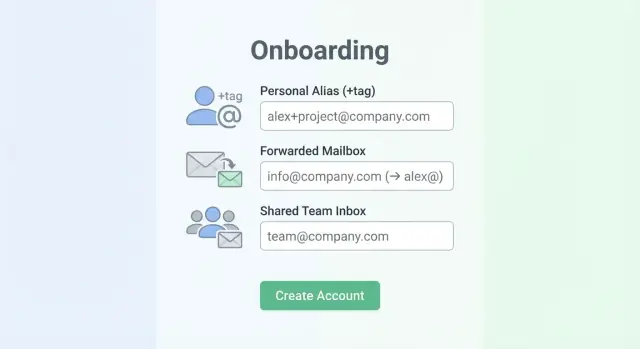
An alias is an extra address that delivers to the same mailbox. Sometimes it’s created by the provider (a second address on the same account). Sometimes it’s plus addressing, where you add a tag after a plus sign and before the @, like [email protected]. To the user, it feels like one inbox with a few “names.”
A forward is different: the email is delivered to one inbox and then sent on to another. Forwards can be set up by the user, by IT, or by the domain. They can also be chained (A forwards to B, B forwards to C). In practice, forwarding can change how quickly someone receives the message, and it can make troubleshooting harder when a confirmation email “never arrives.”
A group inbox (shared mailbox) is an address multiple people can read, like [email protected]. Access is based on team membership, not one person’s identity. Some group inbox setups let people reply from the shared address; others reply as the individual.
Related but separate: role-based addresses like admin@, billing@, hr@, and sales@. These might be personal in a very small company, but they’re often shared or managed by a team. They’re common in B2B signups, so it’s worth calling them out explicitly.
A few quick examples:
- Alias: [email protected] or [email protected] reaching Sara’s inbox
- Forward: [email protected] forwarding to [email protected]
- Group inbox: [email protected] used by five coworkers
- Role-based: [email protected] managed by the finance team
These differences are why you usually need more than a single yes-or-no rule.
Separate the risks: deliverability vs ownership
It helps to split the problem into two risks. Teams that mix them together often end up with rules that are too strict (hurting signups) or too loose (hurting security and accountability).
Deliverability risk: will your email reach them?
Deliverability risk is about whether messages you send will actually arrive. If an address is invalid, blocked, or low quality, you’ll see bounces, missing confirmations, and support tickets like “I never got the code.” It can also hurt your sender reputation if you keep emailing bad addresses.
An address can be “personal” and still deliver poorly. Common causes include typos (gmal.com), domains that no longer exist, mail servers with no valid MX records, or addresses at disposable email providers that get shut off quickly.
This is the area where email validation tools help: syntax checks, domain and MX lookups, and screening against known disposable providers and spam traps.
Ownership risk: who really controls the account?
Ownership risk is about identity and accountability, not bounce rates. Even if mail gets delivered, you may not be able to tie the account to a single person or a stable owner.
A shared inbox is the classic example: [email protected] or [email protected] may receive email perfectly, but multiple people can read and act on it. That makes it harder to:
- Know who approved terms, created the workspace, or changed billing
- Remove access cleanly when someone leaves
- Investigate abuse or suspicious activity
- Prevent “pass-the-code” logins from spreading widely
Deliverability and ownership can move in opposite directions. A group inbox can be highly deliverable but high ownership risk. A personal address can be low ownership risk but still fail deliverability checks.
So the policy is usually two-layered: validate deliverability to keep your database clean, then decide what level of ownership proof you need for each action (signup, admin roles, payouts, SSO setup). Verimail can help on the deliverability side, while ownership requires product rules and verification steps.
What email validation can (and cannot) tell you
Email validation is good at answering one question: will this address likely accept mail? That’s mostly a deliverability question, not an identity question.
A solid validator checks signals before you ever send a confirmation email:
- Syntax: does it follow RFC rules (no broken characters or missing parts)?
- Domain checks: does the domain exist and resolve correctly?
- MX records: is the domain set up to receive email?
- Risk screening: does it match known disposable providers or known spam trap patterns?
Tools like Verimail are most useful here. Its multi-stage pipeline (syntax checks, domain and MX lookup, plus real-time matching against thousands of disposable providers) helps reduce bounces and blocks many low-quality signups before they hit your database.
What validation can’t prove is ownership or intent. It can’t tell you:
- Who actually reads the inbox (one person, a rotating team, or nobody)
- Whether the address is shared, role-based, or monitored after onboarding
- Whether the person signing up works at the company they claim
- Whether messages will be forwarded somewhere else
Forwards are especially tricky. A forwarded address can look perfectly normal: the original inbox receives mail, then silently passes it on. The final destination is hidden from validators, so you can’t see who ends up reading the message or how many people receive it.
Disposable and spam-trap screening is best viewed as a deliverability filter. It helps you avoid addresses that are likely to bounce, churn quickly, or harm your sender reputation. But if your real concern is access control (who can join a workspace or see invoices), you still need an ownership step like confirmation, domain-based rules, or admin approval.
Policy options you can choose from
There’s no single “right” rule. The best choice depends on what you’re protecting: smooth signup, reliable delivery, or stronger proof that the person really controls the account.
A practical menu of policies
Here are five common approaches, from lowest friction to highest control:
- Open access + verify later: accept any address, then use verification, bounce monitoring, and behavior signals to catch problems.
- Accept but tag as shared: allow role-based or shared addresses, mark them as “shared/role-based,” and apply stronger checks for sensitive actions.
- Targeted restrictions: block or warn on specific local parts (like finance@, admin@) only for certain flows (high-volume invites, trial abuse).
- Business email required for higher-risk features: keep signup open, but require a business domain before enabling exports, billing changes, or sending many invites.
- Enterprise allowlist: for regulated or enterprise customers, only permit approved domains, with a clear process for adding more.
Each option can still use deliverability validation, but don’t treat deliverability as proof of ownership. A group inbox can be perfectly deliverable while giving weak accountability, and a forward can hide where mail ends up.
Picking the right option by risk
If your main goal is growth, start open and tighten later, but be strict about disposable email detection and known bad domains. If your main goal is control and auditability, treat shared inboxes as second-class identities: allow them for contact, but don’t let them be the only admin for billing or security settings.
A practical middle ground is “accept, then gate.” Let someone create a workspace with a forwarded address, but require a business domain (and a second proof step) before enabling bulk invites. Validation tools like Verimail can flag disposable providers and reduce bounces during signup, while your policy decides who is allowed to do what once they’re inside.
Step-by-step: build a decision flow for onboarding
Start by writing down what you’re trying to protect. Some checks are about whether the email can receive mail. Others are about whether the person signing up really controls it.
1) Map actions to the level of ownership you need
List what a new account can do in the first week, then tag each as “needs strong ownership” or “good enough.” Strong ownership usually matters for password resets, billing changes, adding admins, exporting data, and changing security settings.
From there, build a flow with two gates, in order:
- Set a baseline deliverability gate (syntax, domain, MX, and known disposable providers).
- If deliverability fails, choose a response: block outright, ask for another email, or route to manual review.
- If deliverability passes, decide whether the user gets normal access or limited access until ownership is proven.
- For sensitive actions, add an ownership gate: confirmation, admin approval, or domain proof for company workspaces.
- Define what “failure” means at each step: warn only, restrict features, require an alternate address, or hold the account.
Verimail can help with the deliverability gate by catching invalid addresses, disposable emails, spam traps, and risky domains quickly. It won’t tell you who “owns” a shared inbox. That’s a product decision.
2) Write the “why” in plain user-facing copy
Your message should explain the rule without sounding accusatory. For example: “For security, changes to billing and admin roles require a verified email address. You can keep using this address for notifications, but please verify an address you control to continue.”
That kind of copy reduces support tickets and gives honest users a clear next step, even when they signed up with a group inbox or a forward.
Ways to prove control when ownership matters
Email verification is the baseline: send a one-time link or a short code to the address and require the user to confirm it. This proves the person can receive messages at that inbox right now. It doesn’t prove they’re the legal owner, that the inbox is private, or that control won’t change later (especially with forwards and shared inboxes).
When the stakes are higher, add a second check that matches the risk. A finance tool enabling payouts needs more certainty than a newsletter signup.
Stronger options when you need higher trust
Pick one, or combine a couple, based on what you’re protecting:
- Phone verification (useful against automated signups, but watch for recycled numbers)
- SSO (SAML/OIDC) with a business identity provider
- Payment verification (a verified card or small charge, when it fits your product and region)
- Domain verification for workspaces (proof that the team controls example.com before unlocking admin-only features)
- Step-up checks at sensitive actions (allow onboarding, require extra proof to change billing, export data, or invite many users)
Email validation still matters here. Verimail can help you catch invalid addresses and many disposable providers before you send a code, so you’re not building trust on top of a bad email.
Teams and invites: verify each person, not just the creator
If someone creates a workspace using a shared inbox (like [email protected]), don’t treat that as proof for the whole team. Require each invited member to verify their own email before they can access the workspace.
Plan account recovery for shared inboxes up front. Avoid recovery paths that rely only on a mailbox several people can access. Use a secondary contact, allow admins to restore access, and log changes to security settings so a forward or shared inbox doesn’t become a single point of failure.
Common mistakes and tricky edge cases
Many onboarding problems happen when teams treat all “non-standard” emails the same. Aliases, forwards, and group inboxes can be normal, but they change your risk picture.
One easy mistake is breaking valid emails with over-strict rules. Plus addressing ([email protected]) is common for filtering and tracking. If you reject it, you frustrate careful users and create support tickets for no good reason. A safer approach is to accept it, then store a normalized version for dedupe if you need it.
Another frequent misstep is labeling every role address (support@, sales@, info@) as fraud. Some are low quality, but many real companies onboard with a shared inbox first. Instead of a blanket ban, treat role-based email risk as a signal and pair it with extra checks when the account will have money, admin access, or sensitive data.
Where teams get burned is using deliverability checks as a proxy for ownership. A mailbox can be real and reachable, but still controlled by the wrong person. Email validation (including disposable detection) improves deliverability and list hygiene, but it can’t confirm who’s behind an alias or who receives forwarded messages.
Watch for shared inboxes becoming a single point of failure:
- One verified address controlling many workspaces with no limits
- No audit trail for who joined using that inbox
- Password resets and billing notices going to a shared distribution list
Security notifications can also misbehave with forwarding. Some orgs have forwarding loops (A forwards to B, B forwards to A), or a group address that fans out to many people.
Keep account-critical messages predictable:
- Send security alerts to a primary address plus an optional backup
- Require re-verification for email changes on admin accounts
- Warn users if an address appears to forward to multiple recipients
Example: a new workspace signs up with [email protected]. It validates, but five people receive the code, and later nobody knows who changed billing settings. Early guardrails prevent messy disputes later.
Quick checklist before you ship the policy
Before you roll this out, decide what you’re optimizing for: fewer fake signups, fewer locked-out real users, or maximum security. The right mix depends on your product, but this checklist helps you avoid gaps that later show up as support tickets.
Final pre-launch checks
Start with what your signup form will accept. Many real users rely on alias formats, and blocking them creates needless friction.
- Confirm you accept plus addressing and common alias patterns for major providers (for example, name+project@domain). If you restrict them, document why and where the exceptions apply.
- Block known disposable providers and obvious throwaway domains. If you use a validation service like Verimail, make sure disposable detection and blocklist checks are enabled and logged.
- Decide which actions require verification before they’re enabled. A common baseline is: no team invites, exports, or billing changes until the address is verified.
- Write a clear rule for role-based and shared inboxes (support@, sales@, info@). Pick one: allow, allow with a warning, or restrict to certain plans or use cases.
- Define a recovery plan for shared or changing inbox ownership. This matters when someone leaves and the mailbox is reassigned.
Once those decisions are made, test the policy against a few realistic signup paths. For example, a small agency might sign up with [email protected] (shared) and forward it to two people, while a contractor uses [email protected] (alias). Your policy should say exactly what happens in each case: allowed, warned, or blocked, and what the user must do next.
Sanity checks that prevent surprises
Decide who can change the account email later, and what proof you require. If ownership matters, consider requiring both: access to the current email and verification of the new one.
Also check your logging and support tools. When an onboarding attempt fails, your team should be able to see whether it was blocked due to deliverability risk (invalid or disposable) or ownership risk (shared mailbox, forward, or role address). That distinction saves time and keeps product and support aligned.
Example: a shared team inbox used for a new workspace
A 5-person team creates a new workspace using [email protected]. That address forwards to two managers, Ava and Ben, so both see the messages. From a deliverability view, this can look healthy: the domain exists, MX records are set, and mail is accepted. From an ownership view, it’s unclear who should be the admin, who can reset passwords, and who’s accountable for changes.
Here’s the subtle risk: forwards and shared inboxes make it easy for the “wrong” person to click the verification email first. If Ben verifies the account but Ava expected to be the admin, you now have an internal dispute and a support headache. Nothing was undeliverable, but control was never clearly assigned.
A practical outcome is to allow the signup, but separate access from authority:
- Let [email protected] create the workspace.
- Require each member to join with their own address and verify it.
- Grant admin rights only after a stronger proof step, like company domain verification or a verified admin email on that domain.
Email validation helps you avoid obvious garbage addresses (invalid domains, typos, disposable providers). Verimail can confirm the address is well-formed, the domain is set up for email, and the provider isn’t known for disposable signups. But it can’t tell you whether the inbox is shared, who receives the forwards, or whether the signer is authorized.
For support and billing notifications, avoid sending everything to the shared inbox by default. Set clear contacts:
- Billing: a named person or finance address that’s monitored and verified
- Security and admin alerts: the verified admin’s address
- General product updates: optional, can stay on [email protected]
This way the workspace can start quickly, while critical actions and invoices go to a responsible owner.
Next steps: implement, measure, and keep the list clean
Start by defining risk tiers. Low-risk actions (reading public content, joining a mailing list) can be flexible about aliases, forwards, and shared inboxes. High-risk actions (inviting teammates, changing billing, exporting data) should demand stronger proof of control and clearer accountability.
Turn those tiers into simple rules your team can explain and support can enforce. Keep the policy small enough to live in a help article and a single internal playbook.
Instrument what happens after signup so you can tell whether your rules are working. Track a few signals consistently:
- Bounce rate (overall and by provider/domain)
- Verification completion rate and time-to-verify
- Fraud signals (repeat signups, suspicious IP patterns, rapid retries)
- Support tickets tied to email issues (“never got the code,” “shared inbox,” “forwarding”)
Put an email validation layer early in the flow, before you send any verification email. This reduces typos, non-existent domains, broken MX setups, disposable emails, and known spam traps.
If you want a simple way to do that, Verimail (verimail.co) is designed to sit at signup as a single API call for RFC-compliant syntax checking, domain verification, MX lookup, and disposable-provider matching. Use the result to prompt the user to correct an address, choose a different email, or move to a stronger verification step.
Treat the policy as a living thing. Review your metrics monthly, sample recent problem signups, and adjust the rules that create the most bounces or support load. Small changes, like requiring extra verification only for high-risk actions, often improve security without blocking legitimate teams using shared inboxes.
FAQ
What’s the practical difference between an alias, a forward, and a group inbox?
An alias usually delivers to the same underlying mailbox, so it’s often fine for onboarding. A forward can change where messages are read and can introduce delays or failures that look random. A group inbox is shared by multiple people, which is less about delivery and more about who’s accountable for actions taken through that email.
Why do aliases and forwards make onboarding harder?
Because they mix up two different questions: whether your emails will arrive reliably and who actually controls the inbox. A shared or forwarded address can receive messages perfectly while still making ownership unclear. That can create problems for admin access, billing changes, and account recovery later.
What can email validation actually tell me in this situation?
Email validation mainly helps with deliverability: catching typos, invalid syntax, non-existent domains, missing MX records, and many disposable providers. It reduces bounces and “never got the code” tickets. It does not prove who controls the inbox or whether multiple people can access it.
Can I detect if an address is forwarded before I accept the signup?
No, not reliably. A forward often looks like a normal working address because the original mailbox accepts mail and silently passes it along. Validators can’t see the final destination or how many recipients get the forwarded message. Treat forwarding as an ownership and support risk, not something you can fully detect via validation.
What’s a good default policy that won’t hurt conversions too much?
Start by validating deliverability at signup, then add stronger ownership checks only for higher-risk actions. Let users sign up with flexible emails, but gate invites, billing changes, exports, and security settings behind verification or additional proof. This keeps signup smooth without letting a shared inbox become the only key to the account.
Should I allow plus addressing like [email protected]?
Blocking plus addressing is a common mistake because it’s widely used for filtering and tracking. Instead, accept plus tags and store the original email as entered, then optionally normalize for deduplication if your product needs it. If you must restrict formats, do it narrowly and explain the reason in the UI.
Should I block role-based emails like admin@, billing@, or support@?
Avoid blanket bans, because many real businesses start with role addresses like billing@ or support@. A practical approach is to allow them but treat them as weaker identities for sensitive actions. For example, require a verified personal work email or admin approval before granting admin roles or enabling billing changes.
If someone signs up with a shared inbox, how should I handle team invites?
Require each invited teammate to join with their own email and verify it, even if the workspace was created from a shared inbox. That way access is tied to individuals, not a mailbox that multiple people can read. It also makes offboarding and audit trails much cleaner.
How can I prove ownership when email alone isn’t enough?
Use verification as the baseline, then add a second step when the stakes are high. Options include domain verification for company workspaces, admin approval for role changes, or SSO for enterprise teams. The point is to separate “this inbox can receive mail” from “this person should control the account.”
What should I tell users when I restrict shared or forwarded addresses?
A good message is clear and non-accusatory: say what action is blocked and what to do next. For example, allow the address for notifications but require a verified individual email to change billing or add admins. Keeping the next step simple reduces support load and helps legitimate teams move forward.