Async email validation patterns for fast, reliable signups
Learn async email validation patterns using queues, webhooks, and retries to keep high-traffic signup flows responsive while improving data quality.
Contents
- Why synchronous validation breaks under high traffic
- Decide what must happen before you create the account
- The core pattern: accept now, verify after
- A simple data model for validation states
- Step by step: build an async validation pipeline
- Webhook validation flow: push vs pull
- Reliability basics: retries, idempotency, and backpressure
- Handling scale: dedupe, caching, and rate limits
- Common mistakes that cause slowdowns and bugs
- Quick checklist before you ship
- Next steps: roll out safely and keep data clean
- FAQ
Why synchronous validation breaks under high traffic
A signup endpoint should be fast: accept a few fields, create a record, respond. Synchronous email validation turns that simple path into a chain of network calls, and every call is another chance to stall.
Under load, the slow parts are rarely your own code. They’re the dependencies you wait on: DNS lookups, MX checks, and blocklist checks. Even if each step is usually quick, the long tail matters. A small percentage of requests will be slow, and when traffic spikes, those slow requests pile up and start blocking everything else.
In real systems, it tends to cascade:
- Latency jumps from a few hundred milliseconds to several seconds.
- Requests time out, so users hit refresh and create even more load.
- App servers run out of worker threads because too many requests are waiting.
- Downstream services get hammered, causing more failures and slower retries.
That hurts conversion and uptime. People abandon slow signup pages. Meanwhile your team sees elevated error rates and starts scaling infrastructure just to handle waiting.
Picture a promo where 10,000 people try to sign up in five minutes. If your signup route waits on external validation, a temporary DNS slowdown can turn into a system-wide incident. The signup path becomes the bottleneck.
Async email validation is a common fix in high-traffic systems: accept the signup quickly, then validate out of band. This improves responsiveness and reduces cascading failures. It doesn’t solve everything, though. You still need to decide what a brand-new account can do before the email is trusted.
Decide what must happen before you create the account
Fast signups and perfect data rarely happen at the same time. If you try to fully validate every email before creating an account, you add latency right where users are most likely to abandon.
A practical rule: only do checks that are cheap, local, and deterministic before you create the account. Everything else belongs after, as part of your async pipeline.
What usually makes sense to do immediately:
- Required-field checks (email present, password present, consent captured if needed)
- Basic email format and obvious typos (missing @, spaces, invalid characters)
- Simple rate limiting or abuse signals you already have in memory
- A quick “is this already in use?” check (if your product requires unique emails)
Deeper checks can wait without breaking the user experience. Domain verification, MX lookups, disposable provider detection, spam trap signals, and real-time blocklist matching can be slow or occasionally time out.
The key decision is your “risk window”: how long you allow an untrusted account to exist and what it can do during that time. For example, you might let the user set up their profile, but block sending invites, starting a free trial, or accessing high-value features until validation completes.
The core pattern: accept now, verify after
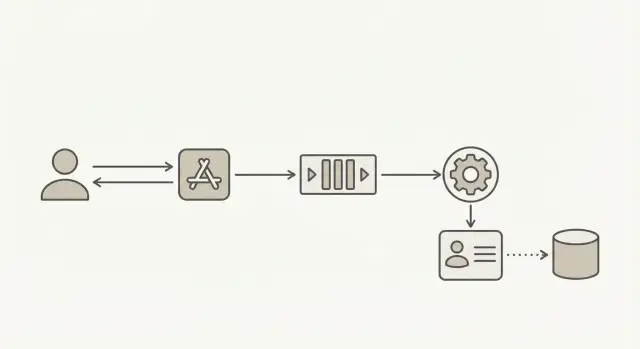
To keep signups fast under load, separate “creating a user” from “trusting the email.” Accept the request, create the account right away, and mark it as pending. Then run validation in the background, where delays won’t slow your signup endpoint.
Treat validation as its own workflow with its own status and timestamps, not as a single boolean. That makes retries safer, debugging easier, and your signup behavior more predictable.
A common flow:
- Create user and set
email_status = pending(store when you queued validation) - Enqueue a validation job (include
user_idand email) - Worker validates and updates
email_statustovalid,risky,invalid, orunknown - Your app gates actions based on that status
You can still guide the user without blocking the request. Show “Check your inbox to confirm your email” immediately. When validation finishes, update what they can do.
When validation fails later, decide upfront what happens next. Common options are restricting sensitive actions, prompting for a new email, or removing clearly fake accounts after a grace period.
A simple data model for validation states
If validation runs later, your database should still answer simple questions: what the user typed, what you normalized it to, and what you currently believe.
Store raw input separately from a normalized value. Raw input helps support and debugging (people paste odd whitespace). Normalized fields are what you use for matching and sending.
A small set of states works well:
- pending: accepted at signup, validation job not finished
- valid: looks reachable and safe to keep
- risky: technically valid, but likely low quality (for example disposable or role-based)
- invalid: failed checks (bad syntax, bad domain, no MX, known disposable)
- unknown: temporary failure (timeouts, provider errors), try again later
Along with the status, store the evidence, not just the verdict. A compact “validation facts” bundle prevents guesswork later and makes policy changes easier.
Suggested fields (example names):
email_raw,email_normalized,email_domainvalidation_status,validated_at,validation_providervalidation_reason_code,validation_reason_textpolicy_version(orruleset_id), plus avalidation_attemptcounter
Example: a user signs up with " [email protected] ". Store the exact string in email_raw, normalize to [email protected], set status to pending, and let the account proceed with limited privileges. When validation finishes, update status and facts without rewriting the original input.
Step by step: build an async validation pipeline
1) Create the user and publish a validation job
When someone submits the signup form, save the user record right away, mark the email as pending, and publish a small job to your queue. The job only needs user_id, email, and a requested_at timestamp.
Keep the payload small. Your database stays the source of truth, so workers can re-read the latest user state.
2) Validate in a worker and store a reason code
A background worker consumes jobs and runs validation. This is where you call your email validation service without slowing the signup response.
Write the result back with both a status and a reason code. Statuses might be valid, risky, invalid, or unknown. Reason codes might be syntax_error, no_mx, disposable, spam_trap_risk, or timeout.
Reason codes matter because they make support and product decisions faster. “Invalid” is not enough when you need to decide what to show the user.
3) Trigger the right follow-up action
Once you’ve saved the status, apply your policy:
- Valid: unlock normal limits and send lifecycle emails
- Risky: allow login, but reduce limits or flag for review
- Invalid: prompt for a new email before key actions
- Unknown: retry later and keep the account limited
4) Recheck when the email changes
When a user updates their email, reset status to pending and publish a new job. Record which address was checked so old results never apply to a new value.
Webhook validation flow: push vs pull
Once validation is async, you need a way to get results back into your app. There are two main models:
Pull means your app checks for status later. It’s easier to reason about and often enough when only one system needs the answer. The downside is extra traffic and slower updates if you poll too often.
Push means the validator calls you back with a webhook-style event as soon as the result is ready. This helps when multiple systems care (signup service, CRM sync, marketing automation) or you want near real-time updates without polling.
If you implement push, keep the callback payload small but complete:
- Internal identifier (user id or account id)
- Validation status (
valid,invalid,risky,unknown) - Reason code
- Timestamp and a unique event id
- Optional: an email hash (not the raw email) for debugging
Secure it. Require HTTPS, verify a signature with a shared secret, reject old requests by timestamp, and keep a short-lived “seen event ids” cache to prevent replay. If your infrastructure supports it, add an IP allowlist.
Reliability basics: retries, idempotency, and backpressure
Moving validation off the signup request buys speed, but you still need to handle everyday failures: networks drop, providers time out, workers crash mid-job.
Retries: treat validation as retryable. Timeouts and 5xx errors are usually temporary, so retry with a delay that grows each time. Keep the window bounded so you don’t validate the same address for hours.
Idempotency: assume duplicate deliveries from queues and webhooks. Give each request a stable dedupe key (for example, a request_id or (user_id, validation_attempt)), then make your updates safe to apply twice and end in the same final state.
Dead letters: when retries keep failing, stop. Move the job to a dead-letter queue and mark the email as unknown so you can investigate later.
Backpressure: cap concurrency and set time budgets so validation can’t overwhelm critical paths like signup, login, and billing.
A few metrics catch most problems early:
- Queue depth and age (how long the oldest job has waited)
- Success rate vs transient failures vs permanent failures
- Average validation time and p95/p99 latency
- Retry counts and dead-letter volume
- Worker utilization
Handling scale: dedupe, caching, and rate limits
High traffic usually fails in boring ways: the same address gets validated repeatedly, workers pile up, and one slow dependency makes everything feel broken. The goal is to make validation cheap during bursts while keeping results reasonably fresh.
Dedupe during bursts. Normalize keys (lowercase, trim) so [email protected] and [email protected] map together. Add a short “dedupe window” before enqueueing (or at worker start) so the same email isn’t validated 20 times in a minute.
Cache briefly. Caching isn’t about keeping results forever. It’s about avoiding repeated work during spikes. Cache both positive and negative results, but expire them quickly.
A simple starting point:
- “Valid” cache: 1 to 24 hours
- “Invalid/disposable” cache: 5 to 60 minutes
- “Unknown/timeout” cache: 1 to 5 minutes
Rate limits and priorities. Protect every downstream dependency with a rate limit. During spikes, prioritize validations that unlock higher-risk actions like password resets, payouts, or inviting teammates. Let low-stakes checks (newsletter signups) wait a bit.
Common mistakes that cause slowdowns and bugs
Marking users verified too early
Setting email_verified = true when you enqueue the check turns “we will check” into “we did check.” If the queue backs up, you end up granting full access to addresses you never validated.
Vague or missing state transitions
If you only have “pending” and “verified,” accounts can get stuck when providers time out. Use clear states like pending, valid, invalid, risky, and unknown, and make every transition intentional.
Non-idempotent webhook handlers
Webhooks can arrive twice. If your handler creates a new job every time, one user can trigger ten validations and ten updates. Key updates by a stable event id or request id and ignore repeats.
Leaking sensitive details
Don’t log full email addresses or expose “spam trap” or “disposable provider” details to the client. Mask logs and return simple outcomes.
Blocking key actions without a plan
If you block login or purchases until async validation finishes, you recreate the original slow signup problem. Limited access plus clear messaging usually works better.
Quick checklist before you ship
Test the worst day, not the average day. Simulate slow validation, timeouts, and a sudden traffic spike, then confirm signup stays responsive and your backlog drains safely.
- Signup returns quickly even when validation is delayed (account is created with a clear
pendingstate). - One source of truth for validation status (not scattered flags across services).
- Retries are defined and bounded, with dead-letter handling.
- Webhook endpoints (if used) are secured and idempotent.
- Dashboards and alerts exist for failures, timeouts, and queue backlog.
Next steps: roll out safely and keep data clean
Start small and keep the system predictable. Agree on a short set of statuses (for example pending, valid, invalid, unknown) and make one background job path the only place that changes them.
Only add a webhook consumer when you truly need to notify other systems in near real time. If your app is the only consumer, reading the latest status from your own database is often simpler.
Before you write code, write down your retry and dedupe rules: what counts as the same event, how long you retry, and what happens after you give up. That’s what prevents mystery duplicates and accidental loops later.
If you want to outsource the deeper checks, Verimail (verimail.co) is an email validation API designed for signup protection, with syntax checks, domain and MX verification, and disposable provider and blocklist matching as part of a single call. Even with a fast validator, keeping the call in a worker instead of the signup request is what protects your signup flow during spikes.
FAQ
Why does synchronous email validation make signups slow under high traffic?
Synchronous validation makes your signup request wait on external network calls like DNS and MX lookups. Under traffic spikes, a small number of slow lookups can pile up, tie up worker threads, and push the whole endpoint into timeouts.
What should I validate immediately vs in the background?
Do only cheap, local checks that can’t time out: required fields, basic email format, trimming obvious whitespace, and simple abuse controls you already have in-process. Save deeper checks like MX, disposable detection, and blocklist matching for the background job.
What’s the simplest async flow to implement?
Create the account right away, set an explicit email_status = pending, and enqueue a validation job keyed to that user and the current email value. When the worker finishes, it updates the status and stores a reason code so your app can react consistently.
Which email validation states should I store?
Use a small set of statuses you can gate on: pending, valid, risky, invalid, and unknown. Unknown is important for timeouts and provider errors so accounts don’t get stuck in a fake “verified” state.
What can a user do while their email is still pending?
Default to letting the user proceed with low-risk actions while the email is pending, and block or delay high-value actions until it’s valid. Commonly gated actions are team invites, trials, payouts, and password reset flows, because attackers get the most value there.
What should I store besides “valid/invalid”?
Store a compact “facts” bundle: normalized email, domain, status, timestamp, provider name, reason code, policy version, and an attempt counter. This makes debugging and support easier and avoids re-running checks just to explain a decision.
How should retries and failures work in an async validation pipeline?
Retry timeouts and 5xx errors with backoff and a hard limit so you don’t retry forever. If you exhaust retries, mark the email as unknown, move the job to a dead-letter queue, and keep the account limited until you can recheck.
How do I make webhook handlers and jobs idempotent?
Assume duplicates happen and make updates safe to apply twice. Use a stable dedupe key like (user_id, validation_attempt) or a request/event id, and ignore late results that don’t match the user’s current email.
How do I secure webhook-style “push” validation results?
Require HTTPS, verify a signature with a shared secret, and reject callbacks that are too old based on a timestamp. Also record seen event ids for a short time so replayed requests don’t overwrite state or trigger extra work.
How do I reduce repeated validations during spikes?
Normalize emails consistently (trim and lowercase) and add a short dedupe window so the same address isn’t validated many times during bursts. Cache recent results briefly to reduce repeated lookups, but keep TTLs short so you don’t hold on to stale answers.