Blocking disposable emails: common mistakes and safer policies
Avoid false positives when blocking disposable emails. Learn key edge cases, safer rollout steps, and how to monitor signup and support impact after changes.
Contents
- Why teams block disposable emails (and what can go wrong)
- What counts as disposable vs just free email
- Mistake 1: relying on a static disposable domain list
- Mistake 2: blocking by keywords, patterns, or TLDs
- Edge cases that commonly trigger false positives
- Designing a safer disposable email policy
- Step-by-step rollout plan for policy changes
- How to monitor user impact after the change
- Example scenario: tightening signup rules without losing real users
- Quick checklist and next steps
Why teams block disposable emails (and what can go wrong)
Teams block disposable emails for simple reasons: fake signups drain free trials, skew product metrics, and waste support time. Marketing feels it too. Low-quality leads and invalid addresses raise bounce rates and can hurt sender reputation.
The goal is to reduce abuse, not to eliminate every suspicious signup. When rules get too strict, you quietly turn away real users who are ready to try or buy. The signals are easy to miss at first: fewer signups, more "I never got the verification email" tickets, and a slow conversion drop that gets blamed on marketing.
One of the biggest mistakes is treating every unfamiliar domain as disposable. Plenty of people use private domains, school domains, regional providers, forwarding addresses, or alias services. If you block those, you aren't stopping fraud, you’re adding friction for honest users.
Strict policies usually backfire in a few predictable ways:
- False positives (legit but uncommon domains get blocked)
- Verification and onboarding issues (emails can’t be delivered, accounts get stuck)
- More abandonment (users feel accused or mistrusted)
- Messy edge cases (existing users get locked out when changing emails)
A better outcome looks like this: less obvious abuse, fewer undeliverable addresses, and almost no extra work for real people. That usually means layered checks (syntax, domain, MX records, known disposable providers) and thoughtful enforcement.
If you use an email validation API, treat the result as a risk signal, not a final verdict. Block clear disposable providers, but for borderline cases use step-up verification, rate limits, or review flags so legitimate users can still get through.
What counts as disposable vs just free email
"Disposable" and "free" get mixed up, but they’re not the same.
A free inbox provider can be a real, long-term address. A disposable email is meant to be short-lived or low-commitment, often used to grab a one-time code and disappear.
Where teams get burned is lumping anything "unfamiliar" into the disposable bucket. Different address types behave very differently.
Common types you’ll run into
You’ll typically see a mix of:
- Temporary inboxes that expire quickly or can be accessed publicly
- Disposable-focused providers built for quick signups
- Forwarding services (a stable address that forwards to a real inbox)
- Aliases (variations that still reach the same mailbox, including plus tags)
- Custom domains used in unusual ways (still potentially valid)
Forwarding and aliases are the big trap. Many careful, legitimate users rely on them for privacy and organization. Blocking them outright often causes more harm than good.
"Looks suspicious" isn’t a definition
Some teams block based on patterns: certain words, long random strings, or uncommon TLDs. That tends to catch real people: international domains, newer TLDs, and privacy-focused addresses.
Instead, decide what you’re trying to stop:
- Throwaway signups that never confirm or never return
- Multi-account abuse
- Unreachable emails that increase bounces and deliverability issues
Each goal points to a different policy. If your main goal is reachability, prioritize validation (syntax, domain, MX) plus real disposable-provider signals, rather than broad bans.
Mistake 1: relying on a static disposable domain list
A static list feels like the easiest start: grab a spreadsheet of "known bad domains" and block them at signup. The problem is that disposable providers change constantly. New domains appear every day, old ones get abandoned, and some rotate domains specifically to evade blocks.
When the list goes stale, you get the worst of both worlds. New disposable domains slip through, while legitimate users get blocked because the list no longer matches reality.
How static lists create false positives
Static lists often age into overblocking. A domain that was disposable a year ago might get repurposed or bought. Some domains are also shared across multiple products, so a broad block can catch unrelated traffic.
Matching rules create their own problems. Exact matches miss subdomains and variants. Overly broad matches can block normal domains because they happen to contain a string you were targeting.
A typical failure looks like this: a domain lands on the list after an incident, months pass, the domain starts being used legitimately, and suddenly real signups fail because "the list says it’s bad."
The missing piece: change history
Many lists grow without an audit trail. If no one knows when a domain was added or why, people are afraid to remove it. The list only expands, and false positives become more likely.
If you must use a list, give it basic guardrails: assign an owner, review it on a schedule, store a reason and date for each entry, and log every block decision so support can debug complaints quickly.
A safer alternative is relying on real-time checks instead of a file that drifts out of date.
Mistake 2: blocking by keywords, patterns, or TLDs
When blocking disposable emails, a tempting shortcut is writing simple rules: block domains that contain words like "temp" or "inbox", or block entire TLDs that "look risky." It’s fast, but it creates a lot of false positives.
Keyword blocks are especially noisy. Plenty of legitimate domains contain "mail" or "inbox". A school might use a subdomain like mail.example.edu. A small company could literally be named Inbox Studio. The rule can’t understand intent, so it blocks real people.
TLD blocking can be even worse. Banning a country-code TLD can reject legitimate users based on where they live or where their employer is registered. If you sell globally, you can accidentally build bias into your signup flow.
Regex and pattern rules also tend to sprawl. Over time, no one can explain why a real user was blocked beyond "the rule matched". Attackers adapt quickly anyway: they swap words, use lookalike strings, or move to new domains.
Better signals are harder to fake and easier to defend: verify domain and MX records, check against known disposable providers in real time, keep a small allowlist for critical partner domains, and make sure every block has a clear reason support can repeat.
Edge cases that commonly trigger false positives
False positives are the fastest way to turn a reasonable anti-fraud rule into a signup killer. Most happen when a rule is too simple and real-world email setups don’t look like "personal inbox at a big provider."
Real domains that look "suspicious"
Some corporate and school domains route mail through third-party systems: external hosting, security gateways, or routing services. The address is still real ([email protected]), but the MX setup may look unusual. If your policy assumes "unknown MX = disposable," you’ll block legitimate organizations, especially smaller ones on managed email.
Forwarding addresses are another common trap. They often look unusual, but they can be valid and reachable. Blocking them tends to hit real users more than scammers.
Formatting and provider edge cases
Plus addressing ([email protected]) is valid and widely used to filter mail. Many teams reject it accidentally because their form validation is too strict or because they treat "+" as suspicious.
Regional providers also get mislabeled. A domain that’s common in one country may be unfamiliar to your team, and if your "safe" list is too narrow you’ll block real customers simply because they live elsewhere.
Shared domains can be legitimate too. Small businesses and local organizations sometimes use a shared domain provided by an IT co-op or web host. It can resemble a throwaway setup while still serving real users.
If you’re trying to reduce false positives, focus on whether the address can receive mail, not whether it looks unusual.
Watch for early signs that your policy is causing damage:
- Signup completion drops (often worst on mobile)
- Spikes in "email not accepted" or "verification email never arrived" tickets
- Users retrying multiple addresses in the same session
Designing a safer disposable email policy
A safer policy matches the response to the risk. If you treat every suspicious address the same, you’ll lose legitimate users who simply want to sign up quickly.
Start by deciding when you truly need a hard stop. Hard blocks make sense when the cost of abuse is high (promo credits, free trials that attract fraud, high-volume signup attacks). In lower-risk flows, use softer friction so legitimate users can still continue.
Use graduated responses instead of one big block
Keep the action set small and consistent:
- Hard block only when confidence is high (known disposable providers, invalid domains, spam traps)
- Step-up verification when risk is uncertain
- Rate limits for repeated attempts
- Restricted access until verified for sensitive actions (invites, multiple workspaces, high-volume sending)
This keeps enforcement focused on the cases that actually hurt you.
Apply tiered rules by context
Not every flow needs the same strictness. A good rule of thumb is stricter for new accounts and high-value actions, lighter for trusted users.
Be especially careful with existing, verified accounts changing their email. That’s where overblocking can cause lockouts and expensive support work.
When a signal is mixed, verification is usually the best fallback. If an address passes syntax, domain, and MX checks but still looks risky, send a verification email and unlock the account only after confirmation.
Plan for exceptions, too: give users a clear retry path, allow support to override when appropriate, and keep a small allowlist for trusted partner domains. Error messages should tell people what to do next (try another email, verify, or contact support), not just what they did wrong.
Step-by-step rollout plan for policy changes
Policy changes can help quickly, but only if you roll them out like any user-facing change: baseline first, controlled testing, and a safe fallback.
Start by writing down current numbers: signup conversion, abuse reports, bounce rate, and support tickets tied to signup or verification. If you don’t track one of these, set it up before you tighten anything.
Next, choose where the rule applies. Many teams flip the switch everywhere at once. Start with one surface (new account signup), then expand later to invites, checkout, or free trials.
A rollout sequence that keeps risk low:
- Define the rule and the user-facing message
- Run in shadow mode (log what would be blocked, but allow users through)
- Review logs for surprises (real customers, schools, regional providers)
- Roll out gradually (small percent of traffic, one product line, or one region)
- Move to full enforcement only after several stable days
Shadow mode is where edge cases show up. It’s also where you can build targeted allow rules before you start blocking real users.
Before going strict, give people a way to recover: a clear message with the reason, a verification path for borderline cases, and an appeal route for paid or high-value signups.
If you use a validator, keep your policy logic separate from the validation result. That makes it easier to adjust thresholds without rebuilding the signup flow.
How to monitor user impact after the change
This isn’t a set-and-forget rule. The fastest way to hurt growth is to tighten a policy and only watch fraud numbers. You need a simple view of both conversion and abuse.
Watch the signup funnel first
Track the funnel daily against your baseline (at least the week before the change). Segment by device, country, and traffic source if you can, because false positives often cluster.
A small set of metrics usually tells the story:
- Drop-off around the email field
- Signup completion rate
- Verification success rate (if required)
- Repeat attempts per user or IP
If you see a sudden dip right after enforcement, it’s usually a rule problem, not seasonality.
Measure friction and trust signals
Support and chat complaints are often the first obvious signal. Watch for recurring phrases like "can’t sign up", "email not accepted", "work email", and "verification email". Even small increases matter if they’re concentrated in one region or segment.
Also track email outcomes after signup. If validation got smarter, bounces should fall. If bounce rate doesn’t improve, you might be blocking the wrong users while attackers adapt.
Agree on rollback thresholds before shipping (signup completion drop, support spike, lack of bounce improvement, or one domain/region dominating blocks). Change one thing at a time and document it.
Example scenario: tightening signup rules without losing real users
A marketplace gets hit by fake seller accounts. Many use throwaway addresses, so the team blocks disposable emails at signup.
They start with a hard deny list of known disposable domains. Abuse drops quickly, but support tickets rise. Real sellers report that valid emails are being rejected.
What they learned in shadow mode
They run the rule in shadow mode for a week: still allow signups, but log what would have been blocked. The logs show a problem: many "blocked" addresses belong to regional providers used by legitimate small businesses, plus a few corporate domains with unusual MX setups.
Instead of guessing, they sample shadow-blocked signups and check outcomes: whether the address confirms, time-to-first-sale, and downstream risk signals (disputes, chargebacks).
The policy update: verify and slow down
They switch from "deny at the door" to a graduated approach:
- Clearly disposable addresses must verify before listing items
- Uncertain cases can sign up but get extra checks (rate limits, phone verification, or review)
- Trusted partner and known customer domains are allowed even if they look unusual
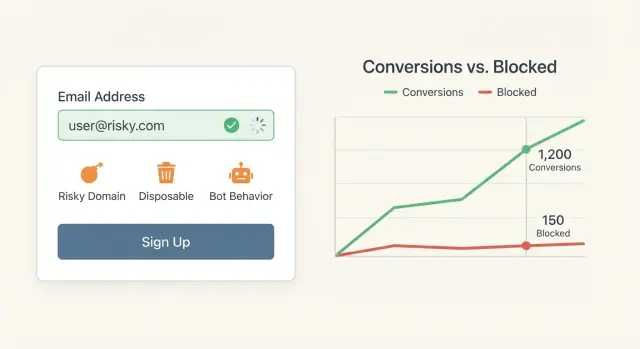
Conversion returns to normal within days. Fake seller creation keeps falling because throwaway accounts get stuck at verification.
To make future changes easier, they document the exact rule logic, keep a short allowlist with reasons, and maintain a small dashboard with baseline numbers so impact is visible the same day a policy ships.
Quick checklist and next steps
Blocking disposable emails works best when you treat it like a safety policy, not a one-time filter. Be clear about what you’re trying to stop (fake signups, coupon abuse, spam, bot accounts) and what you must protect (real customers who just want to sign up).
A practical checklist before rolling out new rules:
- Define "disposable" for your use case, and explicitly list what you won’t block
- Avoid keyword, pattern, or TLD blocks unless your own data proves they correlate with abuse
- Run in shadow mode, then roll out gradually
- Provide a fallback path (verification, alternative sign-in, or support override)
- Monitor block rate, signup completion, and signup-related support tickets
After launch, treat the first week as a test window. Look for sudden conversion drops, spikes in support volume, and clusters of blocks by domain. A surge from a legitimate domain (regional ISP, university, small business provider) is a common sign of false positives.
If you want a single-call way to catch known disposable providers and obvious invalid addresses without maintaining your own lists, Verimail (verimail.co) is one option teams use. The key is still policy design: use validation results to choose the right response (block, verify, or slow down), so you reduce abuse without locking out real users.