Clean an Imported Email List Safely With a Staged Method
Clean an imported email list safely with a staged workflow: validate, segment by risk, sample test, and suppress instead of deleting good contacts.
Contents
- Why imported lists are risky in the first place
- Set your goal before you start deleting anything
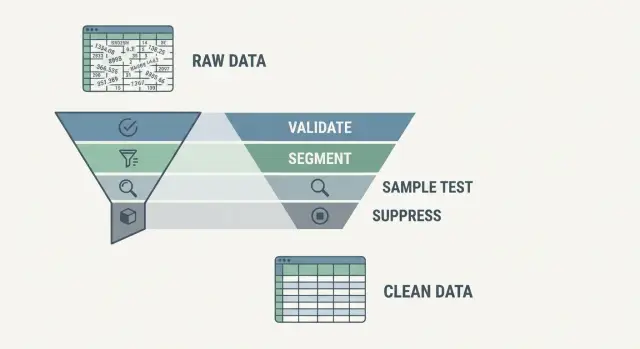
- The staged workflow, step by step
- Stage 1: Validate each address (more than just syntax)
- Stage 2: Segment by risk, not just valid or invalid
- Stage 3: Sample test before you scale
- Stage 4: Suppress rather than purge (how to avoid over-deleting)
- After the cleanup: monitoring that keeps the list healthy
- Common traps that lead to over-deleting (or deliverability issues)
- Quick checklist before your first send
- Example: cleaning a mixed-source import without losing good leads
- FAQ
Why imported lists are risky in the first place
Imported lists rarely behave like the list you built through your own signup form. They often come from old exports, events, partners, or merged databases where nobody really owns quality. That’s how small problems turn into deliverability problems.
Many imported addresses fail for boring reasons: typos (gmial.com), abandoned inboxes, and domains that no longer exist. You’ll also see role accounts like info@, sales@, and support@. They can be legitimate, but they’re often shared, heavily filtered, or simply not meant for marketing. Engagement tends to be lower and complaints can be higher.
The bigger issue is what happens when you mail a messy list all at once. One bad campaign can spike bounces and complaints, which tells inbox providers you’re careless or spammy. After that, even your good subscribers can start landing in spam, and recovery can take weeks. Bounce rate reduction isn’t about saving one send. It’s about protecting your sender reputation for the next ten.
There’s a second risk that’s easy to miss: over-deleting. If you purge anything that looks questionable, you can throw away real leads. This happens a lot with businesses that have strict mail servers, newer domains, or addresses that don’t behave well during verification.
Safe cleaning aims for fewer bounces without shrinking the list unnecessarily. Think in risk levels, not just keep vs delete. Separate clearly bad addresses (like disposable email detection hits) from “maybe” addresses, and suppress risky segments first instead of permanently removing them.
Set your goal before you start deleting anything
Before you touch the list, decide what you’re protecting.
If your only goal is “remove invalid emails,” you’ll delete real people who would have converted. If your only goal is “keep every lead,” you’ll hurt deliverability and push future sends toward spam.
A helpful distinction is “valid” vs “safe to email.” An address can look fine and have a working domain, but still be risky because it’s disposable, a role inbox (like info@), or tied to patterns that often lead to complaints. That difference should shape how aggressive you are.
It also helps to agree on your failure categories upfront and tie them to actions:
- Hard bounce: permanent failure. Remove or suppress immediately.
- Soft bounce: temporary failure. Retry in a controlled way.
- Complaint: user reports spam. Suppress immediately and treat it as a deliverability alarm.
Then decide what matters most for this specific import. If you’re sending from a new or recently inactive domain, lean conservative to protect reputation. If it’s sales outreach where each lead has high value, you can keep more, but only if you segment and send carefully.
Set a numeric guardrail before you scale. For example: don’t expand volume until bounce rate stays under 2% and complaints are near zero for two consecutive sends. If you use a validator like Verimail, it can help you label addresses early, but the bigger win is having written rules so nobody starts over-deleting mid-cleanup.
The staged workflow, step by step
Treat imported list cleaning like a careful review, not a one-click delete. The goal is to reduce risk (bounces, spam traps, disposable addresses) while keeping real people who might still engage.
Start by protecting yourself from irreversible mistakes. You should be able to explain what changed and roll it back if needed.
Back up the original file (or export) and keep a simple audit trail of your changes. Standardize your columns (email, name, source, date added), dedupe, and make sure you’re not validating or emailing the same address twice.
When you validate, don’t overwrite the original email. Add new columns for outcomes and reasons (for example: validation_status, risk_tier, reason). That keeps your process reversible.
Once each row has a status, shift from a “valid/invalid” mindset to a risk mindset. This is where teams usually make the two big mistakes: deleting too much (losing good leads) or keeping too much (hurting deliverability).
Segment into simple risk tiers, then do small sample sends before you scale. After testing, resist the urge to purge. A safer default is to suppress: keep the record for history and reporting, but block it from mailings until it’s proven safe.
If a tool flags an address as disposable or high-risk, suppress it from your next campaign but keep it in your CRM with a note. If that person later signs up again with a confirmed address, you can merge records instead of guessing what happened.
Stage 1: Validate each address (more than just syntax)
The first mistake is treating “looks like an email” as “can receive email.” Validation should check both the format and whether the domain is set up to accept mail.
Start with RFC-style syntax checks. They catch obvious formatting issues like missing @ signs, extra spaces, double dots, and invalid characters. This removes errors caused by copy-paste, CSV exports, and form bugs.
Next, verify the domain. A real email needs a real domain that exists and is configured for email. Domain checks confirm the domain resolves, and MX record lookups tell you whether the domain has mail servers. This step often catches old company domains, typos (gmial.com), and parked domains that will bounce.
Then add risk signals that syntax and MX checks miss. Disposable email providers and temporary inboxes can pass basic checks but still lead to low-quality signups and weak engagement. Flag them so you can decide how strict you want to be.
Spam traps are the “handle with care” category. You usually can’t confirm a trap with certainty. Avoid guesswork: treat suspicious patterns, questionable sources, and long-inactive contacts as high risk and isolate them.
To avoid over-deleting, store results as labels you can filter later, such as:
- Valid (low risk)
- Invalid syntax
- Domain or MX missing
- Disposable or temporary
- High risk (review)
If you’re building this into an import workflow, an email validation API like Verimail can return these signals quickly so you can keep the original list intact while adding an auditable layer of labels on top.
Stage 2: Segment by risk, not just valid or invalid
After validation, you typically have more than a yes or no. Use that detail to group addresses by risk so you can reduce bounces without throwing away good contacts.
Keep the tiers simple enough that people actually use them. Three buckets plus a special case for role accounts is usually enough:
- Low risk: checks look normal, not disposable
- Medium risk: valid but with warnings (role inbox, unusual patterns)
- High risk: disposable, strong blocklist signals, or clearly bad
- Unknown: temporary issues like timeouts or missing DNS responses
Write the rules in plain English. If an address is valid and not disposable, it’s low risk. If it’s valid but disposable, it’s high risk even if syntax is fine. If the system can’t confidently verify the domain right now, it’s unknown and stays out of your first send.
Role accounts like sales@, info@, and support@ need a decision based on your use case. In B2B, they can be real buying signals. They can also be shared inboxes that complain more often. Many teams put role accounts into medium risk by default, then move them up or down based on performance.
Make segmentation reversible. Don’t delete rows yet, and don’t overwrite the email. Save the validation result, the tier, and the reason so you can adjust your rules later based on what actually predicts bounces and complaints for your audience.
Stage 3: Sample test before you scale
Validation is a strong start, but it’s still a prediction. Before you mail the whole import, run a small, controlled send so real-world results can confirm (or challenge) your rules.
Pick a sample from each risk tier, not just the “good” segment. Make it representative: a mix of common providers (gmail, yahoo, corporate domains), a spread of dates if you have them, and the same sources as the full import. Keep it small enough that a mistake won’t dent your sender reputation.
If you haven’t sent mail from this domain recently, warm up carefully. Start with your lowest-risk tier and expand in steps. Sudden volume jumps are a common reason a “clean” list still performs badly.
Track a few signals that tell you whether your tiers are set too strict or too loose:
- Hard bounces
- Soft bounces
- Spam complaints
- Replies or other positive engagement
- Unsubscribes (especially spikes)
Use the results to adjust your tier rules. If your medium-risk tier has almost no hard bounces and people are replying, you can include more of it. If your low-risk tier shows unexpected hard bounces, tighten the rules and re-check your input data (wrong columns, trimmed characters, hidden spaces).
Example: you imported 50,000 leads, validated them, and flagged disposable addresses. You test 300 from low risk, 150 from medium, and 50 from high. If complaints show up mainly in medium, keep low moving forward, but switch medium from “send” to “suppress until verified,” then re-validate that segment.
Pause if any metric spikes unexpectedly. A short delay now is cheaper than repairing your reputation after a full-scale blast.
Stage 4: Suppress rather than purge (how to avoid over-deleting)
Deleting records feels “clean,” but it’s often the fastest way to lose good leads and create messy data later. Suppression is safer: you keep the contact, but block sends until the address earns its way back.
A practical rule: if you’re not 100% sure an address is bad forever, suppress it first. This keeps your CRM from turning into a mystery box.
Build clear suppression reasons
Suppression should be a labeled decision, not a silent filter. Common reasons include invalid (failed validation or hard bounce), disposable, unknown or temporary, complained, and policy (opt-out, do-not-contact, legal request).
Those labels matter later. “Invalid” might be removable after a period. “Complained” generally shouldn’t.
Add review dates and a revalidation path
Unknown or temporary statuses shouldn’t be permanent. Set a review date (for example, 14-30 days) and revalidate before trying again.
Suppression also lets you change your mind safely. If a sales rep confirms an address by phone, you can lift suppression instead of re-importing or guessing.
Finally, make sure suppression is enforced everywhere you send email. It’s common to have one tool “clean” and another still sending:
- Marketing platform
- Sales sequences
- Product emails
- Support tools
- Any custom scripts or integrations
If one system ignores suppression, you can still rack up bounces and complaints even if the “main” list looks fine.
After the cleanup: monitoring that keeps the list healthy
Cleaning once helps. Keeping it clean is what protects deliverability week after week. Lists age. People change jobs. Companies change email systems. Disposable domains come and go.
Start with a simple revalidation schedule. New imports should be checked before they reach your sending tool. Older records should be rechecked on a cadence that matches your business (quarterly for low-volume lists, monthly if you import often). This is especially important if you want to reduce bounces without accidentally deleting addresses that were fine when you first collected them.
Watch for quiet changes that raise risk. Domains expire. Mail servers get reconfigured. New disposable providers appear quickly. A fast re-check can catch missing MX records, newly risky domains, or new disposable patterns before you send.
Close the loop with outcomes
Validation is a prediction. Your sending results are the proof. Feed bounce and complaint outcomes back into your tier rules so your labels stay realistic.
Keep the loop lightweight: track hard vs soft bounces, review complaints and unsubscribes by segment (not just overall), tighten rules for sources that repeatedly cause problems, and only loosen rules after consistently clean performance.
Make ownership and “done” clear
List hygiene fails when it belongs to “everyone.” Pick an owner (marketing ops, CRM admin, growth, or a shared role) and define what “done” means: acceptable bounce rate, how often revalidation runs, and when an address gets suppressed vs re-approved. Keep short notes on sources that regularly import bad addresses so the next cleanup is faster and less emotional.
Common traps that lead to over-deleting (or deliverability issues)
The fastest way to lose good leads is to treat list cleaning like a purge. If your goal is to reduce risk without throwing away value, watch for these common mistakes.
Trap 1: Only keeping “perfectly valid”
Many validators return more than valid or invalid. If you delete everything that isn’t a clean “valid,” you’ll remove real people with temporary domain issues, strict mail servers, or inboxes that don’t respond well to checks.
Trap 2: Treating “unknown” as “bad” without testing
“Unknown” often means “could not confirm right now,” not “fake.” Before you suppress or delete permanently, do a small sample send to this group with a low-risk message and watch bounces and complaints.
Trap 3: Cleaning, then forgetting to dedupe
If the same contact appears in multiple sources, you can email them twice. That increases complaints and can look spammy. Dedupe before and after validation: normalize case, trim spaces, and dedupe by email (not just name). Only apply provider-specific normalization (like dot rules) if you’re confident it fits your audience and tooling.
Trap 4: Role accounts and all-or-nothing thinking
Role addresses aren’t automatically bad, but they’re higher risk for complaints and often go to shared inboxes. Ignoring them can cost legitimate B2B inquiries. Mailing all of them can raise complaint rates. Treat them as a separate segment with tighter rules.
Trap 5: Sending big right after importing a cold list
A large blast to a cold list can spike bounces and complaints even if you cleaned it. Start with your lowest-risk segment and increase volume gradually.
A simple self-check: if you can’t explain why a group is being deleted (not just suppressed), you’re probably over-deleting.
Quick checklist before your first send
Before you hit send, pause long enough to explain every decision. The goal isn’t aggressive deletion. It’s lowering risk while keeping real leads.
Save a backup and note the source (where the list came from, the date, and what those contacts were told). Normalize and dedupe the data by trimming spaces, standardizing casing, and fixing only the typos you can correct with confidence (like gmial.com).
Run validation and keep the labels instead of a single good/bad flag. Define risk tiers with written rules, and make sure each tier maps to an action (send now, sample test, suppress).
Finally, lock your sample test plan and suppression setup: test size, timing, what you’ll measure, and a suppression list with reason codes so you can reverse decisions later.
If any of that feels fuzzy, stop and fix it first. A repeatable process beats a “clean” list you can’t defend.
Example: cleaning a mixed-source import without losing good leads
You import two sources at once: a tradeshow badge scan list (2,400 contacts) and a partner spreadsheet (1,600 contacts). The tradeshow file has typos from fast scans. The partner file has older addresses and a few role inboxes (like info@).
First, you validate every address and keep the raw import unchanged. Add a few columns in your sheet or CRM: validation_status, risk_level, and recommended_action.
Then tier the list by risk, not just “valid” or “invalid.” Low risk is clean and non-disposable. Medium risk is valid with warnings (role inboxes, catch-all domains, temporary failures). High risk includes disposable or clearly invalid. Unknown includes timeouts and domains that don’t respond reliably.
Before emailing the whole list, you sample test: send a small campaign to 100-200 contacts from low risk, split evenly across both sources. If bounces stay low and engagement looks normal, scale to the rest of low risk. Roll out medium risk more slowly and watch it closely.
Now the key part: suppress rather than purge. High risk and unknown go on a suppression list so they don’t get mailed, but you keep the records for audit and non-email follow-up (like calling a tradeshow lead). Medium risk stays in your database but remains suppressed until you collect a confirmed address.
If you want to make this repeatable, build validation into your import step so each upload gets tagged before it ever reaches a sending tool. For teams that need this in an application or CRM workflow, a single-call validator like Verimail (verimail.co) can be used to tag addresses during signup and imports, so you’re making decisions from consistent labels instead of gut feel.
Next, keep the mess from coming back: validate during signup, validate every new import, and treat suppression as a normal part of list hygiene rather than a one-time cleanup event.
FAQ
Why are imported email lists more likely to hurt deliverability?
Imported lists often contain typos, abandoned inboxes, and domains that no longer accept mail. When you send to all of that at once, bounces and complaints can spike and damage your sender reputation, which can push even good subscribers into spam.
What goal should I set before I start cleaning an imported list?
Start by deciding what you’re protecting: sender reputation, lead volume, or both. A practical default is to aim for fewer hard bounces and near-zero complaints, then only expand volume after a couple of clean sends.
How do I clean a list without making irreversible mistakes?
Keep the original file untouched and add new columns for results, reasons, and actions. That makes the process reversible and helps you explain what changed if someone questions why contacts were suppressed.
What checks matter most when validating an imported email list?
Do more than “does it look like an email.” Check syntax, confirm the domain exists, verify MX records, and add risk signals like disposable email detection and blocklist matching so you can separate low-risk addresses from risky ones.
How should I segment addresses after validation?
Use simple risk tiers so people actually follow them. A common approach is low risk for normal, non-disposable addresses; medium risk for valid-but-warning cases like role inboxes; high risk for disposable or clearly bad signals; and unknown for timeouts or temporary DNS issues.
Should I remove role emails like info@ or sales@?
Treat role inboxes as a separate decision, not an automatic delete. A safe default is to classify them as medium risk, send to them more cautiously, and keep an eye on complaints and engagement before scaling.
How big should my sample test be before I email the full list?
Send a small, representative sample from each tier, starting with low risk. Watch hard bounces, soft bounces, complaints, and basic engagement, then adjust your rules before you scale to the full import.
When should I suppress instead of permanently deleting contacts?
Suppress by default unless you’re sure an address is permanently bad. Keep the record for history and reporting, block it from mailings, and store a clear reason so you can re-check or re-approve it later without re-importing.
What should I do with “unknown” or “temporary” validation results?
“Unknown” usually means the validator couldn’t confirm right now, not that the address is fake. Keep it out of your first send, set a recheck window (like 14–30 days), and only decide after a revalidation or a tightly controlled test.
How can I make list cleaning repeatable inside my app or CRM?
Validate during import or signup so risky addresses never reach your sending tools untagged. With an API like Verimail, you can return validation status and risk signals in milliseconds and store them as labels, which makes your suppression rules consistent across marketing, sales, and product email.