CRM hygiene automation: stop bad emails re-entering pipelines
CRM hygiene automation helps block invalid and disposable emails using dedupe rules, scheduled revalidation, and clear field ownership across pipelines.
Contents
- Why bad emails keep re-entering your CRM
- Common entry points where email quality breaks down
- Dedupe rules: what to match and what to allow
- How to design dedupe rules that fit real pipeline workflows
- Periodic revalidation: when and how often to re-check emails
- Field-level governance to stop silent re-contamination
- Step-by-step: build an automated CRM email hygiene pipeline
- Example scenario: preventing bad emails across signup to close
- Common mistakes and traps to avoid
- Quick checklist and next steps
- FAQ
Why bad emails keep re-entering your CRM
Bad emails aren't always obvious fakes. In a CRM, they usually arrive as small errors that quietly spread: typos (gmal.com), domains that no longer exist, role inboxes that never reply, and disposable addresses used to grab a trial or download a file and vanish.
They keep coming back because a CRM has many entry points. Even if you clean a list today, new records can enter tomorrow through web forms, event uploads, reps pasting from LinkedIn, partner referrals, support tickets, product signups, or marketing tools that sync contacts automatically. If one source is dirty, it can re-contaminate everything else.
Email quality also changes over time. People switch jobs, companies shut down domains, and providers start rejecting mail to addresses that used to work. A one-time cleanup can't keep up without periodic checks.
Bad emails cause real, daily damage:
- Routing breaks when leads can't be reached, so ownership and follow-up get messy.
- Reporting gets noisy: pipeline conversion rates drop and it's hard to tell if a campaign failed or your data did.
- Deliverability suffers as bounces rise, which hurts sender reputation and makes good emails harder to reach.
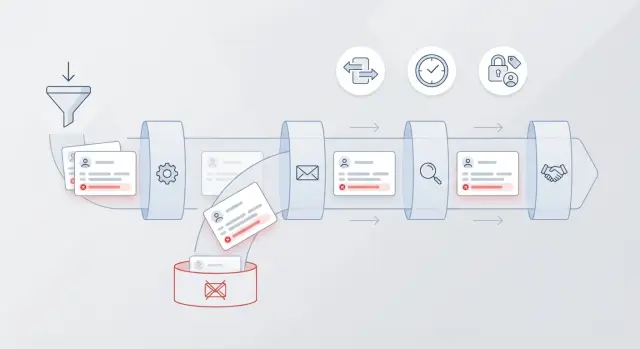
Good automation does four things consistently: prevent bad emails at entry, detect issues that slip through, fix what can be fixed (like obvious typos), and stop re-entry by applying the same rules everywhere. In practice, that means a shared validation step at every ingest point, plus scheduled revalidation and clear rules about who can change email fields and how those changes flow through your systems.
Common entry points where email quality breaks down
Most teams fix email quality once, then watch bad addresses creep back in through side doors. Hygiene automation works best when you name those doors and put the same checks on each one.
The usual places bad emails slip in
A few workflows cause most re-contamination:
- Bulk imports from CSVs or spreadsheets where formatting and typos go unnoticed
- Website forms and product signups that write straight to the database before rules run
- Connected tools (marketing, support, billing) that sync and overwrite email fields without validation
- Manual entry by reps who create a new lead instead of updating an existing contact
- Enrichment providers that append likely emails that were never verified
Imports are the fastest way to add thousands of records, and the fastest way to add thousands of problems. People paste data from multiple sources, mix personal and work emails, or upload outdated lists. If your CRM accepts the file first and checks later, you miss the best chance to stop bad data.
Forms and signups are another common leak. A user can mistype their address, use a disposable inbox, or enter a role account your team can't reach. If that email is stored before validation, it starts spreading: welcome emails bounce, marketing tools retry, and sales sequences keep hammering a dead address.
Tool-to-tool sync is where good data gets quietly replaced by worse data. For example, a support system might store an email a customer used once, then push it back into the CRM and overwrite the verified one. The damage is subtle because it looks like a normal update, not a new record.
Manual creation often causes duplicates. A rep searches quickly, doesn't find the record (or can't see it due to permissions), and creates another lead with a slightly different email or a typo. Now your pipeline has two versions of the same person, and only one might be deliverable.
Enrichment can help, but it can also add unverified guesses. A safer pattern is to treat enriched emails as suggested until they pass validation. For example, you can validate in real time before an enriched address is promoted into the primary email field.
Dedupe rules: what to match and what to allow
Dedupe starts with a simple decision: what is a duplicate in your CRM?
- A person might be unique (one contact record per human).
- An account can have many people.
- A lead might be allowed to exist separately until it's qualified.
If you don't define this upfront, your rules will either block good activity or let bad data multiply.
Most teams do best with two layers: strict rules for obvious duplicates, and softer rules that only flag records for review. This keeps the pipeline moving while still protecting data quality.
Choose matching keys that fit your workflow
Use matching keys that are stable and meaningful. Email is often the strongest identifier for individuals, but it isn't enough by itself in every case.
Good keys to combine (pick a few):
- Email address (exact match, case-insensitive)
- Phone number (normalized to one format)
- Full name plus company (useful when emails are missing)
- External IDs (billing ID, user ID) when available
Exact match rules are best for blocking true duplicates at the door (the same email submitted twice). Close match rules are best for catching near-duplicates without creating false positives (Jen vs Jennifer at the same company). Close matches should usually create a task or queue item, not an automatic merge.
Shared inboxes and role addresses
Addresses like sales@, info@, support@, and admin@ are common and often shared. If you treat them as personal emails, you'll merge unrelated people together and lose context.
A practical approach is to label role addresses and adjust how you dedupe them:
- Allow multiple contacts to reference a shared inbox, but don't use it as a unique person key.
- Prefer phone plus name, or name plus company, for uniqueness.
- Route new submissions with role emails to a review queue.
What to do when a duplicate is found
Blocking is clean, but it can frustrate sales if it stops legitimate updates. Merging is powerful, but risky if match confidence isn't high.
A simple decision rule: block only on high-confidence exact matches; merge only when key fields agree; otherwise queue it.
Example: a webinar import adds [email protected] as a new lead, but [email protected] already exists as a contact tied to an open opportunity. Your rule should avoid creating a second record, attach the activity to the existing contact, and alert the owner.
To make matching safer, validate emails before you dedupe. That way you don't treat typos and disposable emails as real identities and lock bad data into your system.
How to design dedupe rules that fit real pipeline workflows
Good dedupe is less about one email equals one record and more about protecting the work your team already did.
Start by picking a source of truth: choose one object that owns the email address (often Contact if you sell to companies, or Lead if you qualify people first). Every other place that can store an email should follow that choice, not compete with it.
Next, separate create rules from update rules. Creates are where duplicates explode. Updates are where good data gets quietly damaged.
The decisions that keep dedupe practical
Write rules as a small set of outcomes your CRM can enforce consistently:
- If an incoming email matches an existing record, update the existing record instead of creating a new one.
- If the email is new but the person is likely the same (same name plus company, or same phone), flag it for review instead of auto-merging.
- Treat email as case-insensitive and trim spaces, but don't normalize away dots or plus tags unless you're certain it matches how your buyers use email.
- Allow multiple people at the same domain. Deduping on domain alone will delete real contacts.
- Decide which stages are allowed to create new records (for example, web signup can create, sales import cannot).
Merge behavior matters as much as matching. One rule prevents a lot of damage: never overwrite a verified email with an unverified one. Store a validation status and timestamp, then treat verified as higher priority than unknown or failed. When a new email arrives during an update, validate it before it replaces anything.
Handle edge cases without blocking the team
Some records shouldn't be auto-merged because the cost of a wrong merge is high. Put these into a manual review queue with clear labels:
- Two records share an email but have different names or companies.
- A verified email is being replaced by an unverified email.
- A high-value account has multiple contacts and one email appears reused.
Log every decision. Blocked because email exists on Contact ID 123 or Merged because email matched and new fields were empty saves hours of confusion. It also makes automation feel fair, because people can see what happened and fix the rule when it's wrong.
Periodic revalidation: when and how often to re-check emails
An email that passed validation once isn't good forever. People change jobs, companies rebrand domains, mailboxes get closed, and inbox providers tighten rules. A lead that was reachable at signup can quietly turn into a bounce six months later, and those bounces add up.
The goal of periodic revalidation is straightforward: catch decay before it hurts deliverability or sales motion. This is one of the easiest wins because you can run it in the background, without forcing reps to play detective.
What should trigger a recheck
Use triggers that match how your team actually sends and hands off records:
- Time-based checks (for example, every 90 or 180 days)
- Right before a big outbound campaign or nurture send
- Before a lead is handed from marketing to sales, or from SDR to AE
- After any email field edit (manual update, enrichment, import)
- When an email hard-bounces or gets multiple soft bounces
Avoid rechecking on every page view or minor activity. That creates noise and cost without improving outcomes.
How often to revalidate (by segment)
Not every record deserves the same schedule. Frequency should reflect how risky and how valuable the segment is.
A practical starting point:
- New leads (0-30 days old): recheck before the first major sequence or campaign
- Active pipeline (open opportunity): recheck before key stages (demo booked, contract sent)
- Dormant leads (no activity in 6+ months): recheck before re-engagement
- Customers: recheck annually, and also before high-stakes sends (renewals, security notices)
- High-risk sources (events, list uploads): recheck sooner and more often
Decide the outcomes upfront
Revalidation only helps if it changes what happens next. Define outcomes your CRM and email tools can act on: mark the email as risky, create a task to request an update, or suppress the record from marketing sends while sales tries another channel.
Keep a simple history so teams trust the status. Two fields are usually enough: last checked date and last result (valid, risky, invalid, disposable). If you use an email validation API, store the latest result and make it visible where reps work, so they understand why a record was paused.
Field-level governance to stop silent re-contamination
Most teams lose email quality quietly, not loudly. A clean email gets verified once, then a later import, sync, or quick edit overwrites it with a typo or a disposable address.
Field-level governance is deciding who can change the email field, where that change is allowed to happen, and what must be recorded when it does.
Lock down ownership and edit paths
Start by naming a single source of truth for the email address. For many teams it's the CRM, but for others it might be the product database or billing system.
Then restrict edits so the same email isn't being changed in three places:
- Define who can edit email fields (sales reps, ops, support) and who cannot.
- Limit which systems are allowed to write to the email field via integrations.
- Require updates to happen through a controlled form or workflow, not bulk edits.
- Keep an audit log of what changed, when, and by which system or user.
Separate raw input from normalized email
Treat what the user typed as raw, and treat what you use for sending as normalized. Keep both.
A practical setup is two fields: Raw Email (as entered) and Email (normalized). Normalization can include trimming spaces, lowercasing, and removing invisible characters.
Add a third field for Email Status, and keep the meanings consistent across tools: unverified, verified, risky, invalid. If a sync partner only supports a boolean, map it carefully so you don't mark risky emails as good.
When an email changes, require a reason. A short controlled picklist works well (user requested change, bounced, typo fixed, updated from billing, merge cleanup). That single step makes bad overwrites easier to spot and reverse.
Finally, stop integrations from silently overwriting good data. Many CRMs let you set do not update if not blank, field-level permissions, or sync rules that only update Email when the incoming record is verified.
Example: a lead signs up with a verified email. Later, a webinar tool syncs a new address for the same person from a signup form. If that new address is risky, the CRM stores it in Raw Email, logs the reason as webinar import, but keeps the normalized Email unchanged until someone reviews it.
Step-by-step: build an automated CRM email hygiene pipeline
Treat email hygiene automation like a small production system: clear inputs, clear rules, clear ownership.
1) Start with a full map of email entry points
Write down every place an email can enter or change, and which system is the source of truth for the email field. Common sources include signup forms, import spreadsheets, support tickets, partner lists, and reps editing records.
When you're done, you should be able to answer: "If two tools disagree, which one is allowed to overwrite the CRM email?" If you can't answer that, bad data will keep sneaking back in.
2) Normalize, validate, and dedupe before you create anything
Do a quick cleanup first so your rules behave the same every time. Then validate and dedupe in one gate before a new lead or contact is created.
- Normalize the input: trim spaces, lowercase, and remove invisible characters.
- Catch obvious mistakes: double "@", trailing dots, commas instead of periods.
- Validate on entry: syntax, domain checks, MX lookup, and disposable provider blocking.
- Apply dedupe rules: check for an existing contact or lead before you create a new record.
- Decide the action: block, create, or attach the activity to the existing record.
Keep the response simple for users. Example: if a rep pastes [email protected] , it becomes [email protected] and either matches an existing contact or creates a clean new one.
3) Revalidate on a schedule and route failures
Even good addresses go stale. Set a periodic revalidation job (often monthly or quarterly, faster for high-volume lists). If an email fails, don't delete it automatically. Route it to a review queue with a clear reason (invalid domain, mailbox risk, disposable).
Finish with reporting. Track top sources of invalid emails, how often dedupe merges happen, and which teams or forms create the most exceptions. Those trends tell you where to fix the process, not just the data.
Example scenario: preventing bad emails across signup to close
A B2B SaaS company runs three main paths into the CRM: a self-serve signup form, reps importing prospects from events, and marketing nurture that creates leads from webinar registrations. The goal is simple: every stage should respect the same best known email so bad addresses don't keep reappearing.
A disposable email slips in on signup. Someone registers with a throwaway address to access a free trial, then never verifies. The product creates a lead in the CRM and a rep later tries to hand it off to marketing. Emails bounce, the rep assumes it's timing, and the record quietly goes stale.
Now the same person shows up at a conference and gives a real work email. A rep uploads a CSV and the CRM is about to create a second record. This is where email deduplication rules matter: instead of matching only on email, the system also checks normalized company name plus last name plus website domain. It detects a likely duplicate and merges into the existing record, keeping one timeline and one owner.
For the workflow to hold up, the merged record stores both addresses with clear roles:
- Email (primary): the work email (most recent, verified)
- Email (secondary): the earlier signup email (unverified, low trust)
- Email status: Verified / Risky / Unknown
- Verification timestamp: when it was last checked
Three months later, the buyer's company changes email providers and their domain temporarily stops accepting mail. A periodic revalidation job catches it before a renewal sequence goes out. The CRM updates Email status to Unknown and opens a task for the owner: confirm the address or ask for an alternative.
Finally, governance prevents silent re-contamination. An integration from the marketing platform tries to overwrite the primary email with the old signup address because it appears first in that tool. A field-level rule blocks changes to Email (primary) unless the incoming value is verified and newer than the current verification timestamp.
The result: one contact, one pipeline, and a clear rule that verified beats unverified.
Common mistakes and traps to avoid
Most email hygiene programs fail for the same reason: they treat email as a one-time field, not a living piece of data that changes as people switch jobs, abandon inboxes, or mistype addresses.
One common trap is relying on regex only. A regex can tell you if an address looks like an email, but it can't tell you if the domain exists, if it can receive mail, or if it's a disposable provider. That's how valid-looking addresses still turn into bounces later.
Another frequent mistake is overly aggressive dedupe. If your rules merge records based on email alone, you can accidentally combine two different people who share an address (shared inboxes, role accounts like sales@, partners forwarding mail, or a spouse using one inbox). Once you merge incorrectly, you lose context, mis-assign deals, and create awkward outreach.
A safer approach is to set clear match rules and clear exceptions:
- Require a second match signal for merges (name + company, phone, or account ID).
- Treat role addresses as a special case, not a person record by default.
- Prefer link over merge when you're not sure.
- Keep a suspected duplicate status for human review.
A third trap is letting any integration overwrite email without checks. Imports, form tools, event scanners, and enrichment providers can silently replace a good email with a bad one. Decide which source is allowed to write to Email, which sources can only suggest values, and which updates must be validated first.
Teams also run periodic revalidation but don't act on the results. If an email is flagged as disposable or starts failing deliverability checks, you need a policy that triggers something real: pause sequences, move the record to a cleanup stage, and ask for an updated address.
Finally, don't operate without an audit trail. If you can't answer who changed this email, when, and why, the same mistakes repeat. Log the source (form, API, import), the previous value, and the validation outcome.
Quick checklist and next steps
If you want CRM hygiene automation that sticks, focus on two moments: when an email first enters your system, and when someone tries to edit or overwrite it later. Catch bad addresses early, and prevent quiet re-contamination.
Quick checklist
- Validate on entry (forms, imports, integrations). Check syntax, domain, and MX records, and block known disposable providers.
- Dedupe before create. If there's a full match on email, update the existing record instead of creating a new one.
- Treat partial matches as review needed (same name and company but different email, or same email with different supporting fields). Route it to a queue so a human can confirm.
- Track email status and last checked date on every record. Make the status visible in the CRM view so reps don't guess.
- Lock down who can edit email fields. Require a reason when it changes, especially after it was marked invalid.
Example: a rep imports a list and one lead has an address that looks real but the domain has no MX records. If you mark it invalid and record the last checked date, you can stop that same address from being re-added later by another import or a sales tool.
Next steps
Pick one lead source and pilot the workflow end to end before rolling it out everywhere. Start with your highest-volume source (website signup, partner leads, or list imports) so you'll see results quickly.
Keep the pilot tight:
- Define what happens for each outcome: valid, invalid, disposable, unknown (temporary domain issue), and duplicate.
- Decide which outcomes block creation vs allow creation with a warning.
- Add a simple review lane for partial dedupe matches, with a clear owner and a 24 to 48 hour SLA.
If you want a single shared check across all those entry points, an email validation API can be the common gate. Verimail (verimail.co) is one option teams use to validate syntax, domains, MX records, and disposable providers in a single call, then write the status and timestamp back to the CRM so your rules stay consistent.
Once the pilot is stable, expand source by source with one rule: no new entry point goes live unless it validates, dedupes, and writes back email status and last checked date.
FAQ
Why do bad email addresses keep coming back after we clean the CRM?
Because your CRM has many ways to create or update records, and only one weak entry point can re-contaminate everything. Even after a cleanup, new bad addresses arrive through forms, imports, tool syncs, enrichment, and manual edits, and email quality can also decay over time when people change jobs or domains stop accepting mail.
Which entry points should we fix first to stop re-contamination?
Start with bulk imports, web/product signup forms, and any tool-to-tool sync that can overwrite the email field. Those three paths usually account for most of the volume and most of the silent damage, because they can create thousands of records or replace a good email without anyone noticing.
Is regex validation enough to keep bad emails out?
No. A regex only tells you the text looks like an email, not whether the domain exists, whether it can receive mail, or whether it’s a disposable provider. Use syntax checks as the first step, then add domain verification, MX lookups, and disposable detection so “valid-looking” addresses don’t turn into bounces later.
How should we handle role emails like sales@ or info@ in dedupe rules?
Treat shared and role inboxes differently from personal emails, because they’re not a reliable unique ID for a person. If you dedupe or auto-merge solely on a role email, you can accidentally combine unrelated contacts and lose history, ownership, or deal context.
What are the safest matching keys for deduplication?
Default to exact email match (case-insensitive, trimmed) to block obvious duplicates at creation time. For near-duplicates, use a second signal like phone number, full name plus company, or an external ID, and route those cases for review instead of auto-merging.
How do we stop integrations from overwriting a verified email with a worse one?
By separating “create” rules from “update” rules and protecting verified data. A practical default is to validate any incoming email before it can replace an existing one, and to store a validation status and last-checked timestamp so your automation can prefer a verified email over an unknown or failed one.
How often should we revalidate emails in the CRM?
A common baseline is every 90–180 days, with earlier rechecks for high-risk sources like events and list uploads. Also revalidate right before large outbound sends and whenever the email field changes, because that’s when bad updates and decay cause the most deliverability harm.
What should we do when an email is flagged as invalid or risky?
Don’t delete it automatically. Mark it clearly (for example, invalid, risky, or disposable), suppress it from marketing sends, and create a task or workflow to collect an updated address through another channel. Keeping the record but pausing email outreach prevents repeated bounces while preserving history.
How do we safely handle CSV imports without flooding the CRM with bad emails?
Validate and dedupe before the CRM creates records, not after. If you can’t block the import, land it in a staging object or a quarantine status, run validation, and then only promote clean rows into Leads/Contacts so you don’t spend weeks undoing duplicates and bounces.
How can we use an email validation API like Verimail in a hygiene workflow?
Use a single validation step that every entry point can call, and write the result back to the CRM as fields your rules can act on. With an email validation API like Verimail, you can check syntax, domain, MX records, and disposable providers in one request, then store the status and last checked time so forms, imports, and syncs follow the same logic.