Disposable email addresses: why they break your GTM
Disposable email addresses quietly sabotage signups, analytics, and deliverability. Learn the real costs, warning signs, and practical ways to block them.
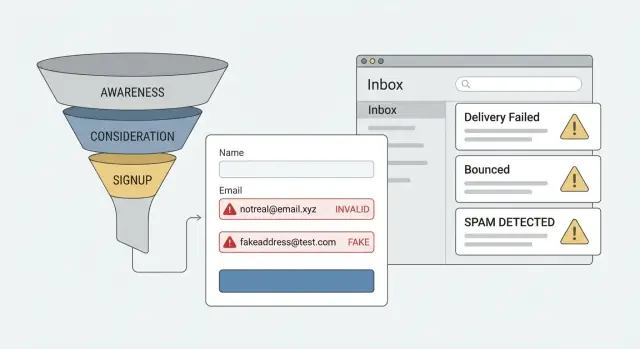
Contents
- What disposable emails are and why they show up
- How disposable emails distort your funnel and metrics
- Where the resource waste actually happens
- Deliverability damage: bounces, complaints, and reputation
- Fraud and abuse risks that come with throwaways
- Step by step: how to prevent disposable emails at signup
- Common mistakes that make the problem worse
- Quick checks to spot disposable-email impact
- A realistic example: the campaign that looked successful
- Choosing the right policy: block, warn, or verify
- Next steps: reduce waste without slowing real signups
- FAQ
What disposable emails are and why they show up
Disposable email addresses are temporary inboxes people create to receive a message or two, then abandon. They often live on burner email services and can be made in seconds with no real commitment. The address might work briefly, but it isn't meant to be a reliable way to contact someone long-term.
They show up for two reasons at once: they solve a real user need, and they also make bad behavior easier.
People use them for normal reasons like privacy or speed. They might want a download, a webinar recording, a coupon, or a quick look at your product without giving away their main inbox. They also use them for testing, like checking pricing or onboarding without signing up "for real." On the other end of the spectrum, throwaway inboxes make it easier to dodge limits, reset trials, farm referral rewards, or create many accounts for spam and fraud.
Your go-to-market strategy (GTM) is how you acquire, activate, and retain customers in a repeatable way. Disposable emails interfere with that loop because they create "users" you can't reliably reach, qualify, or convert.
This usually shows up early in growth. As soon as you run ads, launch in communities, offer a free tier, or add a lead magnet, you attract a mix of real prospects and low-intent signups. The faster you grow, the more noise you collect, and the easier it is for disposable addresses to hide inside your metrics.
A simple example: someone wants your webinar recording, but they don't want follow-ups. They use a throwaway inbox, grab the link, and disappear. That can look like a successful signup while quietly weakening activation, retention, and email performance.
How disposable emails distort your funnel and metrics
Disposable email addresses can make your top-of-funnel look healthy while quietly breaking the numbers you use to judge progress. You see more signups, but a smaller share of those people can be reached again. The result is a funnel that looks bigger on day one and emptier every day after.
The first damage shows up in activation and cohorts. If 30% of new accounts are throwaways, your activation rate drops even if your product didn't get worse. Cohort reports start telling a false story, like "Week 12 users are less engaged," when the real issue is that Week 12 included more disposable signups from a promo, bot wave, or new channel.
It also pollutes experiments. A/B tests assume both groups contain similar kinds of people. When one variant attracts more low-intent users (or automated signups), it can look like the "winning" version even though it's just better at collecting throwaway accounts. You can end up shipping changes that raise signup counts but reduce real customer conversion.
Some symptoms are easy to miss because they show up across different dashboards:
- Big signup spikes with flat (or falling) activated users
- New-user email engagement that collapses after the first message
- Paid channels that look efficient on cost per signup, but not on revenue
- Cohort drop-offs that start exactly when a campaign or launch started
- Conflicting attribution: "This channel works" in signup reports, "it doesn't" in revenue reports
One common scenario: you launch a giveaway and see a 2x jump in registrations. The dashboard celebrates, but your sales team can't reach most leads, onboarding completion falls, and retention gets worse overnight. The campaign didn't necessarily fail. Your measurement did.
A practical first fix is to separate "accounts created" from "reachable humans." Email validation at signup (syntax, domain checks, MX records, and disposable detection) helps you measure the funnel you actually have, not the one a throwaway inbox invented.
Where the resource waste actually happens
The real cost of disposable email addresses isn't just a messy database. It's the work your team does after a signup that was never going to become a real customer.
Sales is usually hit first. Reps call, personalize outreach, and schedule follow-ups, only to find the address is dead, never checked, or tied to a throwaway inbox that expires. Even when the lead is fake, it still steals time from real accounts that could move.
Support teams feel it next. Throwaway signups often trigger password resets, onboarding questions, and access issues. Some are honest users testing your product, but many are low-intent. Either way, support time gets spent on people who disappear after the first interaction.
Paid acquisition burn is the quiet budget killer. If you pay per click or per signup, low-intent traffic can look like growth while it drains spend. You also end up paying for nurture emails, retargeting audiences, and data enrichment for profiles that were never likely to convert.
In day-to-day ops, the waste tends to pile up in a few predictable places:
- Sales outreach and sequencing for leads that can't be reached
- Support tickets and resets from accounts that won't stick around
- Paid campaigns optimized toward signups that don't convert
- Manual cleanup in your CRM, marketing tools, and lists
Then comes the admin tax. Someone has to merge duplicates, remove bad contacts, fix reporting, and explain why pipeline or activation dipped after last month's "record signup week."
A common pattern looks like this: a campaign brings 1,000 new signups, but 20-30% use throwaway domains. The team celebrates, sales ramps outreach, support staffing is adjusted, and the next month is spent unwinding the noise.
Catching throwaways at the door is cheaper than cleaning them up later.
Deliverability damage: bounces, complaints, and reputation
Disposable email addresses do more than inflate your signup count. They can also damage your ability to reach real customers later. The problem often starts small, then shows up as "email isn't working like it used to" across marketing, sales, and product messages.
Many throwaway inboxes are short-lived or not properly set up to receive mail. When you send to them, you see higher bounce rates. Even a modest bounce increase can trigger stricter filtering from mailbox providers, because bounces look like poor list hygiene.
Reputation is the second hit. If you keep mailing low-quality lists, providers learn that your domain and sending IP produce unwanted or undeliverable mail. That makes it harder for legitimate emails to land in the inbox. You can do everything right with subject lines and content and still lose inbox placement because the list is polluted.
Complaints can rise too. People who use disposable inboxes often never intended to hear from you again. If your messages reach a recycled address, a shared inbox, or someone who forgot they signed up, the easiest action is "mark as spam." That signal is heavily weighted and can harm future sends.
Common signs you're taking deliverability damage:
- Bounce rate creeping up month over month
- Open rates dropping even as your list grows
- More spam complaint notifications from your email tool
- Support tickets like "I stopped getting your emails"
- Win-back campaigns underperforming compared to past quarters
A realistic scenario: a paid campaign looks great because it drives cheap signups, but many are throwaways. Two weeks later, the nurture sequence bounces and complaints rise, and your next launch email lands in promotions or spam for paying users.
Stopping disposable addresses at signup with email validation (syntax, domain checks, MX lookup, and disposable provider matching) helps protect deliverability before the damage builds.
Fraud and abuse risks that come with throwaways
Disposable email addresses don't just mess up your metrics. They also lower the cost of abuse. When someone can create a new inbox in seconds, they can create a new identity in seconds too.
Bots love throwaway emails because they remove friction. A bot can rotate addresses, sign up again and again, and slip past basic "one account per email" rules. That shows up as fake referral signups, fake waitlist growth, and "new users" that never come back.
Free trials and promo codes are an easy target. If a discount is meant to be used once, a throwaway inbox turns it into "use it forever." The damage isn't just lost revenue. It's also support load, infrastructure cost, and product decisions made based on bad users.
A less obvious risk is account ownership. If the email isn't stable, the account isn't stable. Password resets, security alerts, invoices, and legal notices may go to an inbox nobody controls a week later. That weakens your ability to prove who owns an account, and it makes account takeover investigations harder because your "source of truth" is shaky.
Compliance and audits also get painful when identity is weak. If you can't reliably reach the person tied to an account, routine workflows get messy, like consent checks, deletion requests, and communication preferences.
A practical way to think about it: if the email can disappear, the user can disappear too. Common abuse patterns include:
- High-volume bot signups that inflate "new user" counts
- Referral and affiliate abuse using many one-off accounts
- Trial resets and repeated promo code usage
- Harder recovery and verification when an inbox expires
- Disputes and compliance requests you can't close cleanly
Step by step: how to prevent disposable emails at signup
Start by deciding what "good" looks like for your signup form. The goal usually isn't to block people. It's to reduce junk signups while keeping real users moving.
1) Add checks in the right order
Run lightweight checks first, then deeper ones. A practical flow:
- Syntax check: catches obvious typos like missing @ or spaces
- Domain check: confirms the domain format is valid
- MX lookup: checks if the domain can actually receive email
- Disposable provider check: flags known throwaway domains
- Blocklist signals: looks for patterns tied to abuse and spam traps
2) Choose what happens when you detect a throwaway
The right action depends on how risky your product is and how costly fake accounts are.
Block works best for high-abuse products (free trials, promos, marketplaces) where one fake account creates real cost. Warn is useful when you want to keep the door open but set a clear expectation, like "Please use a work or personal email." Verify sits in the middle: allow signup, but require email confirmation before access.
Don't make this decision once and forget it. Log outcomes for each signup (accepted, blocked, verified later) and review them regularly. If a rule blocks too many legitimate users, you'll see it in the numbers.
Add a fallback path for edge cases. If someone claims they can't access their inbox, offer a support option or a quick manual review so real customers don't get stuck.
Common mistakes that make the problem worse
The fastest way to turn a disposable-email problem into a signup problem is to block too aggressively. Some people use forwarding addresses, private domains, or temporary inboxes for a legit reason, like trying a product for work. If your form hard-blocks anything it doesn't recognize, you'll lose real users and push them away.
Another common misstep is treating email checks as a formatting task. A simple regex only tells you whether an address looks like an email. It won't tell you if the domain can receive mail, if it has MX records, or if it's a known throwaway provider. That's how disposable emails slip through while you still feel "covered."
Timing matters too. If you only check after signup (or after the first campaign send), the damage is already done. Your funnel data is polluted, your CRM is full of low-quality leads, and your team spends time chasing people who never intended to respond.
Many teams also lump different problems together. A typo like "gmal.com" isn't the same as a disposable inbox, and each needs a different response. Typos need a friendly prompt to fix. Invalid domains need a clear error. Disposables often need a policy choice (block, warn, or require verification).
Finally, no monitoring means the issue quietly returns. Providers change domains, new disposable services pop up, and your numbers drift again.
A practical way to avoid these traps is to separate checks and responses:
- Validate syntax, domain, and MX records before account creation
- Detect disposable providers and decide your policy per use case
- Handle typos with suggestions, not rejection
- Log outcomes so you can track trends over time
- Review results and adjust rules
Quick checks to spot disposable-email impact
You don't need a full audit to see if disposable email addresses are skewing results. A few checks can tell you whether your numbers look healthy on the surface but are leaking value underneath.
Funnel signals that don't match
Compare what you're getting (signups) with what you actually want (real users). Over the last 2 to 4 weeks, look for:
- A signup spike with flat activations (no increase in verified accounts, onboarding completion, or first key action)
- Higher bounce rate from your first 1 to 3 lifecycle emails (welcome, verification, trial start)
- Many accounts using the same few suspicious domains, or lots of random inbox names (long strings of letters and numbers)
- Geography or device patterns that don't fit your audience (for example, a surge of signups from regions you don't target)
- More reports of promo or trial abuse (multiple redemptions, repeated resets, unusual support tickets)
If two or more show up together, treat it as a data quality issue, not a marketing performance issue.
Fast ways to confirm the source
Pick a small sample of recent signups and check what happened to them within 24 hours. You're looking for a repeatable story.
Useful confirmation steps:
- Compare activation and retention by email domain group (top domains vs everything else)
- Check time-to-action (throwaway signups often do nothing after account creation)
- Review bounce logs for early emails and tag bounces by domain
- Look for clusters: same IP ranges, similar usernames, or many accounts created in minutes
A simple example: if a paid campaign doubled signups but almost all new accounts skip email verification and your welcome email bounces more than usual, that campaign is probably feeding low-quality addresses.
A realistic example: the campaign that looked successful
A B2B SaaS team launches a paid campaign with a simple offer: "Start a free trial." In the first week, signups jump 40%. The dashboard looks great, the ads team celebrates, and sales starts booking follow-ups.
Then the weird stuff starts. Trial accounts pile up but very few people finish onboarding. Demo requests look strong on paper, yet many calls turn into no-shows. Support sees more "email not delivered" messages, and marketing notices an uptick in bounce rate right after the campaign started.
The team assumes the problem is messaging or onboarding, so they tweak emails and add more reminders. It gets worse: more sends, more bounces, more time spent chasing leads that never reply.
They finally look at the data behind the "growth." A quick audit shows a big slice of signups came from disposable email addresses, often with random names and no activity after the first page view. When they compare those accounts to normal signups, the gap is obvious.
The checks that made the issue clear:
- Activation rate by email domain group (work domains vs free providers vs throwaway domains)
- Bounce and complaint rates starting from the campaign launch date
- Demo show rate by signup source and domain mix
- Time-to-first-action for new accounts (minutes vs days vs never)
- Duplicate patterns (similar addresses, same IP ranges, repeated attempts)
Next, they change the signup flow. They block known disposable domains, verify email addresses in real time, and clean the list before sending another nurture sequence.
Two weeks later, signups are lower, but the funnel is healthier: fewer bounces, fewer no-shows, and sales spends time on people who can actually be reached. The campaign didn't fail. It was just reporting the wrong kind of growth.
Choosing the right policy: block, warn, or verify
There isn't one best rule for disposable email addresses. The right policy depends on what a signup unlocks and how costly a fake or unreachable contact is for you.
If you offer low-risk access, you can often allow throwaway emails. Examples include reading public content, saving a few items, or joining a community where identity doesn't matter much. In these cases, the main downside is messier reporting.
When signups trigger real cost or real trust, you should restrict. Free trials, pricing requests, marketplaces, and most B2B forms are targets for fake signups because they unlock value: product access, human follow-up time, credits, or inventory.
Four friction levels (and when they fit)
Pick the lightest option that protects the action:
- Allow + monitor: good for anonymous browsing and low-stakes accounts
- Warn: good when you want to educate without blocking, like webinar registration
- Verify: best for trials, lead forms, and anything tied to revenue
- Block: best when you see repeated abuse, or when email is the account identity
Verification usually means sending a one-time code or magic link, then activating the account only after the address is confirmed. Blocking means rejecting known disposable domains up front.
How to say it in the UI
People use throwaways for many reasons, including privacy. Keep your message calm and specific.
Instead of "We don't allow fake emails," try: "Please use a non-temporary email so we can send access and security updates." If you warn, offer a clear next step. If you require verification, make it obvious what happens next and why. Avoid blame and focus on the user benefit: access, receipts, account recovery, and support.
Next steps: reduce waste without slowing real signups
Start with a baseline, not a hunch. Pull one week (or one month) of data and measure three things: the share of signups using disposable email addresses, your bounce rate on first-touch emails, and the activation rate from signup to the first real action in your product. If you can, break it down by channel (paid search, affiliates, social, content) because the problem is rarely evenly spread.
Then pick one prevention approach and test it where risk is highest. For many teams, that's the signup form connected to paid campaigns or high-intent landing pages. Start small so you don't block good users by accident.
A practical rollout plan:
- Add real-time checks at signup for disposable domains and obvious invalid addresses
- Choose an outcome: block, warn, or ask for verification based on risk
- Test the change on one entry point and compare activation, support tickets, and conversion
- Review results and adjust the rules before expanding
Monitoring matters because disposable providers change fast. Set up a simple dashboard and alerts for spikes in disposable share, bounces, and activation drop-offs. Pair that with a monthly cleanup routine: remove hard bounces, suppress known throwaways, and re-verify older leads before big sends.
If you want an API-based approach, Verimail (verimail.co) is built for this exact moment in the funnel: it validates emails during signup with RFC-compliant syntax checks, domain and MX verification, and real-time matching against thousands of disposable email providers, all in one call.
The goal isn't perfect purity. It's fewer fake accounts, cleaner metrics, and more budget going to channels that create customers instead of noise.
FAQ
What is a disposable email address, in plain terms?
Disposable emails are temporary inboxes designed to be used briefly and then abandoned. They’re popular because they’re fast and protect privacy, but they’re unreliable for long-term contact.
For businesses, the core issue is simple: you can’t consistently reach or qualify people who sign up with an address that disappears.
Why do people use disposable emails on signup forms?
Most legitimate users use them to avoid follow-ups, reduce spam, or quickly access something like a download or webinar recording. They may also use them to “test drive” a product without committing.
Abusers use them to create many accounts, reset trials, farm referral rewards, or bypass limits.
How do disposable emails distort funnel metrics and cohorts?
They inflate “accounts created” while reducing “reachable humans.” That makes metrics like activation rate, cohort retention, and conversion look worse (or confusing) even if your product didn’t change.
A common tell is a signup spike without a matching rise in verified users, onboarding completion, or first key actions.
Can disposable emails mess up A/B tests? How?
They can skew A/B tests because one variant may attract more low-intent or automated signups. The “winner” might simply be better at collecting throwaway accounts, not better at creating customers.
To reduce this, track test results using downstream outcomes (verification, activation, revenue), not just signup count.
Where does the real resource waste happen after disposable signups?
You spend time and money after signup on people who were never going to convert. The biggest sinks are:
- Sales outreach sequences to unreachable leads
- Support tickets, resets, and onboarding help for short-lived accounts
- Paid acquisition optimized toward cheap signups instead of real outcomes
- CRM and list cleanup work that keeps coming back
How do disposable emails hurt deliverability and sender reputation?
Sending to disposable or misconfigured inboxes increases bounces. Higher bounce rates signal poor list hygiene to mailbox providers, which can reduce inbox placement for your real customers.
Complaints can rise too when people never wanted ongoing emails and hit “mark as spam” instead of unsubscribing.
What fraud or abuse risks come with disposable email addresses?
They make identity cheap. When someone can create a new inbox in seconds, they can create a new account in seconds, repeatedly.
Common patterns include trial resets, promo code reuse, referral abuse, and bot signups that create load and bad product decisions based on fake users.
What checks should I run at signup to catch disposable emails?
A practical order is:
- Syntax check (basic formatting)
- Domain check (valid domain structure)
- MX lookup (can the domain receive mail?)
- Disposable provider detection (known throwaway domains)
- Blocklist signals (patterns tied to abuse or spam traps)
Run the lightweight checks first, then the deeper checks before creating the account.
Should I block disposable emails, warn users, or require verification?
Default choice for most products: verify. Let the user submit the form, but require email confirmation before giving access or routing to sales.
Use block when abuse is clearly costly (trials, credits, marketplaces). Use warn when you want to educate without stopping legitimate users (webinars, lead magnets).
How can I tell if disposable emails are a problem in my product right now?
Start with a quick audit of the last 2–4 weeks:
- Compare activation/verification rates by email domain group
- Check bounce rate on your first 1–3 lifecycle emails
- Look for domain clustering (same throwaway domains repeating)
- Review time-to-first-action (many accounts doing nothing is a red flag)
Then add real-time validation at signup and log outcomes (accepted, blocked, verified later) so you can tune rules without hurting legitimate signups.