Disposable email detection beyond provider lists and rules
Disposable email detection that goes beyond provider lists: use domain patterns, newly registered domain signals, and monitoring to keep up.
Contents
- Why provider lists are not enough
- What counts as a disposable email in practice
- Domain pattern heuristics that catch new throwaways
- Newly registered domains as an early warning signal
- DNS and MX checks: useful, but not the whole answer
- Monitoring throwaway providers that change fast
- Step-by-step: a layered detection flow for signup
- Example scenario: stopping trial abuse without blocking real users
- Common mistakes and traps
- Quick checklist for better disposable detection
- Next steps: operationalize it with clear rules and tooling
- FAQ
Why provider lists are not enough
A static list of disposable providers is a good start, but it breaks the moment the other side changes. Throwaway email services can spin up new domains quickly, swap domains when one gets blocked, or run many lookalike domains at once. By the time a domain appears on a list, it may already be retired and replaced.
That gap matters because signups happen in real time. If your only defense is a provider list, you will miss fresh throwaway domains and accept accounts that were never meant to stick around.
The cost is rarely just “a few bad emails.” It tends to show up as fake accounts that inflate user numbers, trial and coupon abuse, higher bounce rates later (which hurts deliverability), and low-quality leads that waste support and sales time.
The goal isn’t to block every risky address at all costs. It’s to reduce risk while keeping legitimate users moving. Real people use lesser-known providers. New domains can be normal too: a new startup, a personal domain, a rebrand. That’s why good disposable email detection is about probability, not certainty.
Think of it like spam filtering. You combine signals and decide what to do next. A brand-new domain plus a random-looking mailbox like “freegift2026@…” is a much stronger warning than a new domain alone.
Tools like Verimail help by going beyond a simple provider list. Instead of betting on one rule, you can run multiple checks in one API call and decide what to do at signup: allow, warn, require verification, or block.
What counts as a disposable email in practice
A disposable email is an address created mainly to receive messages for a short time and then get abandoned. The intent is usually to bypass signup rules, grab a coupon, start a trial, or avoid being contacted later. In practice, “disposable” is as much about behavior as it is about how an address looks.
Three common cases are worth separating:
- Temporary inbox services: you get a mailbox instantly, often without a password, and it may expire quickly.
- Domain-based throwaways: the provider rotates new domains constantly, but the user experience stays the same.
- Aliasing on normal providers: plus addressing (name+tag@...) and aliases are often legitimate and long-lived.
It also helps to think about where “temporary” happens. Domain-based services are easier to catch because many users share the same domains. Mailbox-based services can sit on domains that look normal, but the temporary part happens at the mailbox level (for example, unique inbox IDs). This is a big reason disposable detection can’t be a single domain list.
False positives are the main risk. A brand-new small business domain can look suspicious: limited history, low email volume, few pages online. Some legitimate users sign up with custom domains they just bought for a side project. Blocking them can cost real customers.
A layered approach balances both goals: stop obvious throwaways, and keep real users moving. Instead of one hard rule, you combine signals (DNS checks, patterns, reputation, risk scoring) and only add friction when the overall risk is high. Tools like Verimail can cover the fast checks (syntax, domain, MX, and matching against known disposable providers) while you set the thresholds that fit your product.
Domain pattern heuristics that catch new throwaways
Provider lists are useful, but new throwaway domains appear every day. Domain pattern heuristics help you spot suspicious “shapes” even when the exact domain isn’t on any list.
Many throwaway domains share telltale patterns. They’re designed to be cheap to register, easy to generate in bulk, and hard to manually review. That often leads to domains that look random, overstuffed, or oddly constructed.
Domain shapes that deserve extra suspicion (not an automatic block) include:
- Random-looking strings (for example, “xkq7p” or “m9z2” in the name)
- Too many numbers or hyphens packed together (like “mail-4821-fast”)
- Unusual or rarely used TLD choices for your audience, especially if your signups are mostly local
- Generic words glued together (“free”, “temp”, “inbox”, “mail”, “now”) in awkward combinations
- A family of similar domains showing up with tiny variations (domain churn)
Another common trick is the lookalike domain. These mimic trusted providers or your own brand to slip through quick checks. Watch for typos (“gmial”), extra words (“gmail-support”), or swapped characters (“outIook” with a capital i). A single suspicious domain isn’t proof, but repeated patterns are a strong signal.
The practical way to use heuristics is scoring. Instead of blocking on one rule, add a few points for each risk sign, then choose an action based on the total. Low score: allow. Medium score: allow but add friction (email verification, rate limiting, CAPTCHA). High score: block or require a stronger step (phone verification, manual review).
Example: “[email protected]” looks normal. “[email protected]” might pass syntax and even accept mail, but the shape suggests low intent, so you can treat it as higher risk without punishing real users.
Newly registered domains as an early warning signal
Many throwaway providers rotate domains on purpose. When one domain gets blocked, they register a fresh one, copy the same mailbox UI, and keep going. That churn is exactly why “known domain” lists fall behind.
Domain age is a useful extra signal. Brand-new domains aren’t always bad, but they’re more likely to be tied to short-lived inboxes, fraud, or spam. Treating “registered yesterday” differently from “active for years” catches many new throwaways before they show up on anyone’s list.
What domain-age checks can (and cannot) tell you
Registration metadata can help if you treat it as a risk hint, not a verdict. If you can access creation date, registrar, and name server patterns, you can score risk based on “how new” and “how disposable-looking” the setup is.
Keep expectations realistic: WHOIS data can be missing, privacy-protected, or inconsistent across TLDs.
A simple approach is to bucket domains by age:
- 0-7 days: high risk, add friction (OTP, CAPTCHA, manual review)
- 8-30 days: medium risk, require email confirmation before granting value
- 30+ days: lower risk, rely more on other signals (MX, blocklists, behavior)
How to avoid blocking real users on new domains
Plenty of legitimate addresses come from new domains: a startup that just launched, a new personal domain, a small business moving providers. Instead of outright blocking, combine domain age with other checks such as syntax quality, domain and MX verification, and disposable provider matching.
For example, if someone signs up with a 2-day-old domain and your checks also show “mailbox exists is uncertain” plus a pattern that looks like auto-generated usernames, restrict high-abuse actions (free trials, bulk invites) until the email is verified. Verimail can handle the fast API-level checks (syntax, domain, MX, disposable matching), while you apply your own policy based on domain age and account behavior.
DNS and MX checks: useful, but not the whole answer
DNS and MX checks answer a simple question: can this domain receive email right now? If a domain doesn’t exist in DNS, or it has no mail setup, you can’t deliver a message there. These checks are a great first filter for obvious typos and fake domains.
What you can learn from DNS:
- NXDOMAIN (domain does not exist): strong sign the address is invalid.
- Missing MX records: often invalid, unless the domain accepts mail on its A/AAAA record.
- No A/AAAA record (and no MX): usually undeliverable.
- Misconfigured DNS (broken records, timeouts): high risk and often not worth accepting at signup.
- Temporary DNS failures: not proof of fraud, but a reason to ask for confirmation.
The catch is that many throwaway domains are perfectly deliverable. A disposable provider wants the inbox to work, so it will typically have valid MX records and a functioning mail server. That’s why DNS and MX checks alone don’t equal disposable email detection.
A realistic example: someone signs up with [email protected]. DNS resolves quickly, MX is present, and everything looks deliverable. If you stop here, you’ll accept the signup even if the domain matches a disposable pattern or shows up across many signups in a short time.
Treat DNS and MX as deliverability signals, then add separate risk signals for disposable behavior: blocklist matching for known throwaway domains, domain pattern heuristics, and other indicators that the address is meant to be short-lived.
Verimail combines RFC-compliant syntax checks, domain and MX verification, and real-time matching against large disposable provider lists. That helps reduce bounces and low-quality signups without confusing a deliverable domain with a trustworthy one.
Monitoring throwaway providers that change fast
Throwaway email services can change faster than your rules. A provider may rotate domains weekly, shift to new subdomains, or rebrand completely after being blocked. If you rely only on static lists, you’ll always be late.
The most reliable early signal is your own traffic. Watch what domains show up when abuse spikes: trial farming, coupon harvesting, referral loops, bot signups. You don’t need perfect attribution. You need a short list of domains that appeared suddenly and correlate with bad behavior.
A simple monitoring setup is often enough:
- Track signup volume by email domain (daily and hourly)
- Flag sudden bursts from a single domain or a tight cluster of similar-looking domains
- Compare quality signals (verification success, bounce rate, chargebacks, support tickets)
- Save a small sample of addresses for manual review (without storing more personal data than needed)
- Keep a small allowlist for partners and corporate domains that should not be blocked
When you find a suspicious domain family, look for how it changes. Many fast-moving providers reuse patterns: random strings, short-lived subdomains, near-copy names that differ by one character. If you only block one domain, they’ll be back tomorrow with a close variant.
A lightweight review loop
A weekly (or twice-weekly) review is usually enough. Investigate spikes, adjust rules, then measure outcomes. Keep it practical: did you reduce bad signups, and did you block real users? If false positives rise, narrow the rule so it only fires when other signals agree (for example, brand-new domain plus a burst).
Blocklist matching is still useful, especially when it checks against thousands of known disposable providers, but treat it as one layer. An email validation API like Verimail can combine blocklist matching with DNS and MX checks, while your monitoring catches new domains that haven’t made it into any list yet.
Step-by-step: a layered detection flow for signup
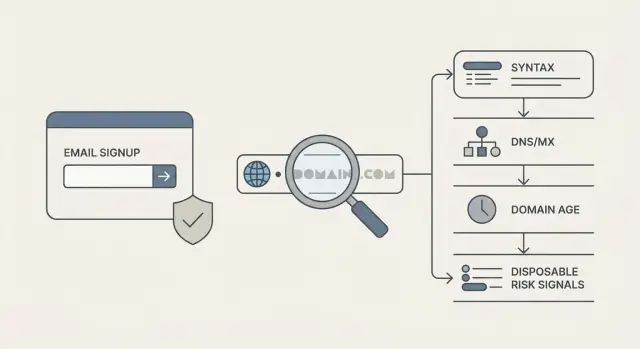
A good signup check doesn’t try to “prove” an email is perfect. It reduces risk in small steps, so you can stop obvious junk quickly and reserve heavier checks for the cases that need them.
A practical 5-step flow
Start with cheap checks, then build toward a decision:
- Normalize the input: trim spaces, remove hidden characters, and make the domain part lowercase. Keep the local part as-is unless you have a clear rule.
- Run a strict syntax check and catch basic typos. Reject things like missing @, double dots, or common domain mistakes that will never deliver.
- Verify the domain exists and can receive mail. A DNS lookup and MX check filter out many dead domains, but remember that throwaway services often have valid MX.
- Score disposable risk rather than relying on a yes/no list. Combine known throwaway domains with domain pattern heuristics (random strings, suspicious TLDs, lookalike brand names) and signals like newly registered domains.
- Choose an outcome that matches the risk. Most teams need more than “allow” and “block.”
After step 4, treat the result like a traffic light. A brand-new domain with a random name and a history of disposable behavior shouldn’t get the same treatment as a normal mailbox provider.
Decide outcomes without hurting real users
Keep the actions simple so support and product teams can explain them:
- Allow: low risk, proceed with signup.
- Block: high risk, show a clear message and invite the user to use a different address.
- Allow with friction: medium risk, require email confirmation (or another lightweight check) before granting trials or credits.
If you use an email validation API like Verimail, you can run these checks in one call and still keep your own policy for what counts as “block” versus “verify,” based on your fraud tolerance and user experience goals.
Example scenario: stopping trial abuse without blocking real users
A SaaS product offers a 14-day trial. One morning, the team sees a spike: 2,000 new accounts in an hour, but almost none reach the “create first project” step. Support also gets odd reports of welcome emails bouncing.
Looking closer, the pattern is clear. Many signups use random-looking domains that change every few minutes (for example, short strings with extra hyphens and numbers). The usernames look auto-generated too. When you compare logs, you see repeated IP ranges and the same device fingerprints creating dozens of accounts.
Layered disposable email detection helps here because no single check catches everything.
Start with strict syntax checks to remove obvious junk (missing @, bad characters). Add DNS and MX checks to filter domains that can’t receive mail at all. Then score disposable risk using known throwaway domains plus domain-pattern heuristics that flag “made for signups” naming styles. Finally, add domain age as an early warning. If a domain was registered yesterday and already appears in hundreds of signups, that’s rarely a good sign.
A practical decision model looks like this:
- High risk: block signup (clear disposable signals, brand-new domain, repeated automation patterns).
- Medium risk: allow account creation, but require a challenge (email verification before trial access, rate limits, or a CAPTCHA).
- Low risk: allow normally.
- Unknown but suspicious: allow, but monitor (watch activation rate and bounce feedback for that domain).
An email validation API like Verimail can provide fast syntax, domain, MX, and disposable checks for this flow, while your app uses IP and device signals to avoid blocking real users.
Common mistakes and traps
Teams get stuck when they treat disposable detection like a single yes-no rule. Real signups are messy, and throwaway providers adapt. If you bet everything on one signal, you’ll either miss abuse or block good users.
The most common trap is relying on only one check, like a throwaway domain list or an MX lookup. Lists go stale quickly, and MX results can look perfectly valid for disposable services. Combine signals and score risk instead of making every decision binary.
Another mistake is blocking every newly registered domain. That sounds safe until you reject a real startup that launched last week and is signing up with its new domain email. Treat new domains as higher risk, then ask for more proof only when other signals also look suspicious.
Also, don’t label normal email features as disposable. Plus addressing (like [email protected]) and aliases are common in Gmail and corporate inboxes. They often indicate a careful user, not a fake one.
Ways teams accidentally hurt results include hard-blocking uncertain cases instead of using a soft step (verify, require CAPTCHA, delay risky actions), setting rules without testing how many real users get caught, ignoring regional and niche providers, treating every free mailbox as low quality, and never reviewing false positives so rules never improve.
If you aren’t measuring outcomes, you’re guessing. Track bounce rate, complaint rate, trial-to-paid conversion, and how often users hit blocks. A small drop in abuse isn’t worth a big drop in signups.
Quick checklist for better disposable detection
Good disposable email detection is less about one magic rule and more about stacking small signals that work well together. If you only block known domains, you’ll miss the new ones that show up every day.
Pressure-test your signup defenses with a short checklist:
- Combine deliverability signals (syntax, domain, MX) with disposable risk signals (provider intelligence, patterns, reputation). Either one alone leaves gaps.
- Prefer a risk score over a simple allow/deny rule. Low risk: accept. Medium risk: accept but limit trials. High risk: require email verification or another step.
- Watch for bursts of new domains. A spike in signups from “random-looking” domains in a short window is often more telling than any single address.
- Review false positives on a schedule. Use a small sample of blocked signups, support tickets, and successful verifications to tune rules without punishing legitimate users.
- Standardize checks across products and teams. An API-based validator helps your web app, mobile app, and internal tools stay consistent.
If someone signs up with a brand-new domain that matches a common throwaway pattern (many digits, odd TLD, short lifespan), don’t default to a hard block. Raise the risk score and ask for email verification before granting a free trial.
If you want one place to apply these layers, a service like Verimail can combine RFC-compliant checks, domain and MX verification, and disposable provider matching in one fast call, then let your app make the final decision based on the result.
Next steps: operationalize it with clear rules and tooling
Disposable email detection only works if it’s applied the same way everywhere a user can enter an email. Map your entry points: signup, invite flows, newsletter forms, free trials, checkout. Many teams block at signup but forget invites or “add another user,” which quietly becomes the new loophole.
Write down three outcomes and keep them simple: allow, block, and challenge. “Challenge” can mean email confirmation before activation, a CAPTCHA, or delaying trial access until the address is verified. Document these rules in plain language so support can explain what happened and how a real user can recover.
Roll out changes without surprises. Start in monitor mode (log decisions, don’t block) so you can spot false positives by country, company domains, or specific flows. Then enforce only the highest-confidence cases first: obvious disposable domains, strong pattern matches, repeat attempts from the same device.
A lightweight way to turn policy into something your team can run:
- Decide enforcement points (signup, invites, checkout) and keep them consistent.
- Define allow, block, and challenge rules with 2-3 examples each.
- Add logging: email domain, rule hit, flow name, and final decision.
- Monitor for a week, then enforce high-confidence blocks.
- Review weekly and adjust rules based on support tickets and conversion.
If you’d rather offload the technical checks, Verimail (verimail.co) can handle RFC-compliant syntax checks, domain verification, MX record lookup, and disposable provider matching in a single call. For small-scale testing, its free tier of 100 validations per month (no card required) is enough to try this in one flow, compare monitor vs enforce results, and tune your challenge rules before rolling out everywhere.
FAQ
Why isn’t a disposable email provider list enough?
Provider lists help, but they lag behind. Throwaway services can register new domains quickly and rotate them as soon as old ones get blocked, so a list-only approach will miss fresh domains that appear between updates.
What counts as a “disposable email” in real life?
A disposable email is usually created to pass signup once and then be abandoned. In practice, it includes temporary inbox services, domain-rotating throwaway providers, and other setups meant to avoid long-term contact, while normal aliases like plus addressing are often legitimate.
Which domain patterns are suspicious, and what should I do when I see them?
Treat it as a risk signal, not an auto-block. Patterns like random strings, heavy use of numbers or hyphens, odd word combos like “temp” or “inbox,” or lookalike spellings can add points to a risk score and trigger a verification step instead of an instant rejection.
Should I block newly registered domains?
Use it as an early warning, not a verdict. Newly registered domains are more likely to be tied to short-lived abuse, but real users can have new domains too, so a safer default is to require email verification or limit high-abuse actions until trust is earned.
Do DNS and MX checks detect disposable emails?
They’re great for deliverability checks, not for intent. A disposable service can have perfectly valid MX records, so DNS/MX can tell you whether mail can be received, but you still need separate signals to detect throwaway behavior.
How should domain-age checks influence my signup flow?
Use simple buckets tied to actions. For example, very new domains can trigger a “challenge” like email verification, mid-age domains can be allowed with limits, and older domains can rely more on other signals, so you’re reducing risk without punishing legitimate new businesses.
How can I keep up with throwaway providers that change domains fast?
Track your own signup traffic by domain and look for sudden bursts or clusters of similar-looking domains that correlate with abuse. A short weekly review loop that updates rules based on observed spikes usually catches new throwaway domain families faster than waiting for public lists.
What’s a practical step-by-step disposable detection flow for signup?
Default to a layered flow: normalize input, run strict syntax checks, verify domain and MX, score disposable risk with multiple signals, then choose an outcome like allow, challenge, or block. This keeps the cheap checks fast and reserves friction for the highest-risk cases.
How do I stop trial or coupon abuse without blocking real customers?
Treat “medium risk” as a cue for friction, not rejection. Require email verification before granting trials or credits, add rate limits or CAPTCHA for suspicious bursts, and only hard-block when several strong signals agree, so real users still get through.
What are the most common mistakes teams make with disposable email detection?
Common mistakes include relying on a single signal, blocking all new domains, and flagging legitimate features like plus addressing as disposable. Measure outcomes like bounce rate, verification success, and conversion, then tune rules to reduce abuse without causing a noticeable signup drop.