Email typo detection: fix gmail.con before users submit
Email typo detection prevents missed signups by catching mistakes like gmail.con. Learn practical UX patterns, heuristics, and validation steps users accept.
Contents
- Why email typos quietly break signups
- The most common email typos worth catching
- Where typo detection fits in the signup flow
- Step by step: a simple typo suggestion algorithm
- UX patterns that fix mistakes without annoying people
- Copy and accessibility details that matter
- When not to suggest a correction
- Common mistakes and traps to avoid
- Quick pre-launch checklist
- Example: fixing a trial signup email typo in real life
- Next steps: measure results and harden validation
- FAQ
Why email typos quietly break signups
One wrong character in an email address can stop a signup cold. If someone types gmail.con instead of gmail.com, your confirmation email never arrives. The user usually has no idea why. They refresh, try again, or leave. The same typo later breaks password resets, billing notices, and any message that proves an account is real.
Email typos matter because most people don’t think of their address as “data.” They think, “I typed it, so it must be fine.” When nothing shows up in their inbox, they blame your product, not their keyboard.
The impact stacks up quickly: more abandoned signups because users can’t verify, more support tickets that sound like “I never got the email,” lost leads and muddier attribution because contacts never become reachable, and deliverability risk when your system keeps retrying to bad addresses.
Typos are also predictable. A small set of domains cause a big share of mistakes: gmail.con, hotnail.com, and yaho.com show up again and again. Catching them early is one of the few UX tweaks that can measurably improve completion without changing your offer.
It helps to be clear about what email typo detection can and can’t do. It can spot likely mistakes (often by comparing the domain to common providers) and suggest a correction before submission. It can’t guarantee the mailbox exists, that the person owns it, or that the address is safe to accept.
A practical approach is: suggest when you’re confident, validate when you need certainty. For example, Verimail can validate email addresses at signup using checks like syntax rules, domain and MX verification, and disposable email detection, while typo suggestions prevent simple errors from ever being submitted.
The most common email typos worth catching
Most people don’t type their email wrong on purpose. They type fast, on a small keyboard, or while switching between apps. Good email typo detection focuses on errors that happen often and are safe to suggest fixes for.
The highest-value fixes are usually in the domain part (everything after the @). People generally know their username, but they mistype popular providers. Common patterns include missing letters (gmal.com), swapped letters (gmial.com), and doubled letters (gmaill.com). These are easy to spot because they sit one or two edits away from a known domain.
TLD mistakes are another big one because they look valid at first glance. The classic is gmail.con instead of gmail.com, but you’ll also see .cmo, .coom, or a country TLD hit by accident. If the domain is a strong match and only the ending is off, a suggestion is usually welcome.
Not all “typos” are about spelling. Formatting issues cause quiet failures too, especially when users copy and paste. Watch for leading or trailing spaces, a trailing dot ([email protected].), double dots ([email protected]), commas instead of dots (name@gmail,com), and missing or extra @ signs.
Mobile adds its own set of problems: adjacent keys (n and m), autocorrect changing a domain, or the keyboard inserting a space after a period. A realistic example: someone types [email protected] on their phone. A simple suggestion like “Did you mean [email protected]?” prevents a support ticket and a lost signup without making the form feel strict.
Where typo detection fits in the signup flow
Typo detection works best as a helper, not a gate. Treat it like spellcheck: fast, quiet, and easy to ignore when the user is right.
Client-side checks should happen close to typing so people can fix mistakes before they move on. Keep them lightweight: compare the domain part to a short list of common providers, and only suggest when the match is very strong (like gmail.con -> gmail.com). Don’t block submission just because you think you found a typo. Some domains look unusual but are perfectly valid.
Server-side checks are the safety net. Users can bypass the browser, scripts can post directly, and even great UI can’t stop every bad address. Run the same typo logic on the backend, then follow with real validation (syntax, domain, MX, disposable provider checks). An email validation API like Verimail can handle the deeper checks so you don’t have to build and maintain them yourself.
When you show suggestions depends on your form style:
- On blur (when the field loses focus): calm and predictable for most forms.
- After a short pause while typing (debounced 300-500 ms): feels instant, but can get noisy if tuned poorly.
- On submit: least interruption, but users fix it later, when they already feel “done.”
People who paste an email and hit Enter fast are the tricky case. Avoid slowing them down. Show the suggestion immediately, but let Enter submit as normal. If you need a second chance, display a small inline prompt after submit and before account creation completes, with two clear actions: “Use typed email” and “Use suggested email.”
A simple rule: suggest early, verify always, and never trap users in a loop where they can’t continue.
Step by step: a simple typo suggestion algorithm
A good email typo detection check does one thing well: it catches obvious mistakes like gmail.con and suggests the right fix, without second-guessing users who typed something unusual on purpose.
Start by building a small, curated set of domains you’re willing to suggest. Include the big public providers (gmail.com, outlook.com, yahoo.com) and, if it fits your audience, the customer domains you see most often (for example, if many signups come from a few companies). Keep this list short and reviewed, because every added domain increases the chance of a wrong suggestion.
Next, normalize what the user typed before you compare anything. Trim spaces, split on @, lowercase only the domain part, and treat strange Unicode characters carefully (users can paste lookalike letters).
Here’s a simple flow that works well in practice:
- Extract the domain after
@; if there is no@, do nothing. - If the domain is already an exact match in your curated list, do nothing.
- Compute a close-match score against each curated domain (edit distance is the common choice).
- Suggest only if there is one clear winner and the distance is small (for example, 1 or 2 edits).
- Show the suggestion as an option, not an auto-rewrite.
A tiny example in pseudocode:
if not hasAt(email): return
local, domain = split(email)
d = normalize(domain)
if d in knownDomains: return
best = closestByEditDistance(d, knownDomains)
if best.distance <= 2 and best.isUniqueWinner:
  suggest(local + "@" + best.domain)
Be conservative with thresholds. It’s better to miss a rare typo than to annoy many people with constant prompts. Only suggest when confidence is high, like hotnail.com to hotmail.com, not when several domains are equally close.
Finally, keep the user in control. Offer a clear choice like “Use gmail.com” and “Keep gmail.con,” and don’t block submission just because you showed a suggestion. Your validation layer (such as an email validation API like Verimail) can still run separately to catch invalid domains and disposable addresses.
UX patterns that fix mistakes without annoying people
A good correction suggestion feels like a helpful nudge, not a scolding. The goal is simple: help someone fix gmail.con or hotnail.com in one tap, without interrupting their flow.
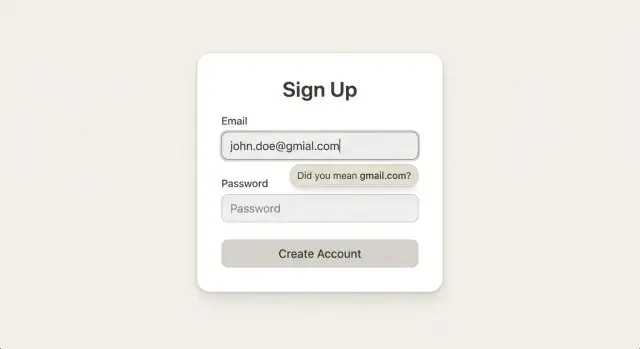
The cleanest pattern is an inline hint right under the email field. Keep it short and specific: “Did you mean gmail.com?” Add an obvious action like “Use gmail.com” so the user doesn’t need to retype anything. This works best as soon as the address looks complete (after the user types the domain, or on blur), not after every keystroke.
When the stakes are higher, add a light confirmation step right before submission. For example, when the user clicks “Create account,” show a small inline message near the email field that presents both choices: keep what they typed, or switch to the suggested domain. This reduces false positives and prevents the feeling that the form is “taking over.”
A few details make these patterns feel respectful:
- Make the suggestion dismissible (“Dismiss”) and remember that choice for the session so it doesn’t keep popping up.
- Avoid modal popups for minor typos. A modal is heavy and can feel like an error, even when you’re not sure.
- After the user accepts the fix, keep focus predictable: the cursor should stay in the email field (or move to the next field only if that’s your normal behavior).
- If they choose to keep their input, don’t keep re-suggesting unless the email changes.
Example: someone types [email protected] on a trial signup. An inline hint offers “Use hotmail.com.” Sarah taps once, the field updates, and she continues to the password field without losing her place. Later, you can still run a server-side check (for example with an email validation API) to catch deeper issues, but the UX win happens right here.
Copy and accessibility details that matter
Email typo detection is mostly about how you talk to the user. The goal is to help, not to blame. Neutral copy keeps people moving: “Did you mean gmail.com?” lands better than “That email is wrong.” If you need a more careful tone, try “Check the domain: did you mean gmail.com?”
Show the exact difference, and keep it focused on the part that changed. Most mistakes are in the domain, so highlight only that segment (for example, show name@ unchanged and visually emphasize gmail.con -> gmail.com). This reduces confusion and makes the fix feel safe.
Keep suggestion and error states clearly different. A suggestion is a hint, not a failure, so it should look quieter than a hard error. For example: a gray suggestion row under the field, and only use red when you truly block submission (like missing @, invalid characters, or a domain that can’t exist).
Accessibility needs the same care as the visuals. Screen readers should hear both the suggestion and what action is available. A simple pattern is:
- Announce: “Suggestion: did you mean
gmail.com?” - Provide an action label: “Use
gmail.cominstead” - Confirm after activation: “Email updated to
gmail.com”
Also make sure the suggestion is keyboard-friendly (reachable by Tab, activatable by Enter/Space) and that focus doesn’t jump unexpectedly.
Localization is easy to get wrong. Translate the surrounding text, but don’t translate the domain itself. gmail.com stays gmail.com in every language. If you use an email validation API like Verimail, keep the product messages consistent across locales while leaving the suggested domain untouched.
When not to suggest a correction
Typos are common, but overconfident suggestions can be worse than doing nothing. If your form “fixes” a real address, you risk losing a user who did everything right.
Start by being conservative with domains you don’t recognize. Many people use school emails, company domains, or newer endings like .dev or .app. If someone enters [email protected], that isn’t “wrong” just because you haven’t seen it before. Treat unknown domains as “unverified yet,” not “typo.”
Avoid touching the local part (everything before the @). Changing jane.smith to jane-smith, or removing dots, is guessing. Only suggest local-part edits if you have a clear, user-approved rule in your product (for example, you know your own domain ignores dots). Otherwise, keep suggestions focused on the domain only.
Plus-addressing is another place teams accidentally break good emails. Addresses like [email protected] are valid and widely used for filtering. If your system supports them, don’t warn, strip, or block them. If you don’t support them, be explicit about why, because users may rely on tags for inbox rules.
A simple rule of thumb: suggest, don’t force. Good “do not suggest” moments include:
- You’re not highly confident (for example, only one character differs from many possible domains)
- The domain looks intentionally custom (company, school, internal)
- The user has edited the email twice already and kept the same value
- Your suggestion would require changing the local part
Finally, always let people continue with what they typed. A clear option like “Use as entered” prevents frustration, especially when your validator (for example, a service like Verimail) can’t confirm deliverability instantly but the user knows the address is correct.
Common mistakes and traps to avoid
The easiest way to make email typo detection feel “smart” is also the easiest way to make it wrong: suggesting fixes too often. If your matching threshold is too loose, you’ll annoy people with correct addresses (especially work domains). Keep suggestions focused on high-confidence cases like popular domains (gmail.com, outlook.com, yahoo.com) and very small edits.
Silent auto-correct is another classic trap. Changing gmail.con to gmail.com without telling the user sounds helpful, but it can create real damage later: password reset emails go to the wrong inbox, or a user thinks they signed up with one address but your system stored another. Always ask for confirmation when you propose a correction.
Also, don’t rely on frontend checks alone. A clean UI can still accept junk if bots or scripted clients post directly to your endpoint. Treat the browser suggestion as a convenience, and enforce validation on the server too. A practical flow is: suggest in the UI, then re-check server-side with syntax and domain/MX checks (and reject obviously invalid addresses).
To keep this under control, track what happens after you show a suggestion. If you don’t log outcomes, you won’t know whether your rules help or hurt.
- Log: suggestion shown, suggestion accepted, suggestion ignored, user manually edited
- Track: domains involved, error rate by domain, and later bounce rate by cohort
- Review: high-frequency “false alarms” and add them to an allowlist
Finally, don’t mix up typo handling with disposable email detection. A disposable address can be perfectly spelled, and a typo can happen on a non-disposable domain. Treat them as separate signals with different UI.
For example, hotnail.com is likely a typo that deserves a gentle “Did you mean hotmail.com?” prompt. But mailinator.com isn’t a typo. If you block it, say so clearly. If you use an API like Verimail, keep these decisions distinct: typo suggestions for UX, and disposable detection to protect signup quality.
Quick pre-launch checklist
Before you ship email typo detection, do a quick pass with real devices and real typing habits. Most failures come from small details: when the suggestion appears, what happens on Enter, and whether the server agrees with the browser.
Use this checklist to catch the problems that usually show up after launch:
- Only show a suggestion when you’re very sure. Stick to high-confidence domain fixes (for example,
gmail.con->gmail.com) and avoid guessing on uncommon company domains. - Make accepting and dismissing safe. If the user ignores the suggestion, keep exactly what they typed. If they accept it, change only the domain part, and never clear the field.
- Test the fast paths on both mobile and desktop: paste, autofill, and pressing Enter to submit. The suggestion shouldn’t block submission, and it shouldn’t disappear before the user can act.
- Check accessibility. The suggestion needs to be announced by screen readers, and the action buttons must be reachable by keyboard with clear labels.
- Match client behavior on the server. If the browser suggests a correction, your backend should still validate the final submitted email and handle edge cases the same way (syntax, domain existence, MX). If you use an email validation API like Verimail, confirm that server-side rules and outcomes align with what the user saw.
After that, add analytics so you can prove the feature helps instead of guessing. Capture, at minimum: when a suggestion is shown, when it’s accepted, when it’s dismissed, and what email ends up saved (store safely, and consider logging only the domain or a hashed value if you don’t need the full address).
A final sanity check: intentionally mistype a common domain, accept the fix, and complete the signup. Then do it again but ignore the fix. In both cases, the form should feel calm and predictable, and the saved email should match the user’s choice.
Example: fixing a trial signup email typo in real life
A user starts a free trial and types their email fast: [email protected]. It looks right at a glance, but it’s almost guaranteed to fail later. The user submits, waits for the welcome email, and then opens a support ticket: “I never got it.”
With email typo detection in place, the form catches the mistake while the user is still focused on the field. Right under the input, an inline note appears (not a popup): “Did you mean [email protected]?” Next to it is a single action like “Use hotmail.com.”
The user taps once, the email updates in the field, and the cursor moves on like nothing happened. No modal dialog, no page jump, no interruption. If the suggestion is wrong, the user can ignore it and continue.
A simple version of the interaction looks like this:
- Show the suggestion only after the user finishes typing (on blur) or pauses briefly
- Make the fix one tap and reversible (undo or “x” to dismiss)
- Keep the message calm: “Did you mean…” instead of “Invalid email”
Even with a perfect suggestion, the backend should still validate the final address before creating the account. For example, after the user accepts hotmail.com, your server can run full checks (syntax, domain, MX records, disposable and blocklist signals) using an email validation API like Verimail.
The result is practical: fewer bounced welcome emails, fewer “I never got it” tickets, and fewer trial users lost because of a tiny typo.
Next steps: measure results and harden validation
Once you add email typo detection, treat it like any other product change: measure it, then tighten it based on real behavior. The goal is fewer failed signups and fewer bad addresses, without blocking real people.
Start by tracking a small set of outcomes that connect directly to user pain and business cost:
- Signup completion rate (did more people finish the form?)
- Welcome email bounce rate (did fewer first emails fail?)
- Confirmed email rate (did more people verify successfully?)
- Support contacts about login or missing emails (did confusion drop?)
- Correction acceptance rate (how often users accept your suggestion)
Then iterate your rules. If users rarely accept a suggestion, it might be too aggressive (for example, suggesting gmail.com for many uncommon domains). If they accept it often, expand your domain list and tune thresholds (edit distance, swapped letters, missing dot) to match what you see in production. Keep a short allowlist of popular domains, but learn from your own traffic too.
Typos are only one layer. To reduce fraud and protect deliverability, add deeper checks that confirm an address is likely reachable: RFC-compliant syntax checks, domain existence and MX record lookup, and blocklist matching for disposable email providers and known traps. In many products, it also helps to return risk flags rather than hard blocks when confidence is low.
If you want a single-call option for these checks during signup, Verimail (verimail.co) runs syntax, domain, MX, and disposable/blocklist matching in milliseconds and returns a clear result your form can act on.
Roll changes out gradually. A/B test the suggestion UI and validation thresholds, or stage the release by traffic percentage. Watch closely for false positives, especially for international domains, company domains, and less common providers. When in doubt, let the user proceed, but log the event so you can improve the rules with evidence. "
FAQ
What email typos should I catch first?
Focus on high-confidence domain mistakes that are one or two characters away from a common provider, like gmail.con → gmail.com or hotnail.com → hotmail.com. Also normalize and catch formatting slip-ups such as trailing spaces, a trailing dot, or a comma instead of a period before you even try matching.
Why do typo suggestions usually target the domain, not the username?
Because the local part (before @) is often unique and hard to guess safely, while the domain part is repetitive and predictable. Suggesting domain fixes is both more accurate and less likely to “correct” a real address into the wrong one.
Should I auto-correct emails, or ask the user to confirm?
Show them as a suggestion the user can accept or ignore. Silent auto-correct can send future password resets or billing emails to the wrong inbox and creates confusion when the user thinks they signed up with a different address than you stored.
When should I show a typo suggestion in the signup form?
On blur is usually the calm default because it appears when the user is done with the field. If you want it to feel faster, use a short typing pause, but keep it tuned so it doesn’t fire on every keystroke. On submit is the least disruptive, but it’s also the moment when users feel “finished,” so fixes can feel more annoying.
What’s the best UX copy and behavior for a typo prompt?
Keep it short and neutral, like “Did you mean gmail.com?” and include a one-tap action to apply the fix. Make it dismissible, and if the user dismisses it, don’t keep resurfacing the same suggestion unless they change the email.
How do I implement a simple typo-suggestion algorithm?
Use a small curated list of domains you’re willing to suggest, normalize the input (trim spaces, lowercase only the domain), then compute a close-match score like edit distance. Only suggest when there’s a single clear best match within a tight threshold, and treat it as an option rather than a rewrite.
Is client-side typo detection enough on its own?
No. Suggestion logic is easy to bypass with scripts or direct API calls, and UI checks can’t verify whether a domain has MX records or whether the address is disposable. Run the same basic typo logic server-side and follow it with real validation checks so the backend enforces your rules.
When should I not suggest a correction?
Avoid suggesting when you’re not highly confident, when multiple domains are equally close, or when the domain looks intentionally custom (company or school addresses, uncommon TLDs). Also avoid changing the local part; that’s guessing and can turn a correct email into an incorrect one.
How should I handle plus-addressing like [email protected]?
Treat them as valid. [email protected] is normal and widely used for filtering. Don’t strip or warn on it unless your own system truly can’t handle it, and if you can’t, explain the limitation clearly instead of calling it a typo.
How does Verimail fit into typo detection and email validation?
Verimail can validate the submitted email during signup with RFC-compliant syntax checks, domain and MX verification, and disposable provider detection. A common setup is to use typo suggestions to prevent obvious mistakes before submission, then use Verimail on the backend to decide whether to accept, reject, or flag the address based on validation signals.