Email validation API rate limiting: retries, backoff, breakers
Handle email validation API rate limiting with safe retries, backoff with jitter, idempotency, and circuit breakers to keep signups reliable.
Contents
- What rate limiting looks like in real apps
- Read the signals: 429, Retry-After, and timeouts
- Set goals before you add retries
- Step by step: implement backoff and jitter
- Idempotency and deduping so retries don’t create duplicates
- Know when to retry vs when to fail
- Add a circuit breaker to prevent cascading failures
- Monitoring and tuning that actually helps
- Example: traffic spike during signup
- Quick checklist before you ship
- Next steps: make resilience the default
- FAQ
What rate limiting looks like in real apps
Rate limiting is simple: an API caps how many requests you can send within a short window. Providers do this to keep services stable, prevent abuse, and stop one noisy client from soaking up shared capacity.
Most teams only notice limits during spikes: a campaign goes out, a partner launches, or a bot starts hitting your signup form. If you validate emails during signup (for example, calling Verimail to block disposable or invalid addresses), those bursts can push you past the threshold.
To users, this usually feels like the app is flaky, not “rate limited.” You’ll see things like slower signups, random “try again” errors that vanish on refresh, verification emails not arriving because the address never got accepted, and support tickets that sound inconsistent.
The trap is what happens next. A naive client sees a failure and retries immediately, sometimes with multiple retries in parallel. Under rate limiting, that makes the problem worse. You add traffic at the exact moment the API is asking you to slow down, and a short hiccup can turn into minutes of disruption.
A resilient client assumes these moments will happen and reacts calmly: it slows down on purpose, retries only when it makes sense (and only a few times), avoids duplicate work when the same user action gets retried, and prevents a struggling dependency from cascading into a full-site issue.
Rate limits are normal. The difference between a smooth signup and an incident is mostly how your client behaves after the first 429.
Read the signals: 429, Retry-After, and timeouts
When you hit a limit, the server is giving you a control signal: you are sending requests faster than it wants to accept right now. Treat that as normal feedback, not as a generic failure.
The signals you’ll see most often are:
- HTTP 429 (Too Many Requests)
- Request timeouts
- Network errors like connection resets
They can look similar in dashboards, but they need different handling.
429 and helpful headers
A 429 response is the cleanest case because it’s explicit. If the API includes a Retry-After header, treat it as the best available instruction for when to try again. Some APIs also include quota hints like remaining requests or reset time, but only use those if they’re documented.
A decision rule that keeps you safe:
- 429 with
Retry-After: wait that long (plus a small random jitter), then retry. - 429 without
Retry-After: retry with exponential backoff and jitter, with a hard cap on total wait. - Repeated 429s: stop retrying and fail fast for a short period (a circuit breaker helps here).
Timeouts and connection errors
Timeouts and connection errors usually mean overload, unstable networks, or a client-side misconfiguration. Unlike 429, there may be no “correct” wait time. Retrying can help, but only with strict limits.
Log rate-limit events separately from other errors. A 429 is not the same as “invalid email” or “API is down.” If you mix them together, you’ll tune retries badly and waste time chasing the wrong root cause.
In a signup flow calling an API like Verimail, plan a graceful fallback. If validation is temporarily blocked, you might queue it for later, show a clear message, or accept the email and verify later. The right choice depends on whether validation is a hard gate or a quality check.
Set goals before you add retries
Retries sound harmless: if a request fails, try again. In practice, retries affect signup speed, data quality, and how much pressure you put on the provider.
Decide what “success” means for your form. During signup, most teams prefer a fast, predictable experience over perfect certainty. If validation is slow or rate limited, you might accept the email and verify it later instead of blocking the user.
Before changing code, write down a few rules:
- User experience: How much time can validation add (say 200-500 ms), and what happens after that budget is spent?
- Safety: What actions must never happen twice (creating accounts, sending welcome emails, starting trials)?
- Load: How many retry attempts are allowed, and what’s the maximum total time spent retrying?
- Supportability: What will support see in logs, and can they explain it to a customer?
- Fallback: What’s the safe default under pressure (block, allow, or queue)?
These goals keep you from retrying forever, which often turns a brief spike into a longer outage.
Example: your signup form calls Verimail to screen disposable emails. If the API slows down, your rule might be “never delay signup more than 1 second.” That points to a short timeout, one or two retries at most, and then a fallback (like accepting the email but flagging it for later review).
Step by step: implement backoff and jitter
Retries only help when they’re controlled. If you retry too quickly or for too long, you can turn a small slowdown into a bigger problem.
1) Set a small budget first
Pick two limits: a max retry count and a total time budget. The time budget matters more because backoff grows quickly.
For an interactive signup check, a practical starting point is 2-3 retries within 1-2 seconds total. For background cleanup, you can allow more time because the user isn’t waiting.
2) Use exponential backoff, then add jitter
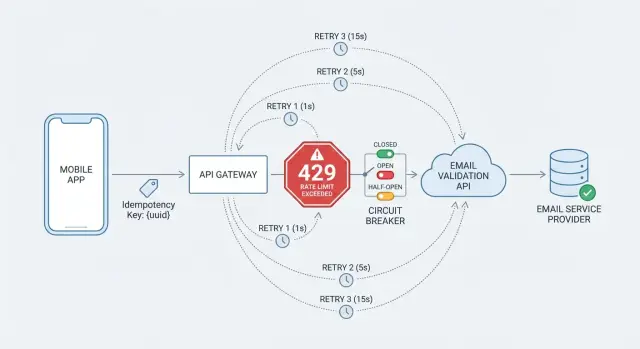
Exponential backoff means you wait longer after each failure. Jitter randomizes that wait so thousands of clients don’t retry at the same time.
A simple pattern:
- Attempt the request.
- If it fails with a retryable error (like a 429 or a transient timeout), compute the next delay.
- Delay = min(maxDelay, baseDelay * 2^attempt) + random(0, jitterRange).
- Sleep, then try again until you hit your time budget.
If the server sends Retry-After, treat it as a minimum delay. If your backoff says 400 ms but Retry-After says 2 seconds, wait 2 seconds.
If Verimail returns a 429 during a sudden signup spike, honoring Retry-After plus jitter helps smooth traffic instead of hammering the API.
3) Tune settings by workload
Don’t use one retry policy for everything. Signup traffic and background jobs have different goals.
Keep it simple:
- Interactive (signup): low retries, tight time budget, fast fallback.
- Background jobs: higher retries, longer time budget.
- Batch imports: steady pacing to avoid bursts.
The point is to keep the user experience snappy while staying polite under load.
Idempotency and deduping so retries don’t create duplicates
Retries are safest when the call is read-only. Email validation usually is: you ask a question and get an answer. Even then, duplicate calls still hurt. They waste quota, add latency, and make logs harder to read when one user action triggers multiple validations.
If your provider supports idempotency keys, use them for any endpoint that could have side effects (for example, “validate and store” workflows). An idempotency key can be a UUID per user action or a stable fingerprint like a hash of the normalized email plus a time window. If keys aren’t supported, you can still get most of the benefit client-side.
A practical approach combines three layers:
- Normalize and fingerprint the email (trim, lowercase, remove obvious whitespace) so the same input maps to the same key.
- Keep a short-lived cache (often 1-10 minutes) so repeated checks don’t call the API again.
- Deduplicate in-flight requests: if multiple parts of your app validate the same email at once, they should await the same promise, not trigger multiple network calls.
Be careful what you cache. “Valid” and “invalid” results are usually safe to reuse briefly. Temporary failures aren’t. If you get a timeout, a 429, or an “unknown” response, cache it for seconds (or not at all) so you don’t lock in a bad outcome.
Example: during a spike, a user double-clicks “Create account” and the frontend also fires a background check. With fingerprinting and in-flight dedupe, you still make one call to Verimail, and retries don’t multiply traffic.
Know when to retry vs when to fail
Retries help when the problem is temporary. They hurt when the request will never succeed.
Retry only when a fresh attempt might work. That typically includes 429 responses, network timeouts, connection resets, and many short-lived server-side 5xx errors. If you get a 429, respect Retry-After when it’s provided.
Don’t retry bad requests. If the API says your payload is invalid, parameters are missing, or auth is wrong, retrying just repeats the same mistake.
A simple decision filter:
- Retry: 429, timeouts, connection resets, 5xx (except cases you know are permanent)
- Fail fast: input validation 4xx, 401/403 auth errors, missing required fields
- Stop retrying when your total wait budget is reached (for example, 2-3 seconds for signup)
Sometimes the best result is “continue without a validated answer.” During a spike, you might let signup finish, store a flag like email_status = needs_review, and queue a background recheck.
Be explicit about partial failures. If validation is skipped, store what happened (error code, timestamp, retry count) and avoid treating the email as “verified” later.
Add a circuit breaker to prevent cascading failures
Retries help when an outage is brief. But if the validation API is slow or failing for minutes, retries pile up and can drag down your whole signup flow. A circuit breaker stops calling the API when failures spike so your app stays responsive.
A breaker has three states:
- Closed: calls go through as normal.
- Open: you stop calling the API for a cool-down period because recent calls failed too often.
- Half-open: you allow a few trial calls. If they succeed, you close the breaker. If they fail, you open it again.
Starting thresholds that work for many teams:
- Open after 5-10 consecutive failures, or a 50% failure rate over the last 20-50 calls
- Cool-down time of 15-60 seconds
- In half-open, allow 1-5 trial calls before deciding
When the breaker is open, decide what your app does. For signup, you might accept the email but mark it as “needs verification” and validate later. For higher-risk flows, you might show a clear message that the email check is temporarily unavailable.
Rate limiting and circuit breakers solve different problems. Rate limiting is the API telling you to slow down (often with 429 and Retry-After). A circuit breaker is your client choosing to pause calls because your recent results show trouble, even if you aren’t being rate limited.
Monitoring and tuning that actually helps
Retries and breakers only work if you can see what they’re doing.
Track a small set of metrics that explains the story over time:
- Retry count per request (and % of requests that retry)
- Total backoff time added per request
- 429 rate (and how often
Retry-Afteris present) - Success rate (2xx) and hard-fail rate (non-retried 4xx)
- End-to-end latency (p50/p95) for validation, including retries
Logging matters as much as charts. For each validation attempt, log a request ID and the final outcome. If the API returns its own request ID, store that too. Keep logs privacy-safe: hash the email and you can still troubleshoot duplicates.
Alerts should focus on sustained changes, not normal noise. A handful of 429s during a busy hour can be fine. A spike that lasts 10 minutes usually means traffic patterns changed, retries are too aggressive, or the breaker is staying open.
Also test under load. Simulate bursty signups and slow networks, not just happy-path calls. Even if your provider usually responds in milliseconds, your timeouts and retry limits should assume the internet can be flaky.
If you can, make key knobs adjustable without a redeploy: max retries, base backoff, timeout, and breaker thresholds. That makes it easier to calm things down quickly during spikes.
Example: traffic spike during signup
A paid campaign hits and signup traffic jumps 10x in an hour. Your app validates every email on the way in, calling Verimail as part of the signup flow. Everything looks fine at first, then edge cases show up: more concurrent requests, occasional timeouts, and a few 429 responses.
Without protection, many clients retry immediately. When hundreds of requests fail at once, they retry together. That creates a thundering herd and makes the next wave fail too, even if the API would’ve recovered with a little breathing room.
With backoff and jitter, retries spread out. Even a simple plan helps:
- First retry after about 200-400 ms (randomized)
- Second retry after about 800-1200 ms
- Stop after 2-3 retries for signup traffic
Idempotency and caching cut call volume further. During spikes, the same address often gets submitted twice (double-clicks, resubmits, users switching devices). A short cache window (say 10-30 minutes) keyed by a normalized email lets you answer repeats without hitting the API again. Pair that with an idempotency key for the signup action so a retry doesn’t create duplicate user records.
A circuit breaker keeps your site responsive when failures pile up. If 429s and timeouts cross a threshold, open the breaker for a short window and skip validation calls temporarily. Signup can still proceed by marking the email as “pending verification” and validating in the background once the breaker closes.
Quick checklist before you ship
Before you turn retries on in production, define what “good behavior” looks like under load. The goal is to keep signups moving and avoid turning a short slowdown into a wider outage.
- Honor
Retry-Afterand cap retry time. FollowRetry-Afterwhen present, and set a hard limit on total retry time so one request can’t tie up your system. - Don’t retry errors you caused. If the API returns a clear 4xx pointing to bad input, retrying wastes time. Fix the input path and return a helpful message.
- Deduplicate repeated lookups. Add a short cache window so repeats reuse the first result.
- Set breaker rules and a fallback. Choose thresholds and decide what happens when the breaker opens (accept and flag, queue for later, or block high-risk flows).
- Make failures easy to debug. Log the outcome (success, 429, timeout), retry count, total wait time, and whether the breaker was open.
Simulate a small traffic spike in staging and confirm the service stays responsive while the client backs off politely. If you use Verimail or a similar provider, the same pattern applies: respect the signals, keep retries bounded, and make the “give up” path predictable.
Next steps: make resilience the default
Treat retry and rate-limit handling as a product feature, not a quick patch. Start conservative, watch what happens in production, and adjust based on metrics. Teams usually get into trouble when retries are too aggressive and amplify a slowdown.
A practical plan:
- Keep retries low (often 2-3) with exponential backoff and jitter, and honor
Retry-After. - Add deduping for any flow that could create duplicates.
- Define stop rules: what retries, what fails fast, and when you fall back to “try again later.”
- Write the behavior in plain language for product and support (what users see, what gets logged, and when validation is deferred).
- Add dashboards and alerts for sustained 429s, rising timeouts, and breaker-open time.
If email checks are business-critical, it also helps to use a validator built for low latency and high volume. Verimail (verimail.co) runs RFC-compliant syntax checks, domain and MX verification, and real-time disposable/blocklist matching in a single API call, which reduces how often your client ends up in the “retry” path.
Schedule periodic reviews as traffic patterns change. Re-check thresholds, update how you handle disposable domains, and confirm your rate-limit behavior still matches real user behavior and support needs.
FAQ
What does rate limiting usually look like to my users?
Start by assuming it’s normal and temporary, not a mystery outage. Treat HTTP 429 as a clear “slow down” signal, stop immediate retries, and switch to a controlled retry plan that respects Retry-After when present.
What should I do when the API returns HTTP 429?
A 429 Too Many Requests means the server is explicitly asking you to reduce request rate. If Retry-After is included, wait at least that long (plus a small random jitter) before trying again so you don’t create another synchronized spike.
How should I handle timeouts differently than 429s?
A timeout is ambiguous: it could be overload, a network hiccup, or an overly aggressive client timeout. Retry only a small number of times with backoff, and keep a strict total time budget so the signup flow stays predictable.
Why do I need both backoff and jitter?
Exponential backoff spreads retries out over time, and jitter adds randomness so many clients don’t retry at the same moment. A simple default is to double the delay each attempt and add a small random amount, stopping once you hit your retry count or time budget.
How many retries should I allow during signup?
For interactive signup validation, a good default is 2–3 retries within about 1–2 seconds total, then fall back. The goal is to avoid turning a brief spike into a long slowdown while keeping the form responsive.
What’s the safest fallback if email validation is rate limited?
Use a safe fallback that matches your risk level. Common options are accepting the email and marking it for later recheck, queueing validation for background processing, or showing a clear message that validation is temporarily unavailable; pick one and make it consistent.
How do I prevent duplicate validation calls when users retry or double-click?
Deduplicate at three levels: normalize the email (trim and lowercase), cache recent results for a short window so repeats don’t call again, and dedupe in-flight requests so concurrent checks share the same promise. This cuts quota waste and reduces the chance you amplify a spike.
When should I add a circuit breaker, and what should it do?
A circuit breaker stops calling the dependency for a short cool-down when failures are frequent, so your app doesn’t keep piling load onto a struggling service. While it’s open, skip the API call and use your fallback behavior, then probe with a few trial calls before fully resuming.
Which errors should I retry, and which should I fail fast?
Retry only when a new attempt could succeed, like 429s, transient network errors, and many 5xx responses. Fail fast on errors that won’t change by retrying, like malformed requests, missing parameters, and auth problems such as 401/403.
What metrics should I monitor to tune retries and rate-limit handling?
Track how often you see 429s, how frequently Retry-After appears, how many requests retry, and how much backoff time you add, alongside p50/p95 latency. Logging the final outcome per validation (separately from “invalid email” results) helps you tune retries without guessing, especially when validating emails via Verimail during traffic spikes.