Email validation for B2B vs B2C: how to set signup rules
Email validation for B2B vs B2C affects what you accept at signup. Learn how to handle work emails, role accounts, and free webmail with clear policies.
Contents
- Why B2B and B2C need different email rules
- Start with the goal of the signup flow
- The building blocks of email validation
- Work emails vs free webmail: what changes in B2B
- Role accounts: allow, block, or treat differently
- Disposable, catch-all, and higher-risk addresses
- Design a policy you can actually run
- Step by step: tune validation for B2B and B2C
- Common mistakes that cause lost signups or bad data
- Quick checklist for a sensible validation setup
- Example scenarios you can copy into your signup flow
- Next steps: roll out rules safely and keep them consistent
- FAQ
Why B2B and B2C need different email rules
Email validation means checking whether an address looks real, can receive mail, and is safe to accept. The basics are simple: the format is correct, the domain exists, the domain is configured to receive email, and the address isn’t obviously risky (like a disposable inbox).
B2B and B2C need different rules because they optimize for different outcomes.
- In B2B, you often care about company identity, lead quality, and keeping your CRM clean.
- In B2C, you usually care about frictionless signup, deliverability, and stopping fake accounts at scale.
One policy rarely fits both.
If you’re too strict, you lose good users. Someone might sign up from Gmail while commuting, or from a small business domain with a quirky mail setup. If you’re too loose, you invite problems: bots, spam complaints, higher bounce rates, and a user database you can’t trust.
A few terms, in plain language:
- Disposable email: a throwaway inbox meant for minutes or hours.
- Role account: shared addresses like support@, sales@, or info@.
- Free webmail: consumer providers like Gmail or Outlook.com.
- Typo: a misspelling that creates a valid-looking email that will never receive mail.
- Reachable: the domain and mail servers are set up to accept email.
The key idea is that the same address can be acceptable in one flow and risky in another. Blocking all free webmail might make sense for a B2B demo request, but it can be a mistake for a B2C newsletter.
Start with the goal of the signup flow
B2B and B2C signups can use the same validation building blocks, but the goal should decide how strict you are, what you block, and what you only flag.
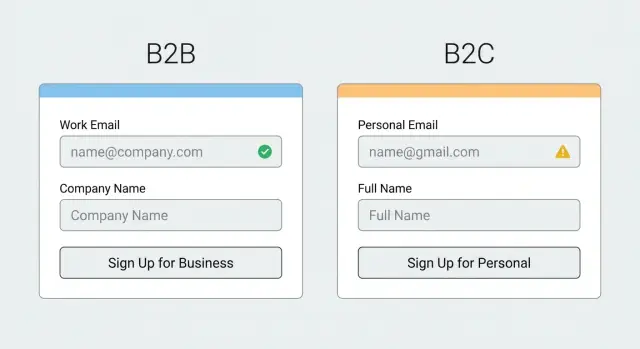
For B2B, signup is often the start of a sales or onboarding path. You usually care about qualified leads, correct routing, and fewer fake accounts. A stricter work email policy can make sense because a business domain helps tie a person to a company and reduces low-intent signups.
For B2C, the goal is usually growth with low friction. People expect to use whatever address they already have, including free webmail. Here, validation is less about forcing a business identity and more about deliverability (avoid typos and dead inboxes) and fraud control (avoid obvious throwaways).
The context changes the risk and the right amount of friction. A newsletter signup might only need to catch typos and hard bounces. A free trial might need stronger disposable detection. A paid checkout can justify the strictest checks because bad data turns into support load, missing receipts, and higher chargeback risk.
A quick way to define “good enough” is to ask what you’ll do with the email in the next 10 minutes:
- If you must reach the user (receipt, password reset), block invalid and high-risk addresses.
- If you’re qualifying leads, consider requiring a work email or at least flagging free webmail.
- If you’re testing interest (newsletter), allow more but confirm with double opt-in.
The building blocks of email validation
Good email validation is a few checks working together, not a single yes/no rule. That matters even more when your B2B and B2C flows have different risks and different definitions of a “good” address.
1) Syntax checks (format)
Syntax is the quick, basic test: does the address look like an email and follow common standards? It catches mistakes like a missing @, double dots, or illegal characters.
Syntax alone isn’t enough. Plenty of fake or unreachable addresses are perfectly formatted.
2) Domain and MX checks (can it receive mail?)
Next, validate the domain itself. Is it real, and is it set up to accept email?
A practical flow usually includes domain existence (DNS resolves) and MX records (mail servers are configured). This prevents you from accepting addresses on domains that cannot receive mail at all, which is a common source of instant bounces.
3) Risk checks (disposable and known bad sources)
Disposable inboxes and some high-risk domains are designed to sign up once and vanish. Blocklist matching helps you stop these before they enter your database.
Real-time checks matter because disposable providers change constantly and new domains appear every day. A user can enter something like [email protected]. Syntax passes, and the domain might even have MX records. A disposable detection step can still flag it as likely temporary.
Work emails vs free webmail: what changes in B2B
In B2B signups, a work email often signals intent and fit. It suggests the person is tied to a company you can sell to, and it reduces throwaway signups. But treating every free webmail address as low quality can backfire.
Many real B2B buyers use Gmail, Outlook.com, or Yahoo. Think consultants, agencies, and small businesses that run on free inboxes. If your product has a product-led trial, hard-blocking free webmail can cut into your best growth channel.
Personal domains sit in the middle. An address like [email protected] can be a real business, or a parked domain used for spam. Don’t guess based on the domain name. Validate the basics first (syntax, domain, MX), then decide what to do with the result.
A practical approach is to set rules by channel, not one global “allowed list.”
Tune rules by signup intent
If the goal is high-intent sales conversations, you can be stricter. If the goal is adoption, be more welcoming and use risk checks instead of hard blocks.
- Sales demo request: require a work email, but offer a clear alternative path for personal email with lighter follow-up.
- Product-led trial: allow free webmail, but block disposable addresses and obvious fakes.
- Pricing or contact forms: allow most emails, then score and prioritize leads.
- Enterprise invite flows: prefer work email, and flag role accounts for review.
Example: a SaaS company asks for a work email on “Book a demo,” but accepts Gmail on “Start free trial.” Both flows run the same validation checks, but the decision rule differs: demo is a hard gate, trial is a soft gate with verification and limits.
Role accounts: allow, block, or treat differently
Role accounts are addresses like sales@, info@, admin@, support@, or billing@. They’re shared by a team, not owned by one person, so they can be harder to tie to a single user.
Some teams reject them because they reduce accountability, increase the chance of low-intent signups, and can hide duplicates across companies. In B2B flows, they can also make it harder to qualify accounts or route onboarding.
But role accounts aren’t automatically bad. They’re common in procurement, partner programs, invoicing, and support portals where a shared inbox is normal. If you block them outright, you may turn away legitimate teams.
A practical policy is to treat role addresses as a signal, not an automatic failure.
A simple policy you can run
Pick one approach and keep it consistent:
- Allow, but flag as role-based in your CRM or user record.
- Allow, but require an extra step (email OTP, magic link, or manual review on higher-tier plans).
- Allow only on certain signup paths (partners, invoicing, admin consoles) and block elsewhere.
- Block only the highest-risk role names (for example, admin@) and allow the rest.
Example: a company signs up with [email protected] for an invoiced plan. You accept it, require email verification, and ask for one named contact during onboarding.
Watch the edge cases
Many “role accounts” are shared mailboxes used by real teams, especially support@ and it@. Allowing access but restricting sensitive actions until a named owner is confirmed is often enough.
Disposable, catch-all, and higher-risk addresses
Disposable emails are the easiest win. In most B2C signups, they’re often used for one-off access, abuse, or avoiding follow-ups. If you want a real customer relationship, blocking disposable domains at signup is usually the right default.
B2B is trickier. Some real people use throwaways when they’re only researching. A common approach is to block disposables for anything that creates ongoing cost or risk (trials, paid plans, API keys), but be more flexible for low-risk actions like downloading a report, with limits and a requirement to use a real inbox later.
A policy that tends to work:
- Block disposable domains for account creation and trials.
- Allow disposables only for low-risk content access, with rate limits.
- Treat suspicious addresses as “verification required” when you can.
- Add stricter checks when a user requests higher privileges (team invites, billing, exports).
Catch-all domains need special care. A catch-all means the domain accepts mail for any address, so an email can look deliverable even if it’s made up. Don’t treat catch-all as a green light. Mark it as higher uncertainty and pair it with a confirmation email, or require an additional signal for sensitive actions.
Example: a B2B SaaS offers a 14-day trial. If someone signs up with [email protected] (disposable), block. If they sign up with [email protected] and the domain is catch-all, allow the signup but require confirmation before enabling integrations.
Email is only one signal. When something looks risky, also look at behavior: signup speed, repeated attempts, unusual IP patterns, and payment mismatches.
Design a policy you can actually run
A good policy isn’t “validate the email.” It’s a small set of decisions your team can explain, measure, and change without breaking signups.
Start by defining clear outcomes for each attempt. Most teams only need four states:
- Accept
- Accept with warning (flag for review, limit features, or ask for more info)
- Require verification (confirm via email before activating)
- Block
Then apply those states differently per flow. A newsletter can tolerate more than a free trial, and a checkout can justify stricter checks because the user is already motivated. Invite-only or admin-created accounts can be the strictest because there’s a human decision in the loop.
Write down what you store, not just what you do. At minimum, keep the raw email (what the user typed), a normalized version (lowercased, trimmed), the validation result, and a reason code. Reason codes like “invalid syntax,” “disposable provider,” or “no MX records” also help support teams explain why a signup was paused.
Keep the policy readable. One page is the goal. If sales and support can’t repeat it in plain words, users will experience it as random friction.
Step by step: tune validation for B2B and B2C
Treat B2B and B2C validation as two different signup products. The same technical checks can power both, but the rules and the tone should match what you consider a successful signup.
Start by listing your signup types (trial, newsletter, checkout, partner portal) and what “success” means for each. For a B2B trial, success might be a real person from a real company you can onboard. For a B2C promo list, success might be a reachable inbox with low bounce risk.
Build from a baseline that rarely hurts good users: syntax checks plus domain and MX verification. This catches typos and dead domains without guessing intent.
Then add policy rules in layers, and make them different per flow:
- Disposable emails: block on high-value flows (trials, account creation), but consider allowing on low-risk flows (content download) with extra friction.
- Free webmail: in B2B, you might allow it but route those signups differently or ask for a company domain later. In B2C, free webmail is normal, so focus on deliverability and abuse signals.
- Role-based addresses: allow with a warning, or require an additional step if you need a single accountable user.
User messages matter as much as the rule. Avoid “Invalid email” if the address is technically valid. Use clear wording like “Please use a work email for a faster review” or “That email provider can’t be used for signups.”
Review outcomes weekly. Look at blocked signups, bounce rates, and support tickets. If real customers are being blocked, loosen one rule at a time. If abuse increases, tighten the riskiest path first.
Common mistakes that cause lost signups or bad data
Most problems with email rules aren’t technical. They come from treating every signup the same, even when the risks and goals differ.
Blocking all free webmail is a common mistake. In B2B, you may want a work email for routing and account ownership. But in B2C, free webmail is normal. Even in B2B, early-stage users, contractors, and small teams often start on Gmail or Outlook. If you hard-block them, you lose real customers. A better approach is to allow the signup, tag it, and step up verification when it matters.
Relying on syntax-only checks is another. An address can look valid and still bounce. If you skip domain and MX checks, you’ll accept emails that can’t receive mail. If you skip disposable detection, you’ll collect addresses designed to vanish.
Overblocking role accounts is also risky. Blocking support@ or billing@ can reduce junk signups, but it can also block legitimate teams. Offer an alternative path: allow but verify, or ask for a named admin later.
Vague error messages hurt conversion. Tell people what to fix (for example, “That domain can’t receive email”), and keep the tone neutral.
Finally, rules drift. If your acquisition channels change or you expand to new markets, revisit your policy and watch conversion, bounce rates, and support tickets, not just pass/fail counts.
Quick checklist for a sensible validation setup
Most signup problems happen because rules are either too loose (fake users get in) or too strict (real users leave). Keep your setup practical, and adjust it by flow type.
Before shipping changes, check:
- You validate syntax, domain existence, and MX records on every signup.
- You’ve decided where disposable detection is a hard block (high-risk flows like trials, credits, referrals) vs a warning (low-risk newsletter).
- You have one clear rule for role-based addresses (support@, sales@, info@): allow, block, or allow with extra verification.
- Your B2B and B2C policies differ based on intent, not labels.
- You log outcomes (pass, fail reason, risk flags) so you can measure bounce rate, conversion, and abuse over time.
Example: a B2B “Request a demo” form might require a work email, while a B2C “Create account” flow might allow most providers but block disposable domains immediately.
Example scenarios you can copy into your signup flow
Scenario 1: B2B free trial signup with a Gmail address
A user signs up for a B2B free trial with a Gmail address. You might prefer a work email, but blocking it can cost real signups (consultants, small teams, people evaluating tools outside their main inbox).
A practical flow:
- Validate syntax and domain, and check MX records to confirm the domain can receive mail.
- Allow the signup, but tag it as free webmail for routing (follow-up, limits, or extra verification).
- Require email verification right away, and delay higher-risk actions until it’s confirmed.
Copy you can show without sounding pushy:
“We recommend using your work email so you can invite teammates and get faster support. You can continue with Gmail, but please confirm your address to activate the trial.”
Scenario 2: B2C promo signup with a disposable email
A user joins a discount list or one-time promo and enters a disposable address. Here, the goal is reachability and lower abuse, so a firmer block is usually worth it.
Keep the experience clear and polite:
- Block known disposable providers at signup.
- Offer an immediate retry with no extra steps.
- If you must allow it, limit rewards until the user confirms a real inbox.
Example error copy:
“That email looks temporary and can’t receive follow-ups. Please use a real inbox (like your personal or work email) and try again.”
Next steps: roll out rules safely and keep them consistent
Write down two clear policies: one for B2B forms (sales demo, trial, partner portals) and one for B2C forms (newsletters, communities, consumer apps). Assign each policy to each form on purpose. “Same rules everywhere” sounds tidy, but it usually means you either block good B2C users or let low-quality B2B signups slip in.
Add validation early, before you save the address and before you trigger email automation. That prevents bad data from being stored and stops welcome emails from being sent to dead inboxes.
A safe rollout is easiest when you treat it like a small experiment:
- Start in monitor mode (log results, don’t block) for a few days.
- Turn on blocking only for clear failures (invalid syntax, no domain, no MX).
- Move higher-risk signals (disposable, role account, catch-all) into “verify” or “step-up” actions.
- Use messages that tell users what to do next (try another address, check spelling).
- Keep one shared source of truth so web, mobile, and backend behave the same.
Track a small set of metrics so you can tune without guessing: signup conversion (by form and channel), bounce rate on onboarding emails, spam complaints, unsubscribes, and support tickets about signup issues.
If you want a single place to run the core checks (RFC-compliant syntax, domain verification, MX lookup, and real-time matching against disposable providers), an email validation API like Verimail (verimail.co) can handle it in one call. That makes it easier to keep rules consistent across every entry point while still tailoring the decision logic for B2B vs B2C.
FAQ
What’s the simplest way to decide how strict my email rules should be?
Start with the goal of the form. For most products, always block clear failures like bad syntax, non-existent domains, or domains with no MX records, because those will bounce immediately. Everything else (free webmail, role accounts, catch-all) should usually be a policy choice that can vary by flow.
Why should B2B and B2C have different email validation rules?
B2B often uses email as a proxy for company identity and lead quality, so a stricter work-email preference can help keep your CRM cleaner. B2C usually optimizes for low-friction signup and deliverability, so blocking common providers like Gmail often hurts more than it helps.
Is syntax checking alone enough to prevent bad emails?
Syntax checks only confirm the address looks like an email. They won’t catch dead domains, domains that can’t receive mail, or disposable inboxes that are designed to pass basic formatting. If you only validate syntax, you’ll still store a lot of emails that will never get your confirmation or onboarding messages.
Should I block Gmail and Outlook.com in B2B signups?
Default to allowing free webmail unless the flow truly requires a company identity, like a “Request a demo” form. If you allow it, tag it (for routing or lead scoring) and require verification before enabling higher-risk actions. This keeps conversion healthy while still reducing abuse.
When should I block disposable email addresses?
In most B2C flows, yes, blocking known disposable providers at account creation is a good default. If the action is low-risk (like a one-time content download), you can allow it but delay benefits until the user confirms a real inbox. The key is to avoid letting disposable emails create ongoing cost or support load.
Are role-based emails like sales@ or info@ always a problem?
Treat role accounts as a signal, not an automatic failure. Many real teams use addresses like billing@ or support@ for purchasing, invoicing, and shared access. A practical approach is to allow the signup but require email verification and collect at least one named contact before granting sensitive permissions.
What should I do with catch-all domains?
A catch-all domain can accept mail for any address, so an email may look deliverable even if it was made up. Don’t treat catch-all as “verified”; treat it as higher uncertainty. Allow the signup if you want, but require confirmation and consider limiting risky actions until the address proves it can receive your messages.
How do I turn validation results into simple product decisions?
Use four clear outcomes: accept, accept with warning, require verification, and block. That keeps your product behavior predictable and easy to explain to users and support. Then apply those outcomes differently per flow, so a newsletter doesn’t get the same friction as checkout or a free trial.
What should my error messages say to avoid losing signups?
Be specific and neutral about what to do next. If the domain can’t receive email, say that and ask for a different address; if it looks temporary, ask for a “real inbox”; if you prefer work email, explain it as a recommendation rather than accusing the user. Avoid generic messages like “Invalid email” when the address is formatted correctly.
What should I log and measure so I can tune rules without guessing?
Log what the user typed, a normalized version, the validation outcome, and a reason code (for example, syntax error, no MX, disposable, role-based, catch-all). Review conversion, bounce rates, and support tickets by form, then adjust one rule at a time. If you want a single place to run syntax, domain verification, MX lookup, and disposable checks in one call, Verimail can handle that and keep results consistent across web, mobile, and backend.