Email validation checklist for signup integrations
Use this email validation checklist to pick where to validate in signup, return clear errors, avoid blocking real users, and keep the flow testable.
Contents
- What email validation is trying to prevent in signup
- Validation layers and what each one tells you
- Where to validate: client, server, and background checks
- Step-by-step: a sane validation flow for signup
- How to handle errors without hurting user experience
- Design the code so it stays simple and maintainable
- Keeping the signup codepath testable
- Common traps and how to avoid them
- Example: a realistic signup flow with clear decisions
- Quick checklist and next steps
- FAQ
What email validation is trying to prevent in signup
Signup is where bad email addresses enter your system. Once they get saved, they create work later: failed password resets, support tickets, bounced campaigns, and a messy user database. A validation checklist helps you decide what to block immediately, what to warn about, and what to simply log.
Many problems are simple human mistakes. People mistype domains (gamil.com), forget part of the address, or paste extra spaces. Catch these fast because they are easy to fix and save users a frustrating loop.
The next bucket is low-quality or risky addresses. Some domains do not exist, have no mail setup, or will never accept mail. Others are disposable email services used to grab a trial and disappear. You may also see spam traps and patterns linked to abuse. These are the ones that quietly hurt deliverability and sender reputation over time.
Good validation is a balance:
- Keep real people moving through signup with minimal friction
- Reduce bounces and unreachable addresses
- Block obvious abuse and throwaways when it matters
- Keep enough signal to review edge cases later
Where you validate matters because it changes both user experience and security.
Client-side checks give instant feedback for typos, but they are easy to bypass. Server-side checks are enforceable, but they add latency and need clear error handling. Background checks can help when you do not want to slow signup, but they should not turn into a silent source of bad data.
Set expectations with your team early: validation reduces risk, it does not guarantee certainty. Even a technically valid, deliverable email can later bounce (full inbox, account disabled). And some risky-looking emails belong to real users.
Example: a user enters [email protected]. Catch that immediately and suggest a correction. But if the user enters a valid address on a disposable domain, you have a policy choice: block it during signup to prevent abuse, or allow it with limits so you do not reject a legitimate user.
Validation layers and what each one tells you
Email validation is not one check. It is a stack of small checks that answer different questions. Keep the layers separate so you can act on the result without guessing what went wrong.
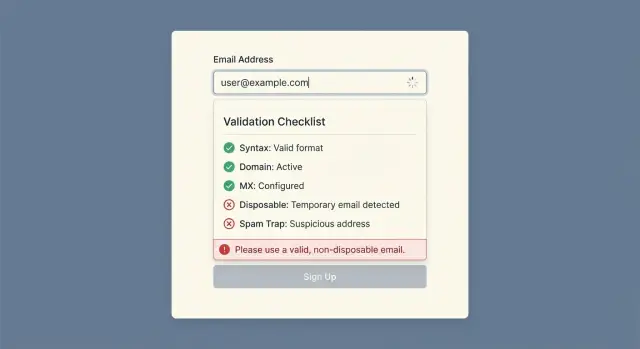
The common layers in an email validation checklist:
- Syntax (format) check: Catches missing
@, spaces, invalid characters, and other formatting errors. This does not tell you whether the address exists. - Domain check (DNS exists): Confirms the domain part (like
example.com) is real and has DNS records. - MX record lookup: Checks whether the domain is set up to receive email (mail servers are configured). Strong signal, still not proof a mailbox exists.
- Disposable/temporary provider detection: Flags known throwaway providers. This is a quality and fraud signal, not a technical failure.
- Known bad patterns and blocklists: Matches spam traps, role accounts (like
admin@), or patterns you consider risky. Treat this as policy, not truth.
Some checks are safe to run instantly in the browser. Others belong on the server.
Syntax checks are fast and reliable, so they work well client-side for immediate feedback. DNS and MX checks are usually fast too, but they depend on network and resolver behavior, so you should treat failures and timeouts as normal. Provider and blocklist matching is typically fast if you use a good service, but your code still needs a timeout and fallback.
A useful mental model: formatting errors are clear and user-fixable. Reachability and risk signals (DNS, MX, disposable flags) are probabilistic. Use them to decide what to allow, warn about, or review.
For privacy, treat emails as sensitive user data. Log carefully and avoid storing raw "bad input" strings just because validation failed. If you need debug logs, keep them minimal (for example: a hashed email, reason code, and request ID).
Where to validate: client, server, and background checks
Where you validate matters as much as what you validate. A good setup uses three places, each with a different job.
Client-side validation is for speed and clarity. Keep it to obvious mistakes only: missing @, spaces, double dots, or a clearly broken format. It helps the user, but it is not security.
Server-side validation is the source of truth. All real rules belong here because the server is the only place you control. It is also where you can safely call an email validation API without exposing keys. This is where you do deeper checks (domain, MX, disposable providers, blocklists) and decide whether to accept, reject, or ask the user to confirm.
Validate before creating the user record whenever possible. If you create accounts first and validate later, you will collect fake users, waste welcome emails, and open the door to abuse.
Background checks are optional, but useful. Email status changes over time (domains expire, mailboxes get disabled, providers get added to disposable lists). Background re-checks also help when the email is edited later.
A practical split of responsibilities
Keep the split simple:
- Client: catch typos and obvious formatting issues.
- Server: enforce policy with one consistent decision.
- Account creation: block or challenge risky emails before writing to the database.
- After signup: re-check on email change, or before the first bulk campaign.
If you do re-checks, store a small validation summary with the user (status, reasons, timestamp). That avoids repeated calls on every login and makes support questions easier to answer.
Step-by-step: a sane validation flow for signup
A good signup flow checks the easy stuff first, then spends time and API calls only when it matters.
Start by normalizing what the user typed. Trim leading and trailing spaces. Decide how to handle internal spaces (many teams reject them). Lowercase only the domain part (example: [email protected] becomes [email protected]). Keep the local part as-is to avoid changing meaning.
Next, do basic syntax checks and stop early on obvious failures. This is your cheapest filter: one @, no forbidden characters, reasonable length, non-empty domain. If it fails, show a plain message like "Enter a valid email address" and do not call any external service.
Only after that should you call an email validation service to learn what syntax alone cannot: does the domain exist, does it have MX records, and is it a disposable provider or known trap source. Treat this call as part of your critical path. Set a short timeout and choose a clear fallback.
Most teams do better with a small set of outcomes:
- Allow: looks reachable and low risk.
- Block: clearly invalid, or disposable when your policy forbids it.
- Warn: uncertain or medium risk. Let the user continue, but require confirmation and watch for abuse signals.
Example: a coupon-heavy consumer app might block disposable addresses to reduce promo abuse. A B2B product might allow them but require a confirmed corporate email before team invites.
Finally, store a short summary of what happened so support and engineers can debug without saving more than needed: normalized email, an outcome (allow/block/warn), a few reason codes (syntax, no_mx, disposable), response time, and a timestamp.
How to handle errors without hurting user experience
Error handling is where good validation can feel bad. The goal is to help real people fix mistakes fast, while still blocking addresses that will hurt deliverability.
Separate "you can fix this" from "we cannot accept this." If the issue is syntax, say so in plain words. "Email must include an @ symbol" beats "Invalid email" because it tells the user what to change.
For risk signals that are not certain, consider a warning instead of a hard stop. If an email looks disposable or temporary, you might allow signup but require confirmation before enabling important actions, or limit sensitive features until a better email is added.
Avoid exposing your internal detection logic. Users do not need blocklist names or provider list details. Keep the UI message generic ("Please use a real, reachable email address") and keep specifics in your logs.
Consistency matters. Use a small set of error codes that your frontend handles the same way every time, and that your logs can filter easily:
EMAIL_SYNTAX: show a fixable messageEMAIL_UNREACHABLE: block (domain has no working mail setup)EMAIL_RISKY: warn or soft blockEMAIL_TIMEOUT: offer retry
Timeouts deserve special care because they are often not the user's fault. If validation times out, do not accuse the user of entering a bad address. Say something like: "We could not check your email right now. Please try again." Provide a clear retry path, and consider letting signup continue in a "pending verification" state if your product supports it.
Example: a user types jane.doe@gmail and taps Sign up. The UI can catch the missing top-level domain and show a short hint. If syntax is fine but the server flags the address as risky, the user-facing message should focus on the next step: "Try another email, or continue and confirm later."
Design the code so it stays simple and maintainable
Keep signup validation maintainable by separating three things: calling the validation service, deciding what to do with the result, and recording what happened. When these are mixed inside a controller or handler, small policy changes turn into risky refactors.
Start with a tiny, stable result type that your app understands. Treat it as the only thing the rest of your code depends on, even if you swap providers later.
export type EmailValidationResult =
  | { status: "valid" }
  | { status: "invalid"; reason?: string }
  | { status: "risky"; reason?: string }
  | { status: "unknown"; reason?: string };
Keep policy decisions separate from the API call. The API client should translate the provider response into EmailValidationResult. A policy module can decide whether to block, warn, or allow based on your product rules.
Make the network part safe by default. Set short timeouts, retry once for transient failures, and define fallback behavior. For example: if validation times out, return unknown and continue signup, rather than failing the whole flow.
Cache results briefly to avoid repeated lookups during the same attempt. A 5 to 15 minute cache keyed by normalized email can prevent double calls when users resubmit or refresh. Do not treat the cache as permanent truth.
Finally, add lightweight metrics so you can spot problems early. Track the count of valid/invalid/risky/unknown, timeouts and retries, blocks vs warnings, and later bounces (so you can compare validation outcomes to real deliverability).
Keeping the signup codepath testable
If email validation is wired straight into your controller and it makes real network calls, tests get slow and flaky. Treat validation as a dependency, not a side effect.
Wrap the validator behind a small interface that your signup code depends on. In production, that interface calls your email validation provider. In tests, swap it for a fake that returns preset answers. This keeps unit tests fast and makes failures easy to reproduce.
Test policy logic separately from the network. Put decision-making in one function that takes a simple result (valid, risky, unknown, error) and returns what the app should do (allow, block, allow-with-warning, require-confirmation). Exercise it with a table of cases.
For integration tests, keep it minimal and deterministic. One happy path and one blocked path is usually enough. Mock the validator at the HTTP boundary (or via a local stub) so tests never depend on the real network.
If you have retries, avoid real time and random backoff in unit tests. Inject a clock and backoff policy so you can test "after 2 retries we stop" without waiting.
Common traps and how to avoid them
Most mistakes in signup validation are not about syntax. They are about what you do when the signal is incomplete, and how you keep the flow fast.
One common trap is treating validation like a yes-or-no switch. If you block every address that is not 100% certain, you will reject real users (false positives). Separate "definitely bad" (broken syntax, non-existent domain, known disposable) from "uncertain" (temporary network issues, ambiguous signals). For uncertain cases, let the user continue but require email confirmation before full access.
Another trap is trusting browser-only checks. Client-side checks help users, but they are easy to bypass. Repeat key validation on the server.
DNS can be flaky. If a lookup times out, treating that as a permanent failure frustrates users. Classify network and DNS problems as retryable. Save the signup, mark the email as pending verification, and re-check in the background.
A few practical rules prevent most issues:
- Use a 3-state outcome: allow, block, or allow-with-confirmation.
- Validate on the server even if the client validates.
- Treat DNS/network failures as retryable, not invalid.
- Give user guidance that helps (typo vs unreachable), and keep detailed reasons internal.
- Put a time limit on validation calls so signup does not hang.
Example: a realistic signup flow with clear decisions
A B2B SaaS product offers a 14-day free trial. Signup is email-first: the user enters an email, receives a confirmation code, then sets a password after the email is confirmed. The goal is to stop obvious junk without blocking real people who mistyped.
A simple policy fits most teams: accept clearly valid addresses, block disposable emails, and warn on risky or uncertain results while still letting the user fix the issue.
Three inputs, three outcomes
1) Typo: [email protected]
Show a friendly inline message like: "Did you mean [email protected]?" and let the user edit. Do not create an account yet.
On the backend, run syntax and domain checks, then use your validation service to confirm domain and MX. If it looks like a typo, return a structured validation error and (optionally) the suggestion.
2) Disposable: [email protected]
Show a clear block: "Please use a work email address. Disposable email providers are not allowed." Keep it short and do not accuse the user of fraud.
Backend: disposable match, block signup, do not send a confirmation email, do not create a workspace.
3) Valid corporate: [email protected]
Show: "Check your inbox for a code." Backend: validate syntax, check MX, accept, create a pending (unverified) user, send the confirmation code, activate the trial only after confirmation.
This works well because each decision is based on one clear outcome, not a pile of ad hoc rules.
What to log (helpful for support, minimal data)
Keep logs useful without copying full addresses into every log line. A reasonable set:
- A one-way hash of the email (plus the domain separately)
- Validation result code (valid, disposable, risky, invalid) and reason
- Provider request ID and your internal signup attempt ID
- Timestamp and rate-limit outcome
- Action taken (blocked, warned, accepted, confirmation sent)
Quick checklist and next steps
Make sure the important checks happen on the server. UI checks catch typos early, but they are easy to bypass. The server should decide whether an email can create an account.
Decide what happens when validation is slow. Set a clear timeout (for example, a few hundred milliseconds to a couple seconds) and pick a consistent policy: allow and flag the account, warn and ask the user to retry, or retry once in the background.
A compact release checklist:
- Server-side validation is required (even if the UI validates too).
- Timeouts are set, and timeout behavior is explicit.
- Validation results map to standard internal codes and clear user messages.
- Tests cover: valid, invalid, risky, unknown/timeout.
- Your validation approach covers syntax, domain, MX, and disposable detection.
For errors, separate what you log from what you show. Users should get simple guidance ("Check for typos" or "Try a different email"). Logs can keep detailed reason codes for support and analytics.
If you want a single-call API that returns multi-stage signals (syntax, domain, MX, disposable/blocklist matching), tools like Verimail can keep your signup code focused on policy instead of plumbing. If you are evaluating options, Verimail is available at verimail.co.
Add one small dashboard metric: how many signups were blocked, warned, or allowed with a flag. That feedback loop tells you quickly whether your policy is too strict or too loose.
FAQ
Why bother validating emails during signup instead of later?
Email validation at signup stops bad addresses from getting into your database in the first place. That prevents bounced emails, failed password resets, extra support work, and deliverability damage that builds up over time.
What should I validate in the browser vs on the server?
Use client-side checks for quick, user-fixable mistakes like missing @, leading/trailing spaces, or obviously broken formats. Put all enforceable rules on the server, because browser checks are easy to bypass and you should keep API keys and policy decisions out of the client.
What’s the difference between syntax validation and MX/domain checks?
Syntax only tells you whether the email looks like an email address. Domain and MX checks tell you whether the domain exists and is configured to receive mail, which is a much stronger signal for reachability, but still not proof that the exact mailbox exists.
How should I normalize an email address before validating it?
Start by trimming spaces and normalizing the domain to lowercase. Keep the local part as the user typed it, because changing it can change meaning on some systems.
What are the best “allow / block / warn” rules for signup?
Use a small set of outcomes you can explain and implement consistently, such as allow, block, and warn. Warnings work well for uncertain or medium-risk cases where you want to keep real users moving but still require email confirmation or add limits until verification.
Should I block disposable/temporary email addresses?
Treat disposable detection as a policy decision, not a technical failure. If your product is promo-heavy or abuse-prone, blocking disposables at signup is usually the simplest. If you’re worried about rejecting legitimate users, allow signup but restrict sensitive actions until a non-disposable address is confirmed.
What should I do when DNS or the validation API times out?
Set a short timeout and decide the fallback in advance. If validation times out, don’t tell the user their email is invalid; either offer a retry or allow signup in a pending state and re-check in the background, depending on your risk tolerance.
How do I handle validation errors without frustrating real users?
Show simple, fixable messages for syntax problems, and keep risk messages generic. Users don’t need provider names or detailed detection reasons; save those as internal reason codes so support and engineers can debug without teaching attackers how to evade your checks.
What should I log from email validation without creating privacy issues?
Log the minimum you need to troubleshoot and measure outcomes. A practical default is a hashed email, the domain, an outcome status, a couple of reason codes, a timestamp, and a request or signup-attempt ID, rather than full raw input everywhere.
How do I keep email validation code testable and easy to change?
Wrap validation behind a small interface and return a stable result type like valid, invalid, risky, or unknown. Unit test the policy decisions with preset validator responses, and mock the network in integration tests so your signup tests stay fast and deterministic.