Email validation layers explained: syntax, domain, mailbox signals
Email validation layers help you interpret syntax, domain, and mailbox signals so you can report results clearly without promising inbox reachability.
Contents
- What email validation can and cannot guarantee
- The three main layers of validation
- Syntax validation: useful, fast, and limited
- Domain validation: domain exists and is mail-capable
- Mailbox-level signals: the hardest part to confirm
- Disposable emails, spam traps, and risk signals
- Turning signals into clear outcomes
- Example: improving signup quality without blocking real users
- How to communicate results without overpromising
- Common mistakes and traps to avoid
- Quick checklist and next steps
- FAQ
What email validation can and cannot guarantee
Many teams hear "validated email" and assume it means one thing: the message will land in an inbox. The word "validation" sounds final. In reality, validation is a set of signals that lowers risk. It can tell you an address looks safe enough to accept, but it can't promise delivery every time.
Think of validation as checkpoints. Each checkpoint catches a different kind of bad input, like obvious typos, broken domains, or disposable addresses. Passing those checkpoints means "this looks reasonable to store and try," not "this person will definitely receive mail."
Even after an address passes, delivery can still fail or the user can still miss the message. Common reasons include a full or disabled mailbox, a mail server that accepts then rejects later, spam filtering, or an address that becomes invalid over time (people change jobs, companies shut down domains).
Overpromising creates avoidable problems. Product teams build flows that block signups or treat a "pass" as a verified user. Support then deals with "I never got the email" tickets even when your system did what it could.
A better goal is simple: reduce fake signups and obvious bounces while keeping the door open for real users. If an address passes syntax and domain checks but still looks risky, allow the account and rely on confirmation for sensitive steps. Services like Verimail (verimail.co) are useful here because they return fast, structured signals you can map to simple decisions without pretending anyone can guarantee inbox reachability.
The three main layers of validation
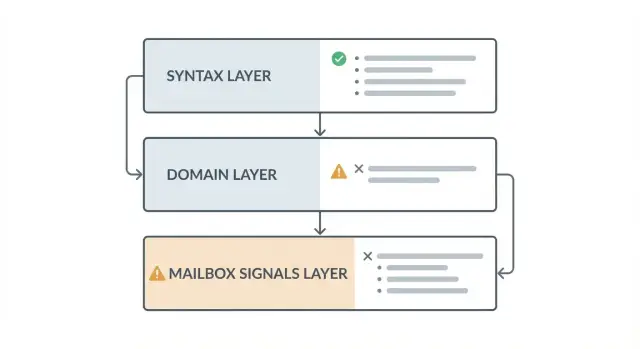
Email validation isn't one single check. It usually breaks into three layers, each answering a different question. Together they raise confidence, but they never add up to a 100% guarantee.
1) Syntax: "Is it written like a real email?"
A syntax check looks at format. Does it have a local part, an @ sign, and a domain? Are there illegal characters, double dots, or missing parts?
Syntax is fast and great for catching obvious mistakes like gamil.com or [email protected]. But it can't tell you whether the domain exists or whether a mailbox is real.
2) Domain: "Can this domain accept email?"
Domain verification asks whether the domain is real and set up for mail. This usually means DNS checks, including whether the domain exists and whether it has MX records (or another valid mail setup).
This layer avoids dead ends like [email protected]. Still, a domain that can accept mail doesn't mean a specific inbox exists.
3) Mailbox-level signals: "Is this inbox likely to be reachable?"
Mailbox-level signals try to estimate reachability without sending an email. Some providers reveal hints. Others block checks to prevent abuse. Many domains use catch-all rules, where any address appears valid.
That means mailbox reachability is often probability, not proof. A practical way to report results is with a small set of outcomes your product can act on:
- Pass: looks valid across checks
- Fail: clearly invalid (bad syntax, no mail-capable domain)
- Risky: signs of low quality (for example, disposable patterns)
- Unknown: not enough signal to be sure
Syntax validation: useful, fast, and limited
Syntax validation answers one narrow question: does this string look like an email address mail systems accept? It catches missing @ signs, extra spaces, double dots, invalid characters, and formatting mistakes from copy/paste (like trailing punctuation or hidden whitespace).
The tricky part is strictness. Many apps use a simple regex and reject anything unusual, which blocks real users. An RFC-compliant syntax check is more tolerant and closer to what real mail servers accept, even if the address looks uncommon.
A syntax pass still doesn't confirm what most teams care about. It doesn't confirm the domain exists, that the domain can receive mail, or that the mailbox is real. For example, [email protected] can be perfect syntax.
Plus addressing and dots are also common sources of false rejections. Many major providers treat them as normal, and users rely on them for filtering:
[email protected]is usually valid and shouldn't be blocked[email protected]can be valid; dots may or may not matter depending on the provider
If you store a normalized version, keep the original address too. Users expect it to match what they typed.
Domain validation: domain exists and is mail-capable
Domain validation answers a simple question: does this domain look like it can receive email? It catches obvious problems early, before you waste time sending messages that will bounce.
At a high level, domain checks look at DNS. First you confirm the domain exists and has working DNS. Then you check mail routing, usually via MX records (and sometimes a fallback to A records). If a domain has valid MX records, it's a strong sign the domain is set up to accept email somewhere.
Common edge cases to expect
Even good domains can fail domain validation sometimes. The usual causes are DNS propagation delays for new domains, temporary DNS timeouts, or misconfigured MX records.
Because of this, a single failed lookup isn't always proof the address is bad. Many teams treat it as "unknown" or "high risk" and retry, especially when the user otherwise looks real.
What a valid MX record does not prove
A valid MX record doesn't confirm the mailbox exists. It only says, "this domain has mail servers configured." The address might still be a typo (like [email protected]), a non-existent user, or a mailbox that rejects new mail.
Think of domain validation as confirming the building has a mailroom, not that a specific person works there.
Mailbox-level signals: the hardest part to confirm
Mailbox-level checks are what people usually mean when they ask, "Can you tell if this exact inbox exists?" They go beyond syntax and domain verification and try to infer whether a mailbox is real by observing how the receiving mail server behaves.
Common signals include SMTP hints, catch-all detection, role-based patterns (like support@ or info@), and risk signals from known bad infrastructure.
The core limitation is that many mail servers are designed to hide the truth. To stop spam and scraping, providers may block probing, throttle connections, or return "accept" responses even for fake recipients. Some setups accept first and reject later, or silently drop mail. Two validators can test the same address and get different results, and both can be reasonable based on what the server chose to reveal.
Catch-all domains are especially tricky. If a domain accepts any mailbox, a check might label [email protected] as deliverable even if no one reads it. Treat catch-all as "unknown" or "risky," not "valid."
Also remember: "deliverable" isn't the same as "will reach the inbox." Inbox placement depends on sender reputation, content, authentication, user history, and filtering.
Disposable emails, spam traps, and risk signals
Disposable email providers aren't the same as normal free inboxes. A Gmail or Outlook address can be real and long-lived. A disposable address is designed for short-term use, often to bypass limits or hide an identity.
This matters most at signup. If your app has a free plan, referral bonus, trial, or gated content, disposable emails are a common way to create many low-quality accounts quickly. Blocking or flagging them protects your database, reduces fake signups, and keeps future campaigns from being dragged down by bounces.
Spam traps are a different problem. You generally can't identify a spam trap reliably just from the email string, and guessing wrong can block real users. The safer approach is to treat suspicious patterns as risk signals and handle them carefully.
A practical approach is to combine signals into outcomes, for example: known disposable domain (high risk), domain with no MX records (likely undeliverable), or a real domain where mailbox reachability can't be confirmed (unknown).
Real-time blocklist matching can help because it checks domains against frequently updated sets of known disposable providers. Verimail, for example, matches against thousands of disposable email services as part of its validation pipeline, which makes it easier to flag risky signups without treating every free provider as disposable.
Turning signals into clear outcomes
Most teams gather signals, then get stuck on one question: what should the product do next?
Start by translating raw checks (syntax, domain/MX, disposable detection, mailbox hints) into a small set of outcomes your app can act on. Four categories is usually enough:
- Valid: allow signup. Still confirm the address for access or sensitive actions.
- Invalid: block with a clear, neutral message ("That email address looks incorrect. Please check for typos.").
- Risky: allow but add friction (gentle warning, confirmation required, limited privileges until confirmed).
- Unknown: allow with safeguards, because network and DNS issues happen.
"Risky" is where most wins are. If an address is from a known disposable provider or matches other abuse signals, you can slow down attackers without locking out real people who made a mistake.
For "unknown" results, decide when to retry. A second attempt often clears transient DNS failures and timeouts, and it reduces false rejections.
Keep the user experience friendly. If you must block, offer a quick fix and keep the form data intact.
Example: improving signup quality without blocking real users
A SaaS company launches a free trial and sees two issues: many "new users" never activate, and marketing emails bounce. Support also gets tickets like "I never got the confirmation email," often because the address was typed wrong.
They add validation at signup with one goal: cut obvious junk without turning away real people.
A simple policy that works well:
- Block: clear syntax errors, non-existent domains, and domains with no valid MX records
- Block: known disposable email providers (when trials are being abused)
- Allow but warn: results where the domain is real but mailbox reachability can't be confirmed
- Allow but verify: higher-risk addresses, with resend rate limits
The user-facing message matters. Avoid accusing the person of using a fake email. Keep it neutral and helpful:
"Please double-check your email address. We couldn't confirm this address can receive messages. If it's correct, you can continue, but you may not get the verification email."
On the back end, they log the outcome and route users into different paths. Obvious invalid and disposable addresses are rejected. Everyone else can proceed, but email confirmation is required before enabling sensitive actions.
How to communicate results without overpromising
Most people hear "validated" and assume "deliverable." That's where trust gets lost.
Use language that matches what you actually know: "likely valid," "domain appears mail-capable," "high risk," and "can't confirm" when mailbox-level evidence isn't available.
Keep internal labels separate from customer-facing copy. Internally you might track detailed signals (syntax, MX, disposable provider, risk score). Externally, show a small set of outcomes users can understand and act on.
Simple wording you can reuse
- Product UI: "Looks valid. The domain can receive email, but we can't confirm mailbox acceptance."
- Product UI: "High risk. This address may be disposable or unreachable. Please use a different email."
- Support reply: "We validate format and the domain's mail setup. Some providers don't allow real-time mailbox checks, so delivery isn't guaranteed."
- Marketing copy: "Reduces bounces and fake signups by filtering invalid, disposable, and risky addresses."
- Engineering note: "Treat results as signals, not a promise. Use them to guide friction (warn, block, or allow)."
False positives happen when a real user uses a rare provider, forwarding address, or a server that blocks checks. False negatives happen when an address passes checks but later bounces due to a full inbox, temporary server issues, or provider rules.
Common mistakes and traps to avoid
Most problems with email checks aren't about the tool. They're about the promises made around the result.
One common trap is treating a syntax pass as deliverable. Syntax only means the address is shaped correctly. It doesn't mean the domain exists, and it definitely doesn't mean a real mailbox is waiting.
Another mistake is over-blocking. Some teams block all free email domains to fight fraud, then wonder why signups drop. Free providers are used by real customers, partners, and job candidates. If you need stricter rules, base them on risk signals (disposable patterns, known bad sources, repeated abuse), not "free vs paid."
Temporary errors need patience. DNS lookups and mail servers can fail for a moment. If you treat every timeout as a hard "invalid," you'll reject good users. Mark it as "unknown" and retry, or allow signup and re-check before sending important email.
Other mistakes that quietly hurt results:
- Ignoring catch-all domains that accept any address
- Treating role addresses (like support@ or info@) as always bad, instead of a soft warning
- Showing scary error text ("Your email is fraudulent") that makes honest users abandon the form
- Mixing up "risk" and "invalid," which confuses both your team and your users
Quick checklist and next steps
If you want validation to improve signup quality, keep it simple: check what you can prove, label what you can't, and decide what to do with each outcome.
Baseline checks to cover:
- Syntax: well-formed (RFC-style), no spaces, missing @, or invalid characters
- Domain and MX: domain exists and is configured to receive mail
- Mailbox signals: use hints when available, but don't treat them as proof
- Risk signals: disposable domains and other patterns tied to low-quality signups
Write down the exact messages you'll show users. "We couldn't verify this domain" is often safer than "This email is invalid" when the truth is you only lack evidence.
Before you launch, set clear allow, warn, and block rules so you're not debating edge cases during a spike in signups. After launch, track bounce rate (hard vs soft), complaint rate, conversion rate, fraud rate, and support tickets.
If you want to implement this quickly, an email validation API can combine RFC-compliant syntax checks, domain verification, MX lookup, and disposable blocklist matching in one step. Verimail offers this as a single-call API, so you can map results to allow, warn, or block without promising inbox reachability.
FAQ
Does a “validated” email mean my message will reach the inbox?
Email validation reduces obvious mistakes and low-quality signups, but it can’t guarantee inbox delivery. A “pass” usually means the address looks correctly formatted, the domain exists, and the domain appears able to receive email.
What should I use email validation for during signup?
Use it to block clear errors and slow down abuse at signup, then rely on email confirmation for account access or sensitive actions. Validation is best as a risk filter, not as proof the person owns the inbox.
What does syntax validation actually catch?
Syntax checks catch formatting issues like missing @, spaces, double dots, or illegal characters. It’s fast and helpful, but it can’t tell you whether the domain exists or whether a mailbox is real.
Why do some “valid” emails get rejected by my form?
Overly strict regex rules often reject real, valid addresses, especially uncommon but allowed formats. An RFC-compliant syntax check is usually safer because it matches what real mail systems accept.
What does domain/MX validation confirm?
Domain validation checks whether the domain exists in DNS and whether it’s configured to receive mail, typically via MX records. This prevents dead-end emails to non-existent or non-mail-capable domains.
If the domain has MX records, doesn’t that mean the mailbox is real?
An MX record only shows the domain has mail servers configured, not that a specific mailbox exists. The address can still be a typo, a non-existent user, or a mailbox that rejects messages later.
Why can’t validators always confirm whether a mailbox exists?
Some mail servers block probing, throttle requests, or behave like everything is accepted to prevent abuse. Others accept first and reject later, so mailbox-level checks are often “likely” signals rather than proof.
What is a catch-all domain, and how should I handle it?
A catch-all domain is set up to accept mail for any recipient address, even if the mailbox isn’t monitored. Treat catch-all results as unknown or risky instead of automatically “valid.”
Should I block disposable email addresses?
Disposable domains are designed for short-term use and are often used to create low-quality or abusive accounts. Blocking or flagging known disposable providers at signup can reduce fake signups and future bounce problems.
How should I handle “risky” and “unknown” validation results?
Map raw checks into a small set of outcomes like Valid, Invalid, Risky, and Unknown. Default to allowing Unknown with safeguards (confirmation, resend limits, retries) to avoid locking out real users due to temporary DNS or server issues.