Email validation logging: what to store and what not to
Email validation logging: what to store (and what not to) to support debugging and audits while minimizing PII, controlling retention, and reducing risk.
Contents
- Why email validation logs matter (and why they get risky)
- Start with the questions your logs must answer
- What to store: a practical, minimal log schema
- What not to store: common PII and security footguns
- Masking and tokenization patterns that still let you debug
- Retention and access: keeping logs useful without keeping them forever
- Make logs audit- and debug-friendly with consistent fields
- Step by step: implement privacy-aware email validation logging
- Common mistakes that make logs noisy or risky
- Quick checklist before you ship logging to production
- Example scenario: investigating a signup spike without exposing emails
- Next steps: turn your policy into a repeatable practice
- FAQ
Why email validation logs matter (and why they get risky)
Email validation logs are often the quickest way to answer practical questions when something breaks: Why did this address fail? Did the signup form reject real users? Did a bot flood the form with disposable emails?
Good logs also help outside engineering. Support can resolve tickets faster. Risk teams can spot abuse patterns early. Deliverability owners can catch changes like a sudden rise in typos or dead domains.
Logs can also become a quiet liability. Email addresses are personal data, and raw addresses in logs are easy to copy, search, or leak. Add IP addresses, user agents, or full vendor payloads, and you can accidentally create a second database of sensitive data.
The goal is to keep logs useful while reducing exposure: record only what you need, mask or tokenize sensitive values, set realistic retention windows, control access, and keep an audit-friendly trail.
One important boundary: validation events are about whether an address looks real and reachable at signup time. They are not marketing activity (opens, clicks, unsubscribes). Keep those streams separate so signup logging stays minimal and purpose-driven.
Start with the questions your logs must answer
Before you pick fields, decide who will read these logs and what they need from them. Email validation logging usually has multiple audiences, and they don’t all need the same detail.
A simple way to avoid bloated or risky logs is to write down the questions first, then store only what helps answer them.
Who uses these logs
Common readers include engineers on call, support teams, compliance or security reviewers, and fraud or risk teams.
Now get specific about the questions you want to answer. Useful logs explain what happened, when it happened, why the system decided what it did, and what action was taken.
Examples:
- Did validation fail because the domain was missing, because there was no MX record, because the address matched a disposable provider, or because a lookup timed out?
- Was the decision a hard block, a soft warning, or a pass?
- Which version of the rules made that call?
It also helps to separate two goals that often get blended:
- Operational debugging: fast answers for incidents (timeouts, spikes, integration bugs).
- Compliance evidence: proof a policy was applied consistently (for example, blocking disposable emails during signup).
Write 3 to 5 concrete use cases before choosing any fields. For example: “Support needs to explain why a signup was rejected without seeing the full email,” or “Security needs an audit trail showing the validation check ran and returned a block decision at a specific time.” Once those are clear, the schema is much easier to keep small.
What to store: a practical, minimal log schema
Email validation logging should answer: what happened, where, why, and what you did about it. If your record supports debugging and audits only by storing raw personal data, the schema is working against you.
Treat each validation as a single event with consistent fields.
Start with context so you can trace a request end to end:
- Timestamp
- Unique request ID or correlation ID
- Environment (prod, staging)
- Source system (web app, mobile app, partner API)
If there’s an actor, store an actor type (anonymous, user, admin, system) and an internal actor ID from your database, not an email address.
Then store the outcome in a way that is easy to query. Keep it small and predictable so dashboards and alerts don’t turn into regex exercises.
Minimal fields that pay off
A compact schema could include:
status: valid, invalid, riskyreason_code: syntax_invalid, domain_missing, mx_missing, disposable_domain, blocklist_matchfailed_stage: syntax, domain, mx, blocklistaction_taken: allowed, blocked, challenged, queued_for_reviewlatency_ms
Domain-level details are often enough for analysis without storing the full address. Logging the domain (for example, example.com) plus a few booleans like mx_present, disposable_flag, and blocklist_match_flag usually gives you enough signal.
If you use a validator with multiple stages (syntax, domain, MX, blocklists), logging the failed stage and a stable reason code is usually sufficient to explain why a signup was blocked, without keeping the raw address.
What not to store: common PII and security footguns
Logs are easy to over-collect. A safe default is simple: if you don’t need a field to fix a problem or prove a control, don’t log it.
The biggest risk is storing full email addresses in plain text. Even if an email feels harmless, it’s personal data, and it can also be used for account takeover attempts if it leaks. Prefer a stable, non-reversible identifier (for example, a salted hash) and reserve full emails for short-lived, tightly restricted debugging.
Also be careful with the habit of logging entire request/response payloads. Vendor responses can include more metadata than you planned to keep, including detailed flags or traces that help an attacker map your defenses. Log only the few fields you actually use (decision, reason code, stage, latency).
Common traps:
- Full email address, local-part, or detailed variants when a coarser label would do (like
disposableorunknown_domain). - Raw IP addresses, unless you truly need them. If you do, store a truncated form (for example, remove the last octet) or a keyed hash.
- Free-form notes or “debug comments.” People paste ticket text, screenshots, and personal details.
- Password reset tokens, email verification tokens, magic links, or session identifiers in the same stream as validation logs.
- Full request/response dumps including headers, auth context, or internal routing data.
When a signup fails due to an invalid address, you usually don’t need the exact email to respond. A hashed email identifier plus a clear reason (syntax, MX missing, disposable, blocklisted) is enough to spot spikes, compare releases, and explain decisions during an audit.
Masking and tokenization patterns that still let you debug
Good validation logging balances two needs: trace what happened, but avoid raw email addresses scattered across logs. The safest approach is to record identifiers that let you correlate events without exposing the full value.
Practical patterns that work
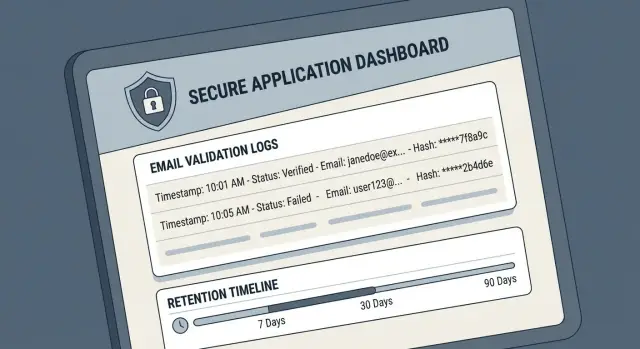
A common setup is to store a one-way hash of the normalized email (lowercased and trimmed). This lets you spot repeated attempts, rate-limit abuse, and confirm the same address failed across multiple sessions, without revealing the address.
If you still need a human-friendly hint during support or incident work, add an optional masked preview, such as j***@example.com. Keep it off by default, and enable it only in controlled contexts (for example, a short-lived debug mode).
It’s often reasonable to store the domain in clear text (for example, example.com). Domains are useful for debugging signup quality and deliverability trends, and they’re typically lower risk than the mailbox part.
To avoid using email as an identifier, log a stable ID that isn’t an email address (session ID, request ID, user ID). That gives you a clean trail from signup to validation outcome.
Fields that are often enough:
email_hash(one-way, normalized)email_masked(optional)email_domain(clear text)user_idorsession_idvalidation_resultandreason_code
Don’t skip key management
If you use hashing, document whether you use a plain hash, a keyed hash (HMAC), and whether you add a salt. Store and rotate keys like secrets, restrict who can access them, and make sure the same input produces the same output when you need correlation (but can’t be reversed back to the email).
Retention and access: keeping logs useful without keeping them forever
Validation logs are most helpful when they answer a clear question. The moment they turn into long-lived personal data, they become a liability. Set retention and access rules up front, and make them the default.
Pick retention windows based on purpose and risk. Routine validation events are mainly for debugging and trend checks, so they usually need a short life. Security-relevant events (for example, repeated signup attempts from one IP, or a spike in disposable domains) may need longer retention for investigations.
A simple split:
- Debug logs (routine validation results): days to a few weeks
- Security events (suspected fraud or abuse): weeks to a few months
- Audit records (policy-relevant actions, like config changes): as long as your compliance needs require
- Aggregated metrics (counts by reason code, not identities): often safe to keep longer
Plan for deletion, not just retention. Use automated expiry in your logging system, then confirm it actually happens. Decide how deletions work for backups too. If backups keep old logs, “30 days” isn’t real. Periodically test deletion and keep a minimal record that the retention job ran (without keeping the underlying sensitive fields).
Access should be tighter than many teams expect. Logs often get copied into tickets, spreadsheets, and chat.
- Use least privilege with role-based access (most people only need dashboards)
- Require approval for exports and bulk downloads
- Record who accessed or exported logs (an access audit trail)
- Keep production logs separate from development and test data
- Redact sensitive fields before they reach shared tools
If you rely on an email validation API, keep raw request payloads out of long-term storage. Store short-lived debugging details only when you’re actively investigating, then let them expire automatically.
Make logs audit- and debug-friendly with consistent fields
Consistency matters more than detail. Free-form text like “invalid email” is hard to search, hard to chart, and easy to misread months later.
Use structured logs (usually JSON) and keep the same field names across services. That way you can filter, group, and compare events without guessing what each team meant.
Use clear reason codes (not messages)
Treat outcomes as data: a small set of stable reason codes, plus optional notes for humans. Standard codes make dashboards and alerts reliable, and they make audits faster because the meaning doesn’t shift between engineers.
A practical set:
- syntax_invalid
- domain_missing
- mx_missing
- disposable
- spam_trap_risk
Keep the human message separate (for example, “missing @”) so you can change wording without breaking queries.
Add context that helps explain “why now”
Debugging often comes down to timing and changes. Log performance fields like latency_ms, whether a retry happened, and whether a timeout was hit. When a provider slows down or DNS lookups start failing, these fields show it quickly.
Also log a version identifier for your validation rules or provider response format.
Finally, include a correlation_id that follows a signup attempt through your system. This lets you tie “validation failed” to later outcomes like “user tried again” or “signup blocked” without searching by email.
{
  "event": "email_validation",
  "result": "fail",
  "reason_code": "disposable",
  "latency_ms": 42,
  "retried": false,
  "timed_out": false,
  "validator_version": "2026-01",
  "correlation_id": "9f1c2b8c-6c3b-4d4f-9b2f-3d5a2a0b1e2c"
}
Step by step: implement privacy-aware email validation logging
Be clear about what your logs must prove later. For each outcome (allow, block, review), decide what evidence you need to explain the decision without exposing personal data. “Blocked because disposable provider” is often enough. The full email address usually isn’t.
A practical rollout:
- Define outcome categories and reason codes. Decide which ones must be auditable vs only helpful for debugging.
- Choose fields, then mark each as masked, hashed, or excluded. Keep raw email out of logs. Store a one-way hash for grouping, plus a masked hint only if your policy allows it.
- Log at the decision point: when you allow a signup, block it, or flag it. Avoid logging every intermediate check unless you truly need it.
- Carry
correlation_idandreason_codeend to end so one event can be traced without searching by email. - Set retention and access before shipping. Decide default retention (often days or weeks, not months), who can read logs, and how access is approved.
Before you deploy, test logging like you’d test security:
- Run fake addresses through every outcome category and confirm the logs explain the decision.
- Search logs for “@” and other patterns to ensure no full emails or names appear.
- Verify that support and engineers see only what they need, and that old logs actually expire.
Common mistakes that make logs noisy or risky
Most problems here aren’t about the validator itself. They happen when teams log “everything” early, then never trim it back as the product grows. You end up with sensitive data that’s still hard to use when something breaks.
Mistakes that show up often:
- Logging the full email address in multiple systems. It lands in app logs, analytics events, support tickets, and error trackers. Later, nobody can answer where all copies are or who can see them.
- Letting reason codes drift. “invalid_domain”, “bad domain”, and “domain invalid” look similar but break dashboards and audits. Treat reason codes like an API contract.
- Dumping full vendor responses. Validation APIs can return metadata you don’t want to retain, like detailed scoring or internal flags. In most cases you need the final decision, a stable reason code, and maybe the failed stage.
- Skipping correlation IDs. Without a request ID (and ideally a signup attempt ID), tracing one user flow across services becomes guesswork. Teams then add more logging to compensate, which increases risk.
- Accidental “forever” retention. Logs get deleted in one place but live on in backups, data lakes, or exported CSVs.
A simple example: support reports “valid users can’t sign up.” If your logs have a correlation ID, a stable reason code, and a masked email fingerprint, you can confirm whether the block was disposable or mx_missing without exposing the full address.
Quick checklist before you ship logging to production
Before you turn on validation logging, do a dry run: pick a recent signup attempt, imagine it becomes a support ticket, and check whether your logs tell the story without exposing private data.
- Can you reconstruct the decision? Each event should show when it happened, which environment it was in, which service made the call, and what the decision was (accept, reject, review).
- Are you avoiding full emails by default? Store a hashed identifier (and optionally a short masked preview) so you can group repeat attempts without keeping the raw address.
- Are outcomes consistent? Use stable reason codes and include a ruleset or version field so results remain comparable after changes.
- Is retention automatic and provable? Enforce retention with expiry, and have a way to verify deletion happened.
- Is access controlled and observable? Limit who can read these logs, and record when logs are exported or shared outside core systems.
One more test: a support engineer should be able to work a case using only a correlation ID and timestamp, plus your decision and reason code. If someone needs the full email address to debug, logging is probably too revealing.
Example scenario: investigating a signup spike without exposing emails
On Monday morning, support tickets jump: “I signed up but never got the confirmation email.” At the same time, your dashboard shows a spike in failed registrations. You need answers fast, but you don’t want raw addresses sitting in logs.
Your validation logging captures a few safe fields per attempt: request ID, timestamp, user or session ID, an email hash (HMAC, not a plain SHA), extracted domain, validation outcome, reason code, and latency in milliseconds.
Within minutes, you can group failures by reason code and see what changed. A report might show:
SYNTAX_INVALIDjumps after a UI changeDOMAIN_NO_MXspikes for one domain (DNS issue or a typo trend likegmal.com)DISPOSABLE_BLOCKEDrises sharply (a fraud wave using throwaway inboxes)TIMEOUTappears in bursts (upstream network or DNS resolver trouble)
Because you log the domain and a hashed email, you can also answer “Is this the same user retrying?” without seeing the address. If the same hash appears 10 times with TIMEOUT and high latency, you likely have a performance problem, not bad data.
For audit questions like “Why was this signup blocked?”, you can show a decision trail without exposing PII: request ID abc123 had outcome BLOCK, reason DISPOSABLE_BLOCKED, and the failed stage was blocklist. That’s clear evidence of what happened, when, and why.
Next steps: turn your policy into a repeatable practice
Email validation logging stays safe only if it becomes routine: the same fields, the same retention rules, and the same access checks every time.
Write a one-page policy that includes your minimal log schema and a retention plan. Then run it as a pilot for a week. During the pilot, check two things: do you have enough detail to debug real issues, and are you collecting anything you don’t truly need?
A practical rollout sequence:
- Pick 6 to 10 fields you will always log (timestamp, request or correlation ID, outcome, reason code, and where the check happened like signup or invite).
- Set retention by purpose: short for raw operational logs, longer only for aggregated metrics or audit records.
- Build a small dashboard around rates, not identities (invalid rate, disposable rate, domain failure rate, spikes by app version).
- Document how engineers reproduce a failed validation using correlation IDs, not raw addresses.
Keep access tight. Decide who can see logs, how access is granted, and how requests are approved.
If you’re integrating an email validation API, design your logging around the decision and its explanation, not the raw input. For example, with Verimail (verimail.co), you can log which stage failed (syntax, domain, MX, blocklist) and the resulting reason code, without storing the customer’s full email in your logs.
Schedule a lightweight quarterly review: confirm retention is enforced, scan for new fields that slipped in, and make sure dashboards still answer the questions your team asks most often.
FAQ
What’s the minimum I should log for each email validation event?
Log the smallest set that still explains the decision: a timestamp, a correlation or request ID, environment, source system, the final result (pass/block/review), a stable reason_code, the failed_stage, and latency_ms. Add an internal user_id or session_id if you need to tie the event to your app without using the email as an identifier.
Should we log the full email address to help support and debugging?
Usually no. A full email address is personal data and it spreads quickly across tools and exports. Prefer a one-way identifier (like an HMAC of a normalized email) and keep raw emails only for short-lived, tightly controlled debugging when you truly can’t solve the issue otherwise.
What’s the safest way to hash emails so we can still correlate repeat attempts?
Normalize first (trim and lowercase), then compute a keyed hash (HMAC) so it’s not easily reversible or vulnerable to simple guessing. Keep the key in your secrets system, restrict access, and plan key rotation so you can limit blast radius if it’s ever exposed.
How can we make logs human-readable without storing raw emails?
A common approach is to store the domain in clear text and optionally a masked preview like j***@example.com, while keeping the real address out of logs. Make the masked preview off by default and only enable it in controlled, time-boxed debug modes.
How long should we keep email validation logs?
Use short retention for routine validation events, typically days to a few weeks, because they’re mainly for incident debugging and trend checks. Keep longer retention only for higher-signal security investigations or policy audit records, and make sure expiry also applies to backups and exports.
Who should have access to validation logs, and how do we control it?
Treat logs like a sensitive system: most people should only see aggregated dashboards, not raw events. Limit direct log access by role, require approval for exports, and record an audit trail of who accessed or downloaded logs so you can review and investigate later.
How do we keep reason codes consistent so audits and dashboards don’t break?
Use a small, fixed set of reason codes and avoid free-form text for the primary outcome. Store a stable reason_code for querying and dashboards, and keep any human message separate so you can change wording without breaking alerts or reports.
Why is a correlation_id so important for email validation logging?
A correlation ID lets you trace a single signup attempt across services without searching by email. That reduces pressure to log more personal data and makes incident response faster because you can jump straight from a support ticket timestamp to the exact validation decision.
Is it okay to log the full response from an email validation API?
Don’t dump full request/response payloads by default, because they often include extra metadata you didn’t intend to retain. Log only what you actually used to make the decision, such as the final result, reason_code, failed_stage, and performance fields like latency or timeout flags.
How do we investigate a signup spike or deliverability issue without exposing emails in logs?
Group failures by reason_code, domain, and time window, then compare against recent releases or config changes using a validator version field. If you see timeouts and rising latency_ms, it’s likely an upstream or DNS issue; if you see a surge in syntax_invalid after a UI change, it’s likely an input or parsing regression. Tools like Verimail make this easier if you log stage and reason code rather than raw addresses.