Email validation in mobile apps for poor connectivity
Learn email validation in mobile apps with offline-first UX patterns, delayed verification flows, caching, and fewer repeated network calls on weak connections.
Contents
- Why email validation gets tricky on mobile networks
- What can be validated offline vs what needs the network
- Offline-first UX patterns that don’t annoy users
- Deferred verification: when and how to run it
- Minimizing repeated network calls without losing accuracy
- A simple state machine for email verification
- Step-by-step: a connectivity-friendly validation flow
- Example scenario: signup offline, verification later
- Common mistakes and traps to avoid
- Quick checklist and next steps
- FAQ
Why email validation gets tricky on mobile networks
Email validation in a mobile app sounds simple: someone types an address, you check it, signup continues. In practice, mobile networks are unpredictable. Users switch between Wi-Fi and cellular, lose signal in elevators or tunnels, hit captive portals, or turn on strict data settings. A quick validation call can turn into a spinner that feels endless.
The common mistake is treating validation as a single, live network gate. When a request fails, the app often can’t tell whether the email is wrong or the connection is. Users get a generic error and start guessing.
That uncertainty creates the same frustration loop: they tap again, edit a perfectly correct email, or abandon signup because it feels broken. If you block the whole flow until validation succeeds, you’re making connectivity part of the signup requirements.
There’s a business cost either way. If you skip validation to keep signup moving, typos and fake signups get through. Bounce rates rise, deliverability suffers, and you spend more time cleaning lists later. Support tickets follow, especially when someone insists they signed up but never received the confirmation email.
Poor connectivity can also waste requests. A single signup can trigger multiple calls because users double-tap, the app retries automatically, background refresh repeats work after a network change, or the app re-validates when reopened. If you use a validation provider, those extra calls are avoidable with tighter client-side rules.
A better target is simple: keep signup calm even when the network isn’t. Do what you can on-device, defer what needs the internet, and make the UI honest about what’s confirmed vs what’s still pending.
What can be validated offline vs what needs the network
Mobile apps work best when email validation is split into two layers: checks that are safe to do locally, and checks that depend on reaching the internet.
What you can do offline (fast and instant)
Offline checks should answer one question only: does this look like a correctly written email address?
Good offline checks include trimming whitespace, removing accidental trailing punctuation, and basic syntax rules (one @, no empty parts, valid characters). You can also clean up invisible copy/paste characters and offer gentle suggestions for a small set of common domain typos.
These checks improve the experience without pretending the address is real. They catch mistakes early, while the user still remembers what they meant to type.
What needs the network (real signals)
Anything that answers can this email receive mail requires an online check. That includes confirming the domain exists, checking for MX records, and flagging risk signals like disposable providers or known bad patterns. These signals change, so caching them forever can backfire.
If you use a service like Verimail, those network steps are usually bundled into a single API call, but you still need connectivity.
Explain it without jargon
Avoid DNS, MX records, and other internals. Say what the user cares about.
“We checked the format. We’ll confirm the address when you’re back online.”
If you need a stronger warning, keep it plain:
“This email looks unusual. You can continue, but we may ask you to confirm it later.”
Offline-first UX patterns that don’t annoy users
Offline-first signup is mostly about timing and tone. People will tolerate a slow network. They won’t tolerate being blocked without a clear reason.
Start with fast local feedback while the user types. Catch obvious issues (missing @, spaces, double dots, trailing punctuation) and show one small hint near the field. Avoid loud red error states until the user leaves the field or taps Continue.
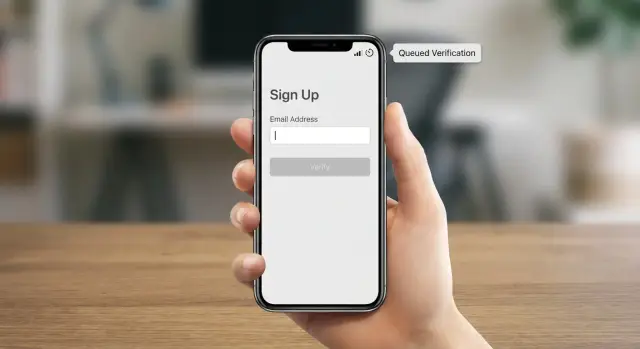
When the device is offline or the connection is shaky, let users continue if the next steps don’t truly depend on email being reachable right now. Be explicit: the app accepted the email, but verification is pending. That single bit of clarity prevents repeated retries and unnecessary edits.
Patterns that tend to work:
- Show a simple status next to the email (Pending, Verified, Needs attention).
- Allow Continue, but keep the account unverified until the check completes.
- Queue one background check and run it automatically when the network returns.
- Offer one clear action like “Verify now” rather than repeated popups.
Make the status visible beyond the signup screen. If the user later visits profile or settings, they should still see what’s going on and what to do next.
Avoid hard stops unless they protect the user or your platform. Blocking signup can make sense when email is the only way to recover an account, or you must confirm ownership before a sensitive action. Otherwise, a softer gate often works better: let them explore, and require verification before actions like exporting data, inviting teammates, or enabling important notifications.
Deferred verification: when and how to run it
Deferred verification means letting the user finish signup even when the network is unreliable, then validating the email as soon as it’s reasonable. For many apps, it’s the best balance: fewer blocked signups, but still a cleaner database.
A practical rule: validate formatting locally, then defer network checks (domain, MX, disposable detection, risk signals) to a background job.
When to trigger verification
Pick one main trigger and one fallback. Too many triggers lead to duplicate calls and confusing status changes.
Common choices:
- Try immediately after Submit if the device is online.
- Otherwise, run in the background once connectivity returns.
- As a fallback, re-run on next app open if the email is still pending.
Treat network validation like queued work, not something the UI has to wait on.
How to queue and retry safely
Persist the job so it survives app kills, restarts, airplane mode, and battery constraints. Store only what you need to retry.
A small record might include the email (or a hashed form), user ID, current status, attempt count, next retry time, and the last error category (no network, timeout, server error).
Retry with exponential backoff plus jitter, and set a hard cap (for example, a small number of attempts within a day). That prevents “bad networks” from creating endless background traffic.
Also decide what happens if verification never completes. Either keep the account active but clearly unverified, or limit only the actions that truly require a reachable email. If the email is confirmed invalid, ask for a new address and explain why in plain words (for example, “This domain can’t receive mail”).
Minimizing repeated network calls without losing accuracy
If your app hits a validation endpoint too often, users feel lag, battery drains faster, and you risk rate limits. The goal is to make as few calls as possible, but still catch bad addresses when it matters.
The first rule is simple: don’t call the API on every keystroke. Typing, deleting, paste events, and autocorrect can create a lot of noise that doesn’t reflect intent.
More reliable triggers:
- Validate on field blur, then again on submit only if the email changed.
- If you validate after paste, add a short debounce (around 500 to 1000 ms).
- Cache the last result for the same normalized email for a short window (often 10 to 30 minutes is enough).
- Deduplicate in-flight requests so one email can’t trigger multiple calls at once.
Short-lived caching isn’t about pretending an email stays valid forever. It’s about avoiding repeated calls while the user is stuck on a bad connection or moving between screens.
In-flight deduping prevents a common bug: blur triggers validation, then the user immediately taps Submit and you fire a second request before the first finishes. Keep one shared task per normalized email so Submit can wait on the existing request instead of starting a new one.
A simple state machine for email verification
A small state machine keeps signup predictable. Instead of treating validation as one big yes/no, store what you actually know and let the UI reflect it.
Useful states:
- Unknown: the user typed something, but nothing has been checked.
- Locally invalid: fails offline checks (missing @, empty parts, invalid characters).
- Pending: looks OK locally, but still needs a network check.
- Verified: the server check confirmed it.
- Risky: the server check returned a warning (for example, disposable or other red flags).
- Failed: the request couldn’t complete (timeout, no network, unexpected server error).
“Failed” is different from “invalid.” Users can fix invalid input, but they can’t fix a tunnel.
Map each state to simple UI behavior
Aim for one principle: don’t block a user because of a network problem.
- Unknown: neutral helper text, allow Next.
- Locally invalid: show a direct fix and block Next.
- Pending: “Will verify when online,” allow Next.
- Verified: subtle confirmation.
- Risky: allow Next, but offer a clear choice (use a different email or continue).
- Failed: “Couldn’t verify right now” with a retry button (avoid scary wording).
Keep messaging consistent and log transitions
Use different copy for “this email is malformed” vs “we can’t check right now.” Users trust you more when the message matches reality.
Log state transitions with a reason code (local format fail, timeout, server confirmed, warning). It helps support answer questions like “Why did the app accept this email on the train but flag it later?”
Step-by-step: a connectivity-friendly validation flow
A strong flow treats validation as two layers: instant on-device checks, then a server check when the network can handle it.
First, validate as the user types with no network calls: trim spaces, normalize the domain casing, and catch basic syntax issues.
Next, decide what must be blocked now vs what can be marked pending. Block only clearly malformed input. If it looks fine but can’t be confirmed yet, let the user continue with a visible “Pending verification” status.
Then, when connectivity is good enough, queue a server-side validation job. Trigger it on submit (or one blur event) rather than on every edit. Store the last result with an expiry so you can reuse it for a short time without rechecking.
Finally, if the email is risky or invalid, follow up without punishing the user:
- Invalid: “This email doesn’t look reachable. Please correct it.”
- Risky: “This email may not receive messages. Use a personal inbox to get updates.”
- Pending: “We’ll verify your email when you’re back online.”
Example scenario: signup offline, verification later
Maya signs up on the subway. The train drops service at random, so requests fail intermittently.
She types [email protected]. The app runs local checks first and spots a likely domain typo. It suggests gmail.com, and Maya accepts the fix.
A minute later the signal drops again. Instead of blocking her with repeated errors, the app lets her finish signup with a clear note: “We’ll verify your email when you’re back online.” In the background, it saves one verification job to run later.
When the train reaches a station, connectivity returns. The app processes the queued job once, calls the backend, and the backend runs full validation. If the result comes back as not reachable or risky, the app doesn’t kick Maya out. It prompts her the next time she opens profile: “We couldn’t verify this email. Update it to receive receipts and password reset emails.”
The important part isn’t the exact provider. It’s the rules: local checks on every edit, one server check when it makes sense, then reuse the result until the email changes.
Common mistakes and traps to avoid
Mobile connectivity fails in messy ways. The biggest trap is treating a failed request as a failed email. Timeouts, captive portals, and flaky DNS say more about the network than the address.
Another common mistake is hammering the validation endpoint: on every keystroke, on every resume, and again on submit. That burns battery, annoys users, and inflates costs.
A few failure patterns to watch for:
- Timeouts used as a verdict: mark the status as unknown or failed, not invalid.
- No cooldowns: cache successes for a sensible TTL, and cache temporary failures for a few minutes to avoid retry loops.
- Blocking everything: require real-time verification only when the product truly needs it.
- Stale results after edits: tie status to the exact normalized input and reset immediately when it changes.
- Vague, scary copy: “Invalid email” after a timeout feels unfair. Say what happened and offer a next step.
Also watch for a subtle UI bug: showing a green checkmark from a previous email after the user pastes a new one. Keep validation state keyed to the email value, not trapped inside a field component.
Quick checklist and next steps
To keep email validation in mobile apps fast on weak networks, keep the rules simple: do what you can on-device, and save network checks for moments that matter.
- Run lightweight local checks first (trim, basic syntax, clear fix messages).
- Call the server only on submit (or once on blur), never per character.
- Queue verification with backoff and a hard retry cap.
- Deduplicate in-flight requests and cache results briefly for unchanged input.
- Show clear states: pending, verified, needs update, failed.
If you want to offload the server-side layer, Verimail (verimail.co) is an email validation API that combines syntax checking, domain verification, MX lookup, and disposable provider matching into a single call. Used behind a queued, offline-first flow, it helps keep signups smooth without letting typos and low-quality addresses pile up.
FAQ
What parts of email validation can my mobile app do offline?
Do instant, offline checks first: trim spaces, remove stray trailing punctuation, and validate basic format (one @, non-empty parts, allowed characters). If it passes, treat it as pending and let signup continue; confirm reachability later when the network is available.
What requires a network call, and why can’t I do it locally?
Anything that answers “can this address actually receive email?” needs the internet. That includes checking whether the domain exists, whether it can accept mail, and whether the address looks like a disposable or otherwise risky email based on up-to-date data.
Why is real-time email verification a bad gate on flaky mobile networks?
Because a failed request often means “bad connection,” not “bad email.” If you block signup, users get stuck in a loop of retries and edits, and many will abandon. A calmer default is to accept the email if it’s well-formed, mark it as pending, and verify in the background.
How should I explain “pending verification” without confusing users?
Use plain status labels tied to what you truly know, such as “Pending verification,” “Verified,” or “Couldn’t verify right now.” Avoid saying “Invalid” unless you’re sure it’s malformed or confirmed unreachable; otherwise users will distrust the app and keep retyping good emails.
When should the app trigger the server-side validation call?
Validate on field blur or on submit, not on every keystroke. If you want to validate after paste, add a short debounce so you don’t fire multiple calls while autocorrect or user edits are still happening. Also only re-check if the normalized email value actually changed.
How do I queue and retry verification safely in the background?
Treat verification as queued work that can survive app restarts. Retry with exponential backoff plus jitter, record the reason for failure (offline vs timeout vs server error), and cap the number of attempts so you don’t create endless background traffic on bad connections.
How can I stop duplicate validation calls without losing accuracy?
Cache results briefly for the exact normalized email so screen changes or double taps don’t cause repeat validations. Also deduplicate in-flight requests so blur and submit share the same ongoing call instead of starting two validations for the same address.
When is it okay to block signup until an email is verified?
Block only on clear local format errors, because users can fix those immediately. For anything network-dependent, allow signup to continue but limit sensitive actions until verification completes, especially if email is required for account recovery or critical notifications.
What should I do when the email is flagged as risky (like disposable)?
Treat “risky” as a warning, not an automatic rejection. Let the user continue, but explain that they may miss messages and offer a simple next step, like changing to a personal inbox or confirming later, so you reduce fake signups without punishing legitimate users.
How does a service like Verimail fit into an offline-first mobile flow?
A single-call email validation API can bundle checks like syntax, domain verification, mail-receipt signals, and disposable detection, which simplifies your backend. It still won’t fix connectivity on its own, so pair it with offline-first UX, background queuing, and short-lived caching; Verimail is one option teams use for that server-side layer.