Email verification vs email validation: what to use when
Email verification vs email validation: learn what each does, what they miss, and how to combine checks and confirmation emails to stop bad signups.
Contents
- Why this decision matters for signups and deliverability
- What “email validation” usually means
- What “email verification” usually means
- Validation vs verification: a clear comparison
- What validation can miss (and why it matters)
- What verification can miss (and the trade-offs)
- How to combine both, step by step
- Common mistakes teams make
- Example scenario: a typical signup flow
- Quick checks before you ship
- Next steps: pick a policy and implement it cleanly
Why this decision matters for signups and deliverability
Bad email addresses aren't just messy data. They create real costs: bounced campaigns, a weaker sender reputation, and support time spent on problems that never should have happened (password resets that don't arrive, receipts that bounce, alerts that go nowhere).
They also make abuse easier. Disposable inboxes, typos, and automated signups can inflate your user count while adding risk and workload. If you offer trials, credits, or invites, weak email checks often turn into predictable promo abuse.
Part of the confusion is the wording. People say “validation” and “verification” as if they mean the same thing, but they're different checks with different goals.
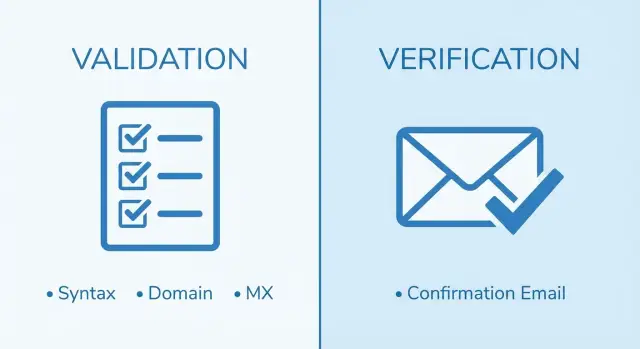
- Validation asks: does this address look deliverable (syntax, domain, mail server signals)?
- Verification asks: does the user actually control the inbox (confirmation email)?
Neither is enough on its own. Validation reduces bounces and obvious junk, but it can't prove a real person owns the mailbox. Verification proves access, but it adds friction and can fail for reasons that aren't the user's fault.
A practical way to choose is to match the method to your risk:
- Use validation when you want cleaner lists and fewer bounces without adding signup friction.
- Use verification when account security or user intent matters (logins, payouts, sensitive data).
- Use both when you face real abuse pressure or high deliverability stakes.
For most products, the best answer isn't picking one forever. It's setting a sensible default for signup, then tightening checks only where the risk is higher. A validation step can block obvious bad and disposable addresses instantly, while confirmation can be reserved for accounts that trigger fraud signals or for actions that must be tied to a real inbox.
What “email validation” usually means
Email validation is a set of automated checks you run as someone enters an address, or immediately after form submit. The goal is simple: stop clearly broken addresses before they enter your database.
In the validation vs verification debate, validation is the fast, technical side. It answers: “Does this look like a real, deliverable email address?” not “Does this person own it?”
Most validators combine a few checks:
- Syntax: does it look like
[email protected], and does it follow RFC rules? - Domain: does the domain exist and have DNS records?
- MX records: is the domain set up to receive email?
- Risk signals: is it a known disposable provider or a spam-trap risk?
- Blocklists/threat patterns: is the domain commonly tied to abuse?
These checks catch the issues that cause immediate delivery failures. Someone might type gmal.com instead of gmail.com, or use a domain that expired last month. Validation also helps with signup fraud prevention by filtering disposable email addresses often used for throwaway accounts.
What validation can't prove is the human part: that the person signing up can actually receive messages in that inbox. An address can pass syntax, have working MX records, and still be useless because it's abandoned, full, or not controlled by the user.
That's why many teams validate at entry for speed, then add a separate “confirm email address” step when they truly need proof of ownership.
What “email verification” usually means
Email verification usually means asking the user to prove they control the inbox. They sign up, you send a message, and they confirm email address ownership by clicking a link or entering a code.
That proof is simple and valuable: the user can receive email at that address and take an action inside that inbox. It's a stronger signal than “this address looks deliverable.”
Common ways teams verify an email
Most products use one of these patterns:
- Magic link: a one-time link that confirms the address when clicked
- OTP code: a short code the user copies into your app
- Double opt-in: an extra confirmation step after signup or newsletter request
The trade-offs: time, friction, and drop-off
Verification adds a delay. The user has to leave your app, find the email, and come back. Some messages arrive late, land in spam, or get lost in a crowded inbox. Some people simply never confirm, even when they meant to.
That drop-off is the main cost. If you require verification before the user can do anything, you'll reduce fake signups, but you can also lose legitimate users who were in a hurry, on mobile, or who made a small typo and didn't notice.
A practical middle ground is to allow limited access until verification is done, then require confirmation before sensitive actions like inviting teammates, exporting data, starting a trial, or changing key settings.
Validation vs verification: a clear comparison
When people compare validation vs verification, they're really comparing two different signals:
- Validation: the address looks reachable.
- Verification: the person behind it can receive and act on a message.
Validation is fast and mostly invisible to users. It checks format, domain health, and mail server records. Done well, it also flags risky patterns such as disposable providers and known traps.
Verification requires user action. It gives stronger proof of access, but it slows activation and introduces failure points (spam filters, delays, device switching).
Side-by-side: what you get
- Speed: validation is milliseconds; verification depends on the user
- User friction: validation is invisible; verification adds a step
- Strength of proof: validation suggests deliverability; verification confirms access
- Best timing: validation before account creation; verification right after
- Impact on list quality: validation reduces bounces and obvious junk; verification reduces fake signups and inactive accounts
A simple rule of thumb
If you need to stop bad addresses before they hit your database, start with validation at the point of entry (signup, invite, checkout). If you need to know a real person can receive messages, add verification right after signup.
If you're choosing under pressure, pick based on what hurts more today:
- High bounce rates or deliverability issues: prioritize validation first.
- Lots of fake accounts or promo abuse: prioritize verification, but still add basic validation.
Many teams do both: validate immediately to block obvious bad input, then verify to confirm ownership for higher-risk actions.
What validation can miss (and why it matters)
Validation catches obvious problems, but it doesn't prove a real person can receive mail at that address. This gap is usually why teams revisit the decision after bounces and low-quality signups start showing up.
Typos that still look “valid.” Some mistakes slip through basic checks because they still form a plausible pattern. Someone might type gmial.com or gmal.com. Depending on the tool, the domain might not be flagged strongly enough, or the typo might be close to a real domain that exists. The result is an address that looks fine in your database, but your email never lands.
Catch-all domains. Some domains accept mail for any mailbox name, even when the person doesn't exist. So [email protected] can pass checks even if that mailbox isn't real. You only learn the truth later through soft bounces, low engagement, or missing replies.
Disposable providers that deliver. Many disposable services have working MX records and accept mail, so a basic validator may say “ok” even though the address is meant to be abandoned. If you care about signup fraud prevention, you need explicit disposable email detection, not just syntax and MX checks.
Addresses that can hurt sender reputation. Even if mail can technically be delivered, some address types can still cause problems over time, such as spam traps or role accounts like admin@ and support@ (often lower engagement and higher complaint risk).
Tools like Verimail add disposable-provider detection and real-time blocklist matching on top of standard checks. Still, treat “valid” as “likely deliverable,” not “confirmed human.”
What verification can miss (and the trade-offs)
Verification proves inbox access, but it isn't a full quality filter.
The user may never see the message. Delivery can fail due to typos, temporary mail server issues, strict corporate filtering, or the message landing in spam. From the user's point of view, your product looks broken. From your point of view, you now have an account stuck in limbo.
Confirmed doesn't mean committed. A real address doesn't guarantee a real customer. People confirm just to look around, then disappear. If your goal is lead quality, verification alone won't solve it.
Attackers can still automate it. Inbox farms and bots can open messages and click links quickly. If the rest of your flow is light on friction, you can still get bot-driven signups that look “verified.”
Conversion takes a hit. Every extra step adds drop-off, especially on mobile where switching apps is annoying.
To reduce the downside without giving up confirmation:
- Send the email immediately and keep it short.
- Allow limited access until confirmed, so users can see value first.
- Make resends easy, and be explicit about checking spam.
- Rate-limit confirmation attempts to make automation harder.
- Validate the address before you send the confirmation, so you're not emailing obvious junk.
A common scenario: a user signs up with a work email behind strict filtering and never receives the message. Validation won't fix corporate filters, but it will catch obvious errors early and prevent you from sending confirmation to domains that can't receive mail at all.
How to combine both, step by step
If you're stuck choosing one, the simplest approach is to use both for different jobs. Validation keeps obvious bad addresses out. Verification confirms the person can receive mail and is willing to act.
A practical flow that works for most products
-
Validate on submit. Run quick checks: syntax, domain existence, MX records, and disposable detection. Using an email validation API helps you do this consistently without maintaining your own rules and lists.
-
Decide what to block vs warn.
- Block clear failures (invalid format, dead domain, known disposable).
- Warn on borderline cases (possible typo, role address, “risky but possible”).
This keeps friction low without inviting abuse.
-
Create the account in a limited state (optional). Let the user see a welcome screen or set a password, but keep sensitive features locked until confirmation.
-
Send confirmation and gate the right actions. Require “confirm email address” before anything high-risk: inviting teammates, exporting data, starting a trial, changing password, or requesting payouts.
-
Handle retries like a product, not a punishment. “Resend” and “Change email” prevents support tickets and helps real users recover, while rate limits keep automation in check.
Common mistakes teams make
Teams often treat validation vs verification as an either-or choice. Most problems come from how each step is used.
Blocking too aggressively. Strict rules (like rejecting any “risky” domain) cause false positives and cost real customers. This is especially painful on mobile, where users won't retry.
Letting users do too much before confirming. If someone can fully activate an account, start a trial, or invite teammates before they confirm, you've created an easy path for fake signups. Limited access until confirmation is usually safer.
Underestimating typos. Users miss small mistakes like gamil.com. If you only show “invalid email,” they may abandon. A simple suggestion and one-tap fix can save the signup.
Ignoring volume abuse. If you don't rate-limit signups and resends, attackers can hammer your forms, flood inboxes, and waste your email budget.
The issues that show up most in audits:
- Treating “valid” as “safe,” without disposable email detection
- Confirming email only after the user already has full access
- Rejecting edge cases without reviewing false positives
- No rate limits on signup or resend-confirmation
- Weak error messages and no typo help
Don't assume an address that passes checks is trustworthy. Syntax and domain checks are a baseline, but you still want protection against disposable providers and known bad patterns.
Example scenario: a typical signup flow
A new user signs up and types their email into the form. You want to stop fake signups, but you don't want to block real people who made a simple mistake.
A balanced flow looks like this:
- User submits the signup form.
- Your server runs validation (syntax, domain, MX records, disposable providers, known risky patterns).
- If the email looks acceptable, create the account in a “pending email confirmation” state.
- Send a confirmation email and unlock key actions only after they click.
- If the user doesn't confirm, send one reminder, then pause or clean up the account after a set time.
Now imagine two signups.
Disposable attempt: someone tries [email protected]. Validation identifies it as disposable and stops the signup before you create an account. You avoid storing junk and you don't waste time sending emails that will never matter.
Real user typo: a customer types [email protected]. Validation flags the domain as suspicious or non-existent. Instead of a hard error, you can show a prompt like “Did you mean gmail.com?” If you let it through anyway, the confirmation email likely won't arrive, and the user won't confirm.
When something goes wrong, support needs clear signals. It helps to be able to see:
- The validation result (disposable detected, domain missing, mailbox uncertain)
- Whether a confirmation email was sent
- Delivery status from your email provider (sent, bounced)
- The user's confirmation state (pending, confirmed, expired)
That makes it easier to help real users quickly while keeping fraud and junk signups out.
Quick checks before you ship
Before debating validation vs verification, write down what you'll do with each result. The same signal can be “nice to know” in one product and a hard block in another.
Start with disposable addresses. Decide whether you'll reject them at signup, allow them but mark the account as higher risk, or only restrict certain features. Blocking reduces low-quality leads, but it can annoy legitimate users who picked a throwaway inbox for privacy.
Next, choose the moment you truly need ownership confirmed. Requiring confirmation before first login reduces fake accounts but adds friction. Many teams get better results by allowing signup, then requiring confirmation before key actions: inviting teammates, exporting data, starting a trial, changing password, or receiving benefits.
Make sure the basics are covered on every email capture (signup, checkout, invite, profile change):
- Validate syntax, domain, and MX records to catch obvious errors.
- Detect known disposable providers so you can block or flag them consistently.
- Set a resend policy (cooldown and daily cap) and explain it plainly.
- Use clear error messages that tell users what to fix.
- Log outcomes so you can measure what's happening.
After launch, watch two numbers: bounce rate from outbound email, and the share of accounts that never confirm. If bounces are high, validation is too weak (or not applied consistently). If unconfirmed accounts pile up, the verification flow is too strict or your messages aren't landing.
If you're using an email validation API, make sure you're using more than a regex. The difference between “format-only” and full checks (syntax, domain verification, MX lookup, disposable/blocklist matching) often decides whether your “clean list” stays clean.
Next steps: pick a policy and implement it cleanly
Pick one default rule for most signups, then add a few clear exceptions. A solid baseline for many products is: validate at the point of entry, then verify soon after with a confirmation email.
Write your default policy in one sentence, for example: “We allow account creation after validation, but we require a confirmed email address before granting key benefits or sending important outbound email.” It keeps onboarding smooth while protecting deliverability.
Then define exceptions for higher-risk actions: free trials, referrals, coupon abuse, and anything involving money (payouts, gift cards, invoice downloads). For those, require verification earlier or add extra checks.
Keep the implementation tight:
- Validate on every email capture (signup, checkout, invite, profile change)
- Require verification before high-risk actions (trial start, referrals, payouts)
- Store both the raw input and a normalized version (trimmed, consistent casing, safe Unicode handling)
- Log validation outcomes and reasons (invalid syntax, no MX, disposable provider)
- Provide a clear retry path for users who can't confirm (resend and change email)
If you want a single place to run the technical checks, Verimail (verimail.co) is built for this: RFC-compliant syntax checking, domain verification, MX lookup, and real-time matching against disposable providers and blocklists, all in one API call.
Run a small test for 1-2 weeks before you lock the policy in. Track bounce rate, confirmation rate, and suspected fraud rate against your baseline. If confirmation rates drop, adjust timing and messaging. If fraud stays high, tighten the exceptions first instead of making everyone suffer.