Multi-stage email validation rollout plan from regex-only checks
Plan a multi-stage email validation rollout from regex-only checks, with milestones, metrics, gradual traffic ramps, and safe fallbacks to avoid signup breaks.
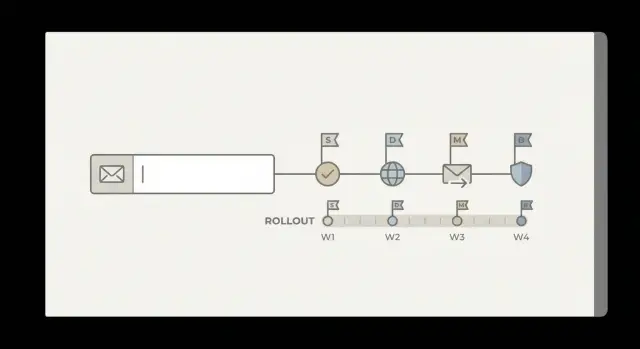
Contents
- Why regex-only checks stop working at scale
- Define goals, constraints, and ownership
- What multi-stage validation looks like in plain terms
- Get a baseline before you change anything
- Phase 1: Shadow mode to learn without breaking signup
- Phase 2: Gradual enforcement with measurable milestones
- Metrics and dashboards that actually catch regressions
- Fallbacks, rollbacks, and safe user experience options
- Common traps teams hit during migration
- Quick rollout checklist
- A realistic example rollout scenario
- Next steps: implement, tune, and keep improving
- FAQ
Why regex-only checks stop working at scale
A regex-only email check answers one question: does this look like an email address? It catches obvious typos like missing an @ sign, spaces, or a broken domain format. That’s useful, but it’s only a format test. It doesn’t tell you whether the address can receive mail.
As signup volume grows, the misses start to matter more than the catches. Regex can’t tell you if a domain exists, whether it has working MX records, or whether an address belongs to a disposable inbox. It also won’t protect you from spam traps and other addresses that look valid but harm deliverability.
Teams usually learn a few lessons the hard way:
- If you’re too strict, you block legitimate users (including unusual but valid addresses) and conversion quietly drops.
- If you’re too loose, fake accounts slip through, support load rises, and bounces pile up.
- Over time, repeated bounces and complaints can hurt sender reputation, making every campaign perform worse.
That’s why a multi-stage email validation rollout matters. You move from a single pattern match to layered checks (syntax, domain, MX, and risk signals), but you do it in a way that doesn’t surprise real customers.
A safe rollout has three goals: minimal user impact (no sudden signup breakage), measurable progress (clear metrics before and after each change), and an easy rollback (a simple switch to return to the previous behavior if conversion or deliverability drops).
This plan is for product, engineering, and growth teams with the same objective: keep signup friction low while reducing invalid addresses and fraud. Tools like Verimail can run the multi-stage checks in one API call, but the rollout approach stays the same no matter what you use.
Define goals, constraints, and ownership
Before you change validation, get clear on what “good” looks like for your business. The goal isn’t to block people. The goal is to accept real, reachable emails while reducing low-quality signups that waste time and hurt deliverability.
Write down 2-3 outcomes you can measure, like fewer disposable addresses at signup, fewer hard bounces in the first week, and fewer accounts created for abuse. This is also where you decide how strict your rules should be in different flows.
Goals and constraints to agree on
Put a few guardrails in place so validation helps without creating new problems:
- Latency: no noticeable slowdown on critical flows (especially signup and checkout).
- Conversion: no meaningful drop in completion rate after enforcement.
- Support load: keep “why was my email rejected?” tickets predictable and rare.
- Fairness: allow legitimate edge cases (new domains, corporate mail servers, plus addressing).
- Compliance: store only what you need (avoid logging full emails in analytics if you don’t have to).
Next, decide where validation runs. Most teams start at signup, but invites, password resets, checkout receipts, and admin-created users can also introduce bad addresses. A simple rule: validate everywhere you create a new email record, and keep the experience consistent.
Ownership and decision rights
Multi-stage checks create product and support decisions, not just engineering tasks. Agree upfront on who owns what:
- Product: what gets blocked vs warned, and what the error message says.
- Engineering: where checks run, timeouts, retries, and how results are cached.
- Data/marketing: which metrics define success (bounce rate reduction, abuse rate, deliverability).
- Support: a short playbook for overrides and common user explanations.
If you use an API like Verimail at signup, decide who can loosen rules if conversion dips, and how quickly you’ll respond when a legitimate user gets blocked.
What multi-stage validation looks like in plain terms
Regex-only validation is like checking whether a key looks right without trying it in the lock. Multi-stage validation adds a few quick checks that tell you whether an address is likely real and reachable.
First is syntax, but done properly. An RFC-compliant syntax check handles formats that basic regex rules often break, like plus addressing ([email protected]), dots in the local part, and longer modern TLDs. It also avoids false positives that match the pattern but still violate email rules.
Second is domain verification. If the domain doesn’t exist, no one can receive mail there. A DNS lookup confirms the domain is real, and an MX record lookup checks whether the domain advertises mail servers (or routes mail via related records). This catches typos like gmal.com and dead domains that a regex would happily accept.
Third is reputation and risk signals. That includes detecting disposable email providers and matching against blocklists of known bad or risky sources.
The point isn’t to “block more.” It’s to choose the right action for each level of confidence:
- Allow: passes all stages.
- Soft-warn: looks risky, but let the user proceed.
- Require confirmation: accept signup, but verify via email before activation.
- Block: clearly invalid, disposable (if your policy says so), or high-risk.
Plan for edge cases like subdomains (mail.eu.company.com), corporate gateways that route mail in unusual ways, and legitimate aliases with plus addressing. Tools like Verimail can run these checks in one API call, but your product policy decides what happens after each result.
Get a baseline before you change anything
Before a multi-stage email validation rollout, you need a clear picture of how signup behaves today. Without a baseline, it’s easy to “improve” validation while quietly hurting conversion, support load, or deliverability.
Instrument the full signup funnel and email outcomes end to end. Measure not only how many users complete signup, but what happens after: do verification emails land, do users activate, and do messages bounce later?
Track a small set of baseline metrics for at least 1 to 2 normal business cycles (often 7 to 14 days):
- Signup conversion rate (visit to created account)
- Verification email delivery rate and time to verify
- Bounce rate (hard and soft) on your first few sends
- Complaint rate (when mail providers flag you)
- Support tickets tied to “can’t sign up” or “never got the email”
If you already reject some addresses (even with regex-only email validation), log every rejection reason and the context: client type, country/locale, domain, and whether the user tried again with a different address. Support tickets are part of your baseline too, because stricter checks can shift pain from bounces to users getting blocked.
Next, create a labeled dataset from recent signups. A simple approach is to sample the last few weeks of new accounts and label each email as: accepted and active, accepted but later bounced, accepted but later complained, or never verified. This becomes your “ground truth” for comparing new checks.
Finally, decide how you’ll quantify mistakes during rollout:
- False positives: legitimate emails blocked or delayed (watch conversion drops and ticket spikes).
- False negatives: bad emails allowed (watch bounces, disposable domains, and spam trap signals).
When you later test a validator (for example, Verimail in shadow mode), score its decisions against this baseline so changes are measurable, not anecdotal.
Phase 1: Shadow mode to learn without breaking signup
Shadow mode means you run the new multi-stage checks on every signup, but you don’t block anyone yet. The user experience stays the same. Your team gets real data on what the validator would have done, without risking a conversion drop.
Log outcomes for each stage, not just a single pass or fail. For example: syntax check result, domain exists, MX records found, disposable detected, and any blocklist match. Keep the old regex-only decision alongside it so you can compare them later.
A useful first milestone is answering three questions with numbers:
- What share of signups are disposable emails?
- What share have invalid or non-resolving domains?
- What share look risky (for example, suspected traps or other red flags)?
Those rates become your baseline for the rollout. If you’re using an email validation API like Verimail, store the raw response and your final internal decision separately, so you can change rules later without losing history.
Pick a review cadence that surfaces problems fast. Daily reviews for the first week usually catch surprises like a spike from one traffic source or a common corporate domain that fails DNS checks during a temporary issue. After week one, switch to weekly.
One practical example: if your regex passes 98% of signups, but shadow mode shows 6% are disposable and 1% have invalid domains, you now have a clear target for what enforcement could save. You also have a list of edge cases to handle gently before you ever block a real user.
Phase 2: Gradual enforcement with measurable milestones
After shadow mode, move to enforcement in small, reversible steps. The goal is to reduce bad emails without surprising real users or hurting signup conversion.
Start with a narrow segment where risk is low and learning is high. A common pick is new signups from paid ads, affiliate traffic, or a single geo where you see more disposable emails. Keep the rest of traffic unchanged so you can compare results.
Begin with low-risk actions before you hard block. If validation flags an address as disposable or undeliverable, show a short message asking the user to double-check and try a different email. Make it easy to edit and continue. Only move to hard blocking once you’re confident you aren’t catching legitimate users.
A simple ramp plan looks like this:
- Enforce on 5% of the chosen segment, watch metrics for 24-48 hours.
- Ramp to 25% if stop conditions aren’t hit.
- Ramp to 50%, then 100% for that segment.
- Expand to the next segment (another channel or geo) and repeat.
- When stable across segments, enforce for all new signups.
Define stop conditions in advance and write them down. Examples: signup conversion drops more than X%, median time to complete signup increases by Y seconds, support contacts about signup issues rise above Z per day, or downstream bounces stop improving.
Track milestones that reflect both user experience and business value: conversion rate, time to complete signup, how many users retry with a new email, support volume, and the bounce rate of welcome emails. If you use an API like Verimail, also monitor how “invalid” and “disposable” verdict rates shift as you ramp.
Treat each ramp as a decision point with a clear threshold for moving forward, holding, or rolling back. That keeps the rollout calm and easy to explain across product, engineering, and support.
Metrics and dashboards that actually catch regressions
If you only watch “signups went up or down,” you’ll miss the real impact of validation changes. Build one dashboard for immediate signup health, and a second view that follows those users into email delivery and abuse outcomes.
Pick a small set of primary metrics you’ll treat as decision-makers. Keep them visible on every chart, and avoid adding so many lines that nobody knows what matters.
These five usually tell the truth fast:
- Signup conversion rate (completed signups / started signups)
- Invalid or undeliverable rate (validation outcomes plus later bounces)
- Disposable email rate (and how it shifts by channel)
- Abuse signals (spam reports, suspicious signups, account takeovers tied to new accounts)
- Delivery outcomes after signup (bounce rate, complaint rate, inbox placement proxies if you have them)
Add guardrails before you enforce anything. Use thresholds, not gut feel: for example, “no more than a 0.5% absolute conversion drop” and “no more than 50 ms added latency at p95.” If a guardrail breaks, pause the rollout and investigate.
Slice every metric by cohort so you can spot localized failures: acquisition channel, country, device type, and email domain category (free providers vs business domains). A common regression is blocking too hard in one geography or on mobile, where typos are more common.
Review borderline cases weekly. Pull a small sample of “risky but not clearly bad” addresses and check whether real people are getting blocked. If you use an API such as Verimail, log reason codes (syntax, MX, blocklist match) so you can see which stage is causing friction and tune rules without guessing.
Fallbacks, rollbacks, and safe user experience options
Multi-stage validation catches more bad signups, but it can also block real users if something changes (DNS outages, new corporate domains, temporary email routing issues). Plan for failure before you turn on enforcement.
Start with a hard kill switch that instantly returns you to regex-only behavior. Make it a server-side config, not a deploy. Pair it with feature flags for each rule type so you can disable one part without losing everything: MX handling, disposable email blocking, and blocklist matches.
When you block or challenge a user, choose a fallback that keeps signup moving while still protecting your platform. Options that work well include:
- Allow signup, but require email confirmation before login or before enabling key actions.
- Allow signup, but delay risky features (referrals, coupons, API keys, trial credits) until verified.
- Put the account in a limited mode while you re-check the email after a few minutes.
- Ask for a different email only when the signal is strong (known disposable provider, clear syntax issues).
With any email validation API, false positives are the biggest rollout risk. Treat them like incidents. Define who gets paged, how quickly, and what “stop the bleeding” means (usually flipping the kill switch or disabling the strictest flag first). Keep internal communication simple: what broke, who’s impacted, and what you changed.
A lightweight incident playbook can be small:
- Confirm the spike (blocked signups, support tickets, conversion drop).
- Disable the most likely flag (disposable or blocklist) before turning everything off.
- Pull examples of blocked addresses and check patterns (domain, region, provider).
- Decide whether this is a temporary outage or a rules issue.
- Document the fix and add a test or monitor so it’s caught earlier next time.
Finally, keep an allowlist process for important domains (partners, big customers). Require an owner, a reason, and an audit trail, and review entries on a schedule so exceptions don’t silently pile up.
Common traps teams hit during migration
Most migration problems aren’t about the validator itself. They come from treating early signals as final truth, then enforcing too quickly. A safe rollout needs room for uncertainty.
A common mistake is blocking signups because DNS was flaky for a minute. Real users don’t control their DNS resolvers, hotel Wi-Fi, or corporate firewalls. If your system does a single lookup and fails closed, you’ll reject good emails. Cache domain checks when you can, retry with a short delay, and log the reason so you can see whether failures cluster by region or ISP.
Another trap is assuming “no MX” always means “invalid.” Some domains accept mail on the root A record, and some setups are unusual but still real. If you treat every “no MX” result as a hard stop, you’ll create false positives. Treat it as a risk signal unless you have strong evidence it’s truly unreachable.
Disposable email blocking trips teams up too. If your product has legitimate short-term use cases (trials, one-off downloads, event registration), a strict block can hurt conversions. Instead of a blanket ban, decide what you’re protecting: abuse, chargebacks, deliverability, or all three.
A few failure patterns show up repeatedly in postmortems:
- Not separating “definitely invalid” from “cannot verify right now”
- Enforcing global rules before testing by segment (country, traffic source, device)
- Launching without support scripts and clear user messages
- Treating temporary DNS errors the same as permanent domain failures
- Blocking disposable domains without a product-specific exception plan
A realistic example: you roll out to all markets on Monday, DNS timeouts spike in one region, and support sees “my email is real” tickets within hours. If you had a “try again” path for “cannot verify now” and a segment-based rollout, you could keep signups moving while you investigate.
Quick rollout checklist
Before you enforce anything, make sure you can prove whether the change helped or hurt. The rollout is safest when every step has a clear owner, a measurable goal, and an easy way to undo it.
Use this checklist right before you move from testing to real enforcement:
- Baseline is captured and stable: You have at least a few days (or weeks) of signup conversion, email bounce rate, and “invalid email” support tickets tracked in one place, and you know the normal range.
- Shadow results are reviewed and decisions are written down: You’ve reviewed what the validator would have blocked, checked a sample of edge cases (corporate domains, uncommon TLDs), and agreed on thresholds (when to hard-block vs warn).
- Feature flags and a kill switch are proven in production: You can turn validation on or off instantly without a deploy, and you’ve tested the “off” path during real traffic (not just staging). If you’re calling an API like Verimail, include timeouts and a safe default behavior.
- Support is ready for the first complaints: You have short canned replies for “Why is my email rejected?”, a way to collect examples, and a clear escalation path to the engineer who owns the rollout.
- Schedule and stop conditions are documented: You have a rollout calendar, named owners for each step, and specific reasons to pause (for example, signup conversion drops more than X% for Y hours, or false rejections exceed a set count).
When this is done, the rollout becomes routine: turn on the next percentage, watch the same few metrics, and stop quickly if users feel pain.
A realistic example rollout scenario
A mid-size SaaS app starts seeing two problems at the same time: more fake trials (accounts that never log in again) and a rising bounce rate on onboarding emails. Their signup form only uses regex-only validation, so almost anything that looks like an email gets through.
They add multi-stage validation in shadow mode first. Signups still work exactly the same, but every submitted address is checked in the background for syntax, domain, MX records, and known disposable providers. After two weeks, the team reviews results and finds two patterns: a large chunk of new trials use disposable domains, and a smaller but important group uses domains that don’t accept mail (missing MX, parked domains, or common typos).
With that data, they move to gradual enforcement with simple milestones:
- Week 1: show a polite warning for disposable emails and ask for a work or personal inbox instead.
- Week 2: block only clear invalids (bad domain, no DNS), while still allowing everything else.
- Week 3: block repeat abuse patterns (for example, multiple signups from the same source using different disposable addresses).
They also add a safe fallback for uncertain cases. If the check isn’t confident, the user can still sign up, but must confirm their email before getting access to key features. That keeps real users moving while filtering low-quality signups.
By the end of the rollout, the team looks for one outcome above all: bounces drop without a meaningful hit to trial starts or activation. If onboarding bounces fall and activated trials stay steady, they tighten the disposable policy. If conversion dips, they relax enforcement and rely more on confirmation until they tune the rules.
Next steps: implement, tune, and keep improving
Multi-stage validation only feels risky when the rules are vague. Pick a first enforcement rule that’s both low-risk and high-value. For many teams, that means blocking clearly invalid domains (no DNS) and handling known disposable providers according to product policy.
Write a short internal policy so everyone knows what “valid” means in your product:
- Block: obvious invalids (broken syntax, dead domain, disposable domains if your product depends on real identity)
- Warn: risky but possible (typos, catch-all domains, temporary mail hosts you’re not ready to block)
- Allow: everything else, but label it so you can measure outcomes later
Then choose a validator that can run multi-stage checks quickly (syntax, domain, MX, and disposable detection) and return reason codes you can log. If you’re evaluating Verimail (verimail.co), it’s designed for this style of rollout: one API call can cover syntax, domain verification, MX lookup, and disposable detection, and you can start in shadow mode before you enforce anything.
Schedule a post-rollout review (for example, 7-14 days after enforcement starts). Bring a small set of disputed emails, look for false positives, and tune thresholds or allowlists. A good rollout isn’t a one-time switch. It’s a living set of rules that evolves as your signup patterns change.
FAQ
Why isn’t regex-only email validation enough?
A regex check only tells you whether an input looks like an email address. It can’t confirm the domain exists, whether the domain can receive mail, or whether the address is from a disposable provider, so bad addresses still slip through and later show up as bounces and complaints.
What does “multi-stage email validation” usually include?
Start with layered checks that answer different questions: RFC-compliant syntax, domain existence via DNS, MX records (or equivalent routing), and risk signals like disposable providers and known bad sources. Treat the output as a confidence signal, then decide whether to allow, warn, require confirmation, or block.
How do we add multi-stage validation without hurting signup conversion?
Use shadow mode: run the new validator on every signup but don’t change what the user sees yet. Log each stage result and compare it to what your current regex would have decided, so you learn the real impact before any enforcement.
Which metrics should we watch during a rollout?
At minimum, track signup conversion, verification email delivery rate, early bounce rate on your first sends, complaint rate, and support tickets tied to signup or missing emails. Watch them by cohort (channel, geo, device, domain type) so you catch regressions that only affect a slice of users.
What’s the best first rule to enforce after shadow mode?
A safe first enforcement is blocking clearly invalid inputs like broken syntax or non-existent domains, because those users can’t receive mail anyway. For anything uncertain, prefer a warning or “sign up now, verify before access” flow until you have enough data to tighten rules.
Should we block emails if a domain has no MX record?
Treat “no MX” as a risk signal, not an automatic hard fail. Some domains accept mail through other configurations, and strict blocking can create false positives; a safer default is to allow with required email confirmation or a soft warning unless you have strong evidence the domain is unreachable.
How should we ramp enforcement safely?
Use segment-based gradual rollout with feature flags and pre-written stop conditions. For example, enforce in a single channel or region first, ramp percentages slowly, and pause or roll back if conversion drops beyond your threshold or support tickets spike.
What rollback plan should we have before enforcing anything?
Build a server-side kill switch that instantly returns you to your previous behavior without a deploy. Also separate flags by rule type (MX handling, disposable blocking, blocklist checks) so you can disable the most problematic rule first instead of turning everything off.
What are good user-friendly fallbacks besides hard blocking?
Keep the signup moving while reducing risk by allowing account creation but gating access until the email is confirmed, or limiting high-abuse features until verification. Make your error message short and specific, and give users an easy way to edit their email and retry.
What should we look for in an email validation API like Verimail?
Look for a validator that returns clear reason codes you can log (syntax, DNS, MX, disposable, blocklist) and responds fast enough for signup. Verimail is one example that runs these checks in a single API call, which makes it easier to start in shadow mode and then enforce gradually based on your policy.