MX record check basics: null MX, retries, and caching
Learn what an MX record check confirms, how to handle null MX, misconfigured domains, and temporary DNS failures, plus why retries and caching reduce false rejects.
Contents
- What an MX record check tells you (and what it does not)
- DNS basics you need before looking at MX results
- Step by step: how to run an MX record check safely
- Null MX: the explicit "do not send email here" signal
- Misconfigured domains: common patterns and how to treat them
- Temporary DNS failures: why they happen and what to do
- Retries and caching: reducing false rejects without slowing signup
- Common mistakes teams make with MX checks
- Quick checklist before you mark a domain good or bad
- Example scenario: signup validation during a flaky DNS window
- Next steps: turning MX checks into reliable email validation
- FAQ
What an MX record check tells you (and what it does not)
An MX record check answers one practical question: can this domain receive email somewhere? It does not try to determine whether a person is real, and it does not confirm that a specific mailbox exists. It only inspects the domain’s mail routing setup in DNS.
When the check succeeds, it usually means the domain publishes mail servers (or a recognized fallback) and, in theory, messages can be routed to that domain. That’s useful during signup or lead capture because it filters out obvious junk like made-up domains before you store them or send any mail.
But MX results are not a mailbox guarantee. A domain can have valid MX records and still reject mail for many reasons: the address might not exist, the server might block unknown senders, or it might require additional checks before accepting anything. MX also can’t tell you whether an inbox is full, whether a domain is parked, or whether the user can access the mailbox.
A typical validation flow treats MX as an early gate, not the final verdict. You start with basic syntax, then confirm the domain has a plausible mail route (MX and related DNS signals), and only then apply higher-signal rules such as disposable provider detection, spam-trap risk rules, and allowlists or blocklists.
Common MX check outcomes (and what they usually mean)
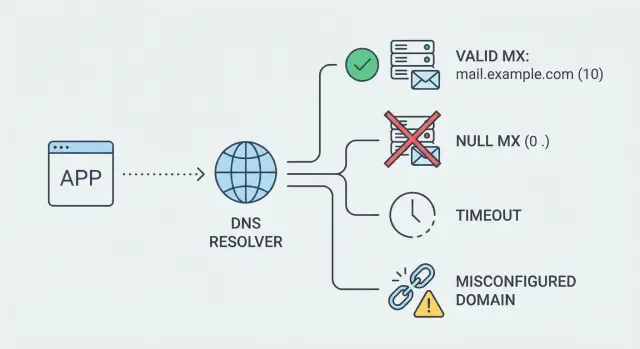
The “failure” result matters as much as the fact that it failed. Most systems end up seeing a small set of outcomes:
- No MX records: The domain may not accept email, or it may rely on an A/AAAA fallback (different validators treat this differently).
- Null MX record: The domain is explicitly saying “do not send email here.”
- NXDOMAIN: The domain does not exist.
- Timeout / no response: DNS might be slow, blocked, rate-limited, or temporarily failing.
- SERVFAIL: The resolver could not complete the query, often due to a temporary DNS issue.
Treat MX as a strong domain-level signal, but never as proof that a specific mailbox is deliverable.
DNS basics you need before looking at MX results
DNS is the phone book for the internet. When you type a domain, DNS returns records that tell computers where to connect and how.
During an MX record check (and any basic email domain verification), you’ll run into a few record types repeatedly:
- MX: which mail servers accept email for a domain (often with priorities).
- A / AAAA: the IP address for a host name (A for IPv4, AAAA for IPv6). MX targets typically need these.
- CNAME: an alias that points one name to another. It can’t exist at the same name as some other record types.
- TXT: text used for email policies and verification (like SPF, DKIM, and DMARC).
- TTL (time to live): how long a DNS answer may be cached before asking again.
DNS answers can change over time, even for the same domain. Caching is the most common reason: your device, router, ISP, and public resolvers may all store answers until the TTL expires. If a domain owner just fixed their mail setup, some users will see the new MX records quickly while others may keep seeing the old ones for minutes or hours.
A resolver is the DNS service doing lookups on your behalf. Resolver choice matters because different resolvers have different cache states, network paths, and timeout behavior. One resolver might return a clean answer instantly while another returns a temporary error because it can’t reach an authoritative nameserver right now.
That’s why a domain can look “good” on your office Wi-Fi but “bad” from a mobile network. For example, the MX host might resolve fine in one place, but elsewhere a resolver times out trying to fetch the A/AAAA record, so the domain appears broken even though it’s only a momentary DNS issue.
These basics help you treat DNS results as signals rather than absolute truth. They also explain edge cases like null MX, misconfigurations, and temporary failures.
Step by step: how to run an MX record check safely
Start by treating the domain as user input, not as “already clean.” Trim spaces, remove trailing dots, and lowercase it. If the user enters international characters (like ü or 例), convert the domain to its IDN form (often called punycode) before querying DNS, so you check what DNS actually stores.
Next, run the MX lookup for that normalized domain. If you get multiple records, sort them by priority (lower numbers are tried first). That ordering matters later if you do deeper checks because a “good” domain can have one broken MX and one working MX.
After you have MX results, validate the targets, not just the fact that “something exists.” Each MX record points to a hostname, and that hostname should resolve to at least one A or AAAA record. If it doesn’t, mail servers can’t reach it even though the MX record is present.
When there are no MX records, check whether the base domain has A/AAAA records. Many systems treat that as a fallback because some mail servers will deliver to the domain’s A/AAAA if MX is missing. The limits are important: it still doesn’t prove the domain accepts mail, and it doesn’t protect you from domains that intentionally do not receive email.
A safe flow looks like this:
- Normalize the domain (trim, lowercase, IDN handling).
- Query MX and sort by priority.
- If MX is empty, query A/AAAA on the base domain (fallback signal only).
- For each MX target, confirm it resolves to A/AAAA.
- Store both an outcome and a reason you can act on.
Don’t store only “pass/fail.” Keep a status, a reason code (for example: MX_FOUND, NO_MX_BUT_A, MX_TARGET_NO_IP, DNS_TIMEOUT), and a checked_at timestamp so you know when to recheck.
Null MX: the explicit "do not send email here" signal
A null MX record is a domain owner clearly stating: “This domain does not accept email.” It’s not a broken setup and not a temporary outage. It’s an intentional policy.
In DNS, it usually appears as an MX record with a special target of a single dot (.). That dot means “nowhere.” So an MX lookup can succeed and still tell you not to deliver mail for that domain.
Null MX differs from two common outcomes that can look similar at a glance:
- No MX: The domain has no MX records. Some mail systems fall back to A/AAAA, so this can be ambiguous.
- Temporary failure: The domain might accept mail, but your DNS query failed in the moment (timeouts, SERVFAIL, resolver trouble).
With null MX, there’s no ambiguity. If your check returns null MX, the safest behavior is to treat the domain as not emailable and block it at signup (or require another address). Letting it through creates predictable bounces and hurts deliverability.
How you explain it to users matters. Avoid DNS terms and keep it actionable:
- “This email domain can’t receive messages. Please use a different email address.”
- “We can’t send email to this address. Try another domain (for example, a work or personal inbox).”
Also keep null MX separate from “could not check right now.” Null MX should be a confident reject. Temporary errors should trigger a retry path, not a hard block.
Misconfigured domains: common patterns and how to treat them
Many email domains aren’t clean “yes” or “no.” They exist, but their DNS is messy enough that an MX record check can produce confusing results. The goal is to avoid rejecting real people while still blocking domains that can’t receive mail.
Common misconfigurations include MX records that point to a mail host that doesn’t exist, often because a domain owner changed providers and left stale records behind. Another frequent issue is an invalid MX target: MX must point to a hostname, not an IP address. You can also run into CNAME chains that end in nowhere, loop, or behave inconsistently across resolvers.
Some domains have no usable delivery path at all: no MX record, and no working A/AAAA fallback. Others return inconsistent answers (MX records appear in one query and disappear in the next), usually due to propagation issues or misconfigured DNS hosting.
Hard fail vs soft fail
Classify based on confidence.
Treat the result as a hard fail when the domain clearly can’t accept email, such as an invalid MX target (like an IP address) or MX hosts that are consistently NXDOMAIN across retries.
Treat it as a soft fail when the result could be temporary (timeouts, inconsistent answers, SERVFAIL). In that case, ask the user to retry, or allow signup but flag the address for later confirmation.
Use an unknown bucket for domains that are odd but not definitively broken, and combine the MX result with other signals rather than making a one-shot decision.
Temporary DNS failures: why they happen and what to do
A failed MX lookup doesn’t always mean a domain can’t receive mail. Sometimes your resolver (or the domain’s DNS provider) is having a bad minute. If you treat every failure as “invalid,” you’ll reject real users during brief incidents.
These are common DNS error outcomes and how they usually map in practice:
- Timeout: No response in time. Often packet loss, slow authoritative servers, or a busy resolver.
- SERVFAIL: The resolver couldn’t complete the query (DNSSEC problems, upstream outages, broken authoritative servers).
- REFUSED: A server refused to answer (rate limits, misconfiguration, restrictive setups).
- Truncated answer (TC=1): The response was too large for UDP and needs a TCP retry.
- NXDOMAIN (for the domain itself): The domain doesn’t exist, and this is usually safe to treat as permanent.
A practical approach is to classify errors into retryable vs final. Timeouts, SERVFAIL, REFUSED, and truncation are typically “try again,” ideally with a short backoff and a cap (2-3 attempts). Only after repeated failures should you fall back to a softer decision like “unknown” instead of “invalid.”
For debugging, log enough to spot patterns without storing unnecessary personal data. The domain queried (not the full email address), the error code and resolver used, attempt count and timestamps, whether a TCP retry happened, and whether the answer was a cache hit can usually get you there.
Retries and caching: reducing false rejects without slowing signup
DNS is usually fast, but it’s not perfectly reliable. If you treat one timeout as a hard “no,” you’ll reject real users during brief hiccups. A good MX record check balances speed with a small safety net.
A retry policy that fits a signup page
Keep retries limited and predictable so users don’t feel stuck on a form:
- Try up to 2-3 times total.
- Space attempts about 200-500 ms apart, with a little randomness.
- Keep a total timeout budget of about 1-2 seconds for the DNS step.
- Retry timeouts and “server failed” errors, but don’t keep retrying clear “no such domain” results.
- If the first attempt is slow, skip extra retries and fall back to a softer decision (for example, allow signup but flag the email for later verification).
Backoff and jitter simply mean waiting a bit longer each time and avoiding perfectly synchronized retries across users. That prevents spikes where many signups hammer DNS at once.
Caching rules that prevent repeat pain
Caching stops you from asking the same question repeatedly. Cache positive results using the DNS TTL when available, but cap it (for example, no longer than 24 hours) so you don’t trust old data indefinitely.
For negative or error outcomes, cache briefly (often 1-5 minutes). This avoids hammering DNS during short incidents and keeps your own systems calmer.
Force a recheck when it matters: the user edits their email, you see new activity after a long quiet period, or your last check is older than your maximum cache cap.
Common mistakes teams make with MX checks
An MX record check is useful, but it’s easy to treat it like a final verdict.
One mistake is assuming that “MX exists” means an email address is deliverable. MX only tells you that a domain claims to accept mail somewhere. It says nothing about whether a mailbox exists, whether the server rejects unknown users, or whether the domain is safe to send to.
Another mistake is failing hard on the first timeout, SERVFAIL, or flaky DNS response. DNS isn’t perfectly reliable. If you block a signup because one lookup failed, you’ll reject real users during short outages.
Null MX is also widely misunderstood. A null MX record is an explicit signal that the domain does not accept email. If you ignore it and accept the domain anyway, you’re signing up for guaranteed bounces later.
Many implementations stop too early after reading MX hostnames. They never resolve the MX targets to A/AAAA records, which misses a common failure mode: the domain publishes MX records that point to hostnames that don’t resolve, or resolve only to an unreachable address family.
Caching can also backfire when it’s done without an expiry plan. Storing results “forever” means you’ll keep rejecting domains that were temporarily broken, or keep accepting domains that later removed mail service.
The patterns that cause the most pain in production are consistent:
- Accepting any MX record as “deliverable” without further checks
- Treating the first timeout or SERVFAIL as a permanent failure
- Ignoring null MX and passing the domain
- Not resolving MX targets to A/AAAA before marking the domain “good”
- Keeping stale verdicts indefinitely instead of rechecking
If you’re validating at signup, think in terms of confidence, not certainty. Retry transient DNS errors, cache results for a limited time, and combine MX checks with other signals.
Quick checklist before you mark a domain good or bad
Use this pass after your MX record check comes back:
- Normalize the domain first (lowercase it, remove trailing dots, and convert international domains to a safe ASCII form). Confirm the domain part is structurally valid (no spaces, no double dots, no forbidden characters).
- Treat mail routing as “confirmed” only if there are usable MX records and the MX hostnames resolve to IPs, or the domain has a valid A/AAAA fallback that can receive mail.
- If you get a null MX record, stop. That’s the domain explicitly saying “do not send email here.”
- Watch for temporary DNS errors. If you see timeouts or SERVFAIL, don’t mark the domain as permanently bad until you’ve retried within a small time budget.
- Record what happened: the outcome, the response type, and a timestamp so you can recheck instead of guessing.
A concrete example: a user signs up with [email protected] during a brief DNS outage at your resolver. The first lookup times out and your app rejects the signup. If you retry once or twice over a second or two, you often get a clean answer without slowing the form much. If it still fails, keep the signup but mark the email as “needs later verification” and recheck in the background.
Keep results for a short time. Caching recent successes and failures reduces repeated lookups, and it helps you separate “this domain can’t receive mail” from “DNS was flaky for a minute.”
Example scenario: signup validation during a flaky DNS window
A user tries to sign up with a real work email, like [email protected]. Your app runs an MX record check during signup to see if the domain can receive mail. At the same time, the domain’s DNS provider has a brief issue.
On the first lookup, your system doesn’t get a clear yes or no. Instead, the DNS query times out or returns SERVFAIL. That doesn’t mean the domain is fake. It means the resolver couldn’t get an answer right then.
If you treat that as “invalid domain” and block the signup, you create a false reject. The user retries a minute later and it works, which makes your validation feel random.
A safer flow separates “definitely bad” from “temporarily unknown”:
- If the domain does not exist (NXDOMAIN), reject.
- If the domain publishes null MX, reject.
- If you get a timeout or SERVFAIL, do a small retry (2-3 attempts with a short delay).
- If it still fails, allow the signup but mark the email as “unverified” and recheck in the background.
- If the domain returns valid MX, proceed normally.
Retries help because many DNS hiccups are brief. Short-term caching helps because multiple signups from the same company can happen close together. If your first attempt fails due to a transient outage, caching that failure for too long can lock out real users.
When support gets the question “why was my email rejected?”, avoid blaming the user. A clear answer is: “We couldn’t confirm your email domain could receive mail at that moment due to a temporary DNS error. Please try again, or use a different address.”
Next steps: turning MX checks into reliable email validation
An MX record check is a strong signal, but it shouldn’t be your only gate. The next step is to turn raw DNS results into a clear policy your product applies the same way every time.
Decide what you do with each outcome. Null MX is usually a hard block because the domain is explicitly saying it doesn’t accept email. A temporary DNS failure should rarely be a permanent reject. Misconfigurations sit in the middle: you may allow signup but require the user to confirm their address before they can do anything important.
A simple policy framework many teams use looks like this:
- Block: null MX, clearly invalid domain, or known disposable provider
- Warn: DNS timeout or SERVFAIL, suspicious but not proven bad
- Allow but verify later: domain exists but MX looks misconfigured or inconsistent
- Allow: domain and MX look normal, no risk flags
Then pair MX results with other checks so you don’t over-trust DNS. Good coverage usually includes RFC-compliant syntax checks, basic domain verification, MX lookup, and disposable email detection.
Consistency matters as much as accuracy. Use stable reason codes and map them to product behavior. If support sees “dns_temporary_failure” but analytics logs “invalid_domain,” you won’t be able to measure what’s actually happening.
If you’d rather not build and maintain every edge case yourself, a multi-stage validator can return one structured response instead of stitching together separate DNS and blocklist calls. For example, Verimail (verimail.co) combines RFC-compliant syntax checks, domain and MX verification, and real-time matching against known disposable email providers in a single API call.
Finally, add a review loop. Track how often warnings later confirm successfully, how often blocked users contact support, and whether spikes line up with resolver incidents. Then tune retries and caching so short outages don’t turn into lost signups.
FAQ
What does an MX record check actually confirm?
An MX record check tells you whether a domain publishes mail routing in DNS, meaning email can probably be routed to that domain. It does not confirm that a specific mailbox exists or that the server will accept your message.
Does having MX records mean an email address is deliverable?
No. A domain can have valid MX records and still reject mail because the address doesn’t exist, the server blocks unknown senders, or additional checks are required. Treat MX as a domain-level signal, not proof of deliverability for a specific inbox.
What is a null MX record, in plain terms?
A null MX is an explicit “do not send email” policy set by the domain owner. It often appears as an MX record pointing to a single dot (.), which means there is intentionally nowhere to deliver mail.
How is “no MX records” different from “null MX”?
“No MX” can be ambiguous because some mail systems try an A/AAAA fallback when MX is missing, so the domain might still receive email in some setups. Null MX is unambiguous: the domain is explicitly saying it does not accept email, so it’s usually safe to reject at signup.
Why should I resolve MX targets to A/AAAA records too?
Because an MX hostname can exist in DNS but still be unusable if it doesn’t resolve to an IP address. Verifying that each MX target has A/AAAA records catches a common failure mode where mail routing looks configured but can’t actually be reached.
What does an MX lookup timeout usually mean?
Timeouts usually mean your resolver didn’t get an answer in time due to packet loss, slow authoritative servers, rate limits, or temporary network issues. It’s typically a retryable problem, not a confident signal that the domain can’t receive email.
What should I do when DNS returns SERVFAIL?
SERVFAIL indicates the resolver couldn’t complete the query, often due to a temporary DNS issue like upstream outages or DNSSEC problems. In most cases you should retry briefly and, if it persists, treat the result as “unknown” rather than permanently invalid.
How many retries are reasonable during signup validation?
A practical default is 2–3 attempts within a small time budget (around 1–2 seconds total for the DNS step), retrying only retryable errors like timeouts or SERVFAIL. If it still fails, avoid a hard reject when possible and move the address into a “needs later verification” path.
How should caching work for MX check results?
Cache successful results using DNS TTL when available, but cap how long you trust them so you don’t keep outdated verdicts forever. Cache temporary failures briefly so you don’t hammer DNS during incidents, and recheck when the user edits the email or when your last check is old.
What should I store from an MX check, and how can Verimail help?
Store an outcome plus a reason code (for example, domain doesn’t exist, null MX, temporary DNS failure, MX target missing IP) and a timestamp of when you checked. If you want to avoid stitching multiple checks and edge cases yourself, Verimail can return a structured result that combines syntax checks, domain/MX verification, and disposable email detection in a single API call.