Newly created domain signups: detect and prevent abuse
Learn how to spot newly created domain signups using domain age signals, email validation results, and progressive verification rules that reduce fraud and bounces.
Contents
- Why newly created domains show up in abusive signups
- What “domain age” is and what it can (and cannot) tell you
- Email validation signals that pair well with domain age
- A simple decision model: bucket domain age, then act
- Step-by-step: combine domain age with validation results
- Progressive verification rules that reduce friction for real users
- Practical rule examples you can start with
- Common mistakes and traps to avoid
- Quick checklist for launching safely
- Example scenario: stopping fake trials without blocking new teams
- Next steps: measure, tune, and add a validation layer
- FAQ
Why newly created domains show up in abusive signups
Brand-new domains are attractive to attackers because they’re easy to spin up, cheap, and disposable. If one domain gets blocked, they can register another and keep going. That’s why “new domain” signups often appear in waves of fake accounts.
New domains also have very little history. There are fewer public signals to judge them by, and they’re less likely to be on blocklists yet. That clean slate helps abuse slip past simple filters and buys time before the domain picks up a bad reputation.
When this pattern hits, it usually leads to the same business problems: bot-created accounts that waste support time, spam sent through your product that harms deliverability, fake trials used to scrape or probe, payment fraud that turns into chargebacks, and low-quality leads that pollute reporting.
None of this means every new domain is bad. Real people register domains every day: a new company, a side project, an event, a rebrand, or a team moving from a free inbox to a branded address. Blocking all new domains punishes exactly the users you want.
The practical goal is to reduce abuse without blocking real users. Treat domain age as a risk hint, not a verdict. Pair it with email validation signals (syntax, domain setup, deliverability clues) and use progressive verification so higher-risk signups face a little more friction while normal users keep a smooth path.
A legitimate new startup might sign up with a domain registered last week, but their mail setup is solid and their behavior looks human. Attackers often show the opposite: a fresh domain plus shaky setup and high-volume, automated behavior.
What “domain age” is and what it can (and cannot) tell you
“Domain age” often refers to one of two things:
- Registration age: when the domain was registered with a registrar.
- First-seen activity: when the domain first showed up in signals like DNS datasets, email traffic, or security telemetry.
Registration age helps because many abuse campaigns register domains right before using them. First-seen activity can be even more useful in practice, because a domain might sit unused for months and only “wake up” today, or it might change owners.
Teams typically get domain-age data from WHOIS/RDAP records, registrar or registry feeds (when available), passive DNS or “first observed” datasets, and their own product history (when they first saw the domain).
A common issue is missing or unclear data. Some registrars redact details, privacy services hide fields, and some TLDs have inconsistent records. When domain age is unknown, treat it as untrusted, not bad. Don’t block by default. Use it to decide which extra checks to apply.
Domain age is a signal, not a verdict. Plenty of real users create a domain for a new business and sign up the same day. At the same time, many fake signups rely on freshly registered domains. The value comes from combining age with other signals.
Email validation signals that pair well with domain age
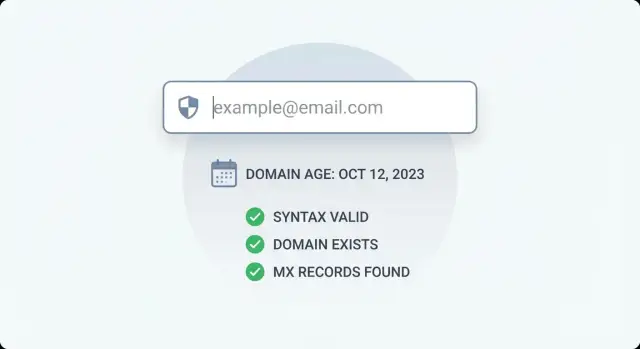
Domain age is useful, but it doesn’t tell you whether an address is reachable. For newly created domain signups, combine age with validation checks that answer simple questions like “is this even an email?” and “can this domain receive mail?”
Start with RFC-compliant syntax checks. This is fast and catches obvious junk like missing parts, illegal characters, or pasted text that isn’t an email at all. Syntax alone doesn’t prove a mailbox exists, but it removes a lot of noise.
Next, check whether the domain exists in DNS. Many abusive signups use typos, random strings, or domains that were never registered. This is a good companion to domain age because both are domain-level signals.
Then do an MX record lookup. Can the domain receive email? Some new domains are registered but not configured for mail yet. If you rely on email for login codes, invoices, or onboarding, missing MX is a practical reason to slow down the signup or require extra proof.
Finally, match against disposable email providers and known bad infrastructure. Domain age won’t catch a long-standing disposable provider, and blocklists won’t always catch a brand-new domain. Together, they cover each other’s gaps.
A simple way to think about it:
- Syntax confirms the input looks like an email.
- DNS and domain checks confirm the domain is real and responding.
- MX confirms the domain is set up to receive mail.
- Disposable and blocklist checks flag high-risk sources quickly.
A simple decision model: bucket domain age, then act
You don’t need a perfect risk score to start. A simple model works well: place the domain into an age bucket, combine that with your validation outcome, then take a consistent action.
Keep age buckets broad so you can tune them later:
- 0-7 days: highest risk
- 8-30 days: elevated risk
- 31-180 days: medium to low risk
- 180+ days: lowest risk
Then combine the bucket with plain validation outcomes such as valid, invalid, disposable, risky, and unknown (for example, temporary DNS issues).
Define two types of responses so the team doesn’t improvise:
- Hard fail: block the signup immediately (clear invalid email, clear disposable provider, obvious syntax errors).
- Soft fail: allow the user to proceed, but add friction (email verification, CAPTCHA, rate limits, manual review, or delaying access until verified).
For example, a 2-day-old domain with a disposable match is usually a hard fail. A 2-day-old domain that validates cleanly might be a soft fail: create the account, but require verification before starting a trial.
How strict you should be depends on your product. B2B products often see legitimate new domains (new startups, project-specific domains), so soft fails are safer when validation looks strong. Consumer apps often see more throwaway behavior, so you can be stricter on 0-30 day domains.
Step-by-step: combine domain age with validation results
New domains aren’t automatically bad, but attackers use them to rotate identities quickly. Treat domain age as one signal, and confirm it with what you can learn from the email itself.
-
Validate the email at signup (not just syntax). Confirm the domain exists, MX records are present, and the address isn’t from a known disposable provider.
-
Look up domain age (for example via WHOIS/RDAP or your provider). Don’t store full WHOIS blobs. Keep only what you need: a creation date if available, lookup status, and an age bucket.
-
Combine signals into a clear risk level. Keep rules simple enough that support and product can understand them later.
-
Take the action: allow, require verification, throttle, or block.
-
Log inputs and outcomes. Good logs turn today’s best guess into next month’s reliable policy.
Actions should match both risk and cost. A 2-day-old domain with valid MX but flagged as disposable is high risk: block. A 5-day-old domain with clean validation is medium risk: allow account creation but require email verification before granting a trial or sending invites.
Progressive verification rules that reduce friction for real users
Most signups are legitimate, even when a company domain is brand new. Start with silent, low-friction checks and only add steps when the risk is higher.
Email validation is a strong first layer because it’s fast and invisible to the user, and it catches common issues like typos, invalid domains, missing MX records, and disposable providers.
When signals stack up (for example, a very new domain plus failed domain checks), escalate with progressive verification. Keep it simple:
- Low risk: normal signup
- Medium risk: email OTP verification
- High risk: CAPTCHA plus email OTP
- Repeated attempts: temporary rate limits and cooldowns
- Clear abuse: block
A user-friendly pattern is to separate account creation from account capability. Instead of blocking immediately, create the account but keep it limited until verification is complete. Let them set a password and view the dashboard, but restrict sensitive actions like inviting teammates, creating API keys, exporting data, or starting a free trial.
Repeated attempts deserve special handling because attackers iterate quickly. Track signups per IP, per device (if you use that), and per domain. If you see many attempts in a short window, escalate faster on the next try.
Roll out gradually so you don’t surprise real users:
- Week 1: monitor only (log decisions, don’t block)
- Week 2: enforce only the highest-risk cases
- Week 3: expand enforcement and tune thresholds
Practical rule examples you can start with
Rules work best when they’re simple, explainable, and easy to adjust. Start with a few outcomes (allow, verify, block), then tune after you see real traffic.
Here are starter rules that cover most cases:
- If a domain is very new and has no MX (or the domain fails to resolve reliably), block and ask for a different email.
- If a domain is very new, has MX, but the address is disposable, block.
- If a domain is very new, passes validation, and isn’t disposable, allow signup but require email verification before granting access to anything valuable (trial activation, API keys, exports).
- If a domain is older and validation is clean, use your normal flow.
- If domain age is unknown and signals are mixed, treat it as medium risk and gate sensitive actions behind verification or review.
A concrete example: someone signs up with [email protected] created yesterday. The address passes validation and the domain has MX. Instead of blocking, you let them create an account but require email verification before issuing trial credits. If the same signup matched a disposable provider list, you’d block immediately.
Common mistakes and traps to avoid
The fastest way to make protection unpopular is to punish honest users. Newly created domain signups are not automatically bad. A safer goal is to separate “unknown” from “malicious” and only add friction when multiple signals point in the same direction.
The mistakes that cause most pain are predictable:
- Blocking all domains under X days old
- Treating WHOIS creation dates as ground truth
- Stopping at syntax checks
- Never measuring false positives
- Letting attackers probe your rules (no rate limits means they can test variations until they find gaps)
To avoid these, use domain age as a soft signal. When age data is missing or conflicting, rely more on deliverability checks like domain verification, MX lookup, and disposable provider matching. Assume your rules will be tested, add rate limits and logging, and review outcomes weekly (how many real users got blocked, and which checks were actually predictive).
Quick checklist for launching safely
Before you enforce rules for newly created domain signups, do a quick setup pass so you catch obvious abuse while giving real users a clear path to continue.
- Confirm what your email checks return: syntax, domain/DNS, MX, disposable detection, and any risk flags.
- Pick domain-age buckets and write down the action for each.
- Prefer step-up verification over a single hard wall.
- Log each decision in plain language (age bucket, validation signals, action, reason).
- Create an override path for legitimate users who get flagged.
If you can explain your rules to a teammate in two minutes, it’s ready for a first release. Then adjust using real data.
Example scenario: stopping fake trials without blocking new teams
A SaaS free trial launches on Product Hunt and gets a spike of newly created domain signups. Support is flooded with trial users that never activate, and the sales team sees bounce rates climb. You want to stop obvious abuse without punishing real teams that registered a domain yesterday.
A simple rule set:
- If domain age is under 7 days, require email verification before the account can start a trial.
- If domain age is under 24 hours and the email looks risky (disposable, blocklisted, or missing MX), block.
- If domain age is 7+ days and validation is clean, allow instant trial.
Now compare two signups.
Signup A: a real startup
Priya signs up with [email protected]. The domain is 2 days old. Validation shows valid syntax, the domain resolves, MX records are present, and it’s not disposable.
Outcome: she isn’t blocked, but she’s asked to verify her email before getting full trial access. It costs seconds, not minutes.
Signup B: an automated spammer
A bot signs up with [email protected]. The domain is 3 hours old. Validation shows missing MX (or a disposable match), and the same patterns repeat across many signups.
Outcome: the signup is blocked immediately.
After launch, measure whether the tradeoff is worth it:
- Trial-to-activation conversion rate (overall and for under-7-day domains)
- Email bounce rate and deliverability
- Abuse rate (fake trials, bot signups, spam reports)
- Verification completion rate and time-to-verify
- Support tickets related to signup and access
Tune thresholds slowly. The goal is to block obvious junk while keeping real new teams moving.
Next steps: measure, tune, and add a validation layer
Treat early rules like a hypothesis. Run them in monitor mode for a week or two and record what would have happened: who would be challenged, who would be blocked, and how many of those signups later looked risky.
Log three things for every signup attempt:
- Domain age bucket and the action it would trigger
- Email validation result (valid, risky, invalid, disposable)
- Outcome a few days later (chargeback, spam report, bounce, support complaint, or a healthy user)
Then tune based on what you see. If real users with brand-new domains are getting blocked, switch that bucket from block to step-up verification. If abuse still gets through, tighten combination rules instead of raising friction for everyone.
When you’re ready to formalize the email side, an email validation API can provide the core signals quickly during signup. For example, Verimail (verimail.co) returns RFC-compliant syntax checks, domain verification, MX lookup, and real-time disposable provider and blocklist matching in a single call, which makes it easier to apply stricter rules only when a domain is very new or the results look suspicious.
Revisit thresholds monthly. Abuse changes, and your product changes too. The goal is steady pressure on bad traffic without making good users pay the price.
FAQ
Why do attackers use newly registered domains for signups?
Because they’re cheap and easy to replace. If one domain gets blocked, an attacker can register another and keep going, so you often see bursts of signups from fresh domains during abuse waves.
Are signups from new domains always fake?
No. Plenty of legitimate users register a domain and sign up the same day for a new company, project, event, or rebrand. Treat domain age as a risk hint, then confirm with mail setup and behavior signals.
What does “domain age” actually mean?
It usually means either the domain is newly registered, or it was “first seen” in activity signals only recently. Registration age and first-seen activity can differ, especially if a domain sat unused or changed owners.
Which email validation checks matter most for brand-new domains?
Start with RFC-compliant syntax checking to catch obvious junk, then verify the domain exists in DNS, then check MX records to see if it can receive mail, and finally screen for disposable providers and known bad infrastructure. These checks answer “is it real?” and “can it receive email?” quickly.
What should I do if a new domain has no MX records?
Missing MX often means the domain can’t receive email yet, which makes verification and onboarding unreliable. For very new domains, it’s a practical reason to slow down the signup or require a different address rather than granting immediate access to anything valuable.
How should I bucket domain age into something actionable?
Bucket domain age into broad ranges like 0–7 days, 8–30 days, 31–180 days, and 180+ days. Then combine the bucket with your validation outcome and choose one action you’ll apply consistently, such as allow, require verification, throttle, or block.
What’s the difference between a hard fail and a soft fail?
A hard fail blocks the signup immediately when the email is clearly unusable or high-risk, like invalid syntax, a non-existent domain, or a disposable match. A soft fail lets the user create an account but adds friction, like email verification, CAPTCHA, rate limits, or limited access until they prove they’re real.
How can I reduce abuse without blocking real new startups?
Default to creating the account but limiting sensitive actions until verification is complete. For example, let them set a password and view the dashboard, but delay trials, API key creation, exports, or invites until they verify their email and pass any extra checks.
What if domain age data is missing or unclear?
Treat unknown age as untrusted data, not as a negative. Use it as a reason to apply extra checks or step-up verification, and lean more on deliverability signals like DNS validity, MX presence, and disposable or blocklist matching.
How do I measure whether my new-domain rules are working?
Run rules in monitor mode first and log the age bucket, validation result, and chosen action, then compare against later outcomes like bounces, spam reports, chargebacks, or healthy usage. If you need a single-call way to gather core signals during signup, an email validation API like Verimail can return syntax, domain verification, MX, and disposable/blocklist checks to support consistent decisions.