Plus addressing in email: accept +tags and dedupe safely
Handle plus addressing in signups without blocking real users. Learn safe normalization for deduping, storage rules, and validation checks.
Contents
- Why +tags cause problems in signups
- Plus addressing and subaddressing in plain terms
- Where plus addressing works and where it might not
- What to store: original email vs normalized email
- Step-by-step: a safe normalization strategy for deduping
- How to handle signup, login, and account merging
- Common mistakes that block real users
- Abuse and fraud notes: what +tags do and do not mean
- Quick checks before you ship
- Example: avoiding bad dedupe in a real signup flow
- Next steps: validate, measure, and keep your database clean
- FAQ
Why +tags cause problems in signups
Plenty of real people use emails like [email protected]. The +tag part is a tag (also called a subaddress). Many providers deliver it to the same inbox as [email protected], but the tag lets someone label where the address was used.
People use tags for practical reasons: filtering (rules that file messages into folders), tracking (spotting which site leaked or sold an address), and keeping signups separate (so each account gets a distinct-looking email). It’s especially common with Gmail and Fastmail users.
Problems start when a signup form treats + as invalid or suspicious. That blocks careful, legitimate customers. Another common mistake is stripping the tag and storing only the base address. That can collapse multiple signups into one account and cause confusing login and recovery issues later.
Common failure modes:
- Rejecting
+emails even though they can receive mail. - Dedupe logic that merges
name+billing@...andname+personal@...into one user. - Password resets and logins failing because the user types the tagged version they originally used.
- Account recovery breaking when the system “normalizes” the address differently over time.
Treat plus addressing as a formatting choice, not proof of fraud. Accept addresses that can receive email, and only dedupe when it’s truly safe. The simplest rule that prevents most pain: keep the original email exactly as the user entered it, and (if you need one) create a separate matching key used only for comparison.
If you run email validation (for example, via a provider like Verimail), validation should focus on deliverability and risk signals, not punishing +tags that many legitimate users rely on.
Plus addressing and subaddressing in plain terms
Plus addressing is a way to add a tag to an email without creating a new mailbox. The usual pattern is [email protected], where the part after + helps the user label where the address was used.
An email address has two main parts: the local part and the domain. In [email protected], name+tag is the local part, and example.com is the domain.
Three ideas often get mixed up:
- Plus addressing (subaddressing): A tag added to the local part, often after
+. - Aliases: Extra addresses that deliver to the same inbox (like
sales@andhello@), managed by the provider or domain owner. - Forwarding: Mail sent to one address is automatically redirected to another.
What counts as “the same inbox” depends on the receiving provider and domain configuration. Technically, [email protected] and [email protected] are different strings. Some providers deliver both to the same mailbox, but not all do, and behavior can vary by domain.
That’s why the safest default is to treat the full address the user typed as meaningful. If someone signs up with [email protected], they may expect future messages to keep landing in the filtered folder they set up.
Example: a customer uses [email protected] for newsletters and [email protected] for invoices. If your app removes +news and +billing, you can merge two separate intents into one account and create confusion (and support tickets) later.
Where plus addressing works and where it might not
Plus addressing is common, but it isn’t universal. Many major inboxes accept addresses like [email protected] and deliver them to the same mailbox as [email protected]. Others treat the + part differently, or don’t support it.
One detail matters more than the brand name: the rule is set by the receiving domain. Even within one company, different domains can have different mail routing settings. Hardcoding “+ always works” or “+ never works” eventually blocks real users.
Variations you will see in the wild
Some domains support +tags only for certain mailboxes. Some allow different separators. Some setups forward mail through systems that strip or rewrite parts of the local address. Treat subaddressing as a “maybe” feature unless you can verify it.
What not to assume across all domains:
- Don’t remove dots (
jane.doevsjanedoe) unless you know the domain behaves that way. - Don’t lowercase the local part for every domain. Case sensitivity is rare in practice, but it’s allowed.
- Don’t strip
+tagsfor delivery decisions (sending email to the user).
How to handle uncertainty without breaking signups
A safe default is straightforward: accept the email the user typed, validate it, and keep it exactly as entered for messaging. If you need deduping, store a second “normalized for dedupe” value separately.
If someone signs up as [email protected] because they want to filter onboarding emails, rejecting it loses a real customer. Overwriting it with [email protected] can be just as bad, because you’re no longer sending to the address they expect.
A practical approach is to accept the address, then validate syntax and domain setup (including MX records), and finally apply disposable and risk checks. An email validation API such as Verimail can confirm the address is well-formed and that the domain is set up to receive mail, while you still keep the original address untouched for delivery.
What to store: original email vs normalized email
Store what the user typed, and send to that exact address. People use tags for real reasons (filtering receipts, separating work and personal signups), and rewriting the address can break delivery or make support harder when a user says, “I signed up with [email protected].”
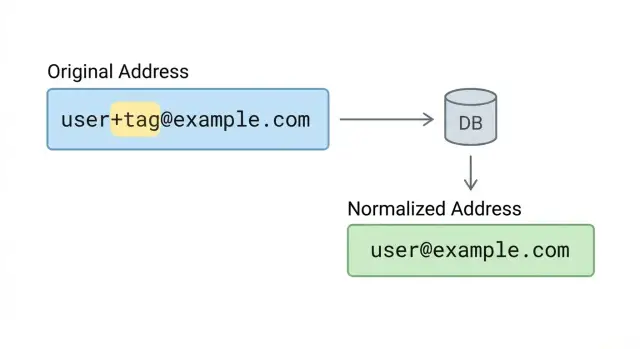
At the same time, many products want a second value that helps spot duplicates and keep accounts tidy. That’s where normalization belongs: in a separate internal key, not in the email you deliver to.
A practical data model keeps two fields with different jobs:
- Email (original): exact input, preserved for sending, display, and audit.
- Email key (normalized): a consistent form used for dedupe, search, and matching.
Keep verification information separate from both. Validation isn’t part of the address itself. It’s a property of the address at a point in time. Store things like status (valid, risky, invalid), a reason (for example, domain missing MX), and a timestamp.
Normalization should be conservative. Lowercasing the domain is usually safe. Lowercasing the local part is often safe in practice, but be consistent and avoid surprises. Most importantly, don’t remove +tag unless it’s only for an internal key and only where you’re confident it won’t merge different people.
Concrete example: store [email protected] as the original email, but keep a key like [email protected] for matching. Messages still go where the user expects, while your system can spot potential duplicates without rewriting the deliver-to address.
Step-by-step: a safe normalization strategy for deduping
Accept real addresses (including plus addressing) while still spotting duplicates by creating a separate dedupe key, not by rewriting what the user typed.
A practical approach:
-
Trim and sanitize input. Remove leading and trailing spaces. Reject control characters (tabs, newlines, nulls) that can hide a different address or break logs and emails.
-
Run basic syntax checks, but don’t ban
+. A valid local part can include+and other characters. Focus on obvious issues like missing@, empty parts, or illegal whitespace. -
Normalize the domain carefully. Lowercase the domain and normalize it consistently. If you support internationalized domains, convert them using a standard process so
exämple.comand its ASCII form map to the same domain. -
Apply local-part rules only when you control the risk. Don’t remove
+tagglobally. If you want to dedupe[email protected]with[email protected], do it only for domains you explicitly allowlist and can verify behave that way. -
Create a stable dedupe key, keep the original untouched. Store both values: the original for sending and display, and the normalized key for matching.
Example: if someone signs up as [email protected], store [email protected] as the contact email. Build a dedupe key like [email protected] only if example.com is on an allowlist for stripping +tags. Otherwise, keep the key closer to the original, like [email protected].
If you use an email validation API like Verimail, validate first, then normalize. That order helps you avoid “fixing” a bad address into something that looks valid but still won’t deliver.
How to handle signup, login, and account merging
Treat the email a person types as their identity label, not something you can freely rewrite. With plus addressing, two strings can route to the same inbox, but they’re not always the same “account” from the user’s point of view.
At signup, accept +tags and show the address back exactly as entered (including the +part). That reassures people you didn’t “fix” their email.
For login, a simple rule prevents surprises: let users sign in with the exact email they used when they created the account. If someone tries a different variation (like removing the tag) and you only find a match via a normalized key, don’t silently log them in. Ask them to confirm ownership, for example by signing in the usual way or completing an email verification step.
Account merging without false matches
Merging should require proof, not just “these normalize to the same string.” Common safe options:
- The user is already authenticated in one account and verifies the other.
- Both accounts confirm ownership via email codes.
- Support-assisted merge with audit logging.
Example: Alex signs up as [email protected] for a newsletter trial. Months later, a coworker types [email protected] on a shared device. Auto-merging based only on normalization can hand over access to the wrong person.
Invites and referrals
Decide upfront whether +tags should count as unique identities. Some teams treat each invited address as distinct for tracking, but still prevent multiple accounts unless the invite is claimed through a confirmed email.
If you validate emails during signup, keep the boundary clear: validation helps with deliverability and risk, while identity decisions (login, merge, invites) should follow explicit product rules.
Common mistakes that block real users
The fastest way to lose good signups is to treat a valid address as “weird.” Plus addressing is normal for people who filter mail, track where they shared an email, or keep signups separate.
The “too strict regex” trap
A common bug is an email regex that only allows letters, numbers, dots, and hyphens before the @. That blocks [email protected] even though it’s valid for many providers. If your validation rules were written years ago, this is often the culprit.
Another mistake is stripping the +tag and then using the stripped version for delivery. If the user typed [email protected], you should store and send to exactly what they entered. Stripping can also break inbox rules that rely on the tag.
Over-normalizing and merging the wrong people
Dot handling is especially risky. Some services ignore dots in the local part (sam.smith@... vs samsmith@...), but many do not. Assuming dot-insensitivity everywhere can merge two different inboxes.
A subtler issue is inconsistent rules across systems. If your signup flow accepts [email protected], but your billing tool strips the tag while your marketing tool keeps it, the same person can show up as multiple contacts or get merged incorrectly.
Quick “don’t do this” checks:
- Don’t reject
+in the local part. - Don’t send mail to a modified version of what the user typed.
- Don’t assume dots are safe to collapse across all domains.
- Don’t apply different rules across signup, billing, and email tools.
Normalization isn’t verification. Use normalization only for careful deduping. Use a real validator (for example, Verimail) to catch typos, invalid domains, and disposable addresses without blocking legitimate +tag users.
Abuse and fraud notes: what +tags do and do not mean
A +tag is usually a sign of a careful user, not an attacker. People use tags to filter mail or to see which site leaked their address.
Attackers can still abuse aliases to create many accounts, because some providers treat [email protected] as the same inbox. That can bypass “one account per email” rules if your system treats every +tag as a new identity.
The fix isn’t banning +tags. That blocks real users and doesn’t stop abuse on providers that support other alias styles (dots, domain aliases, catch-alls). Decide what you’re protecting: account creation volume, promotions, or identity.
Focus friction on behavior, not formatting. For example: rate limit suspicious signup bursts, require email verification for higher-risk signups, and watch for many signups mapping to one inbox in a short window.
If you need to separate “identity” from “contact method,” don’t make email your only key. Treat the account as its own record, and treat email addresses as contact points that can be added, verified, and removed. That makes shared inboxes, role addresses, and legitimate email changes easier to support.
Disposable email detection matters more than banning +tags. A disposable inbox is designed for throwaway signups; a +tag is usually a normal mailbox. Tools like Verimail can help by catching known disposable providers, spam traps, and invalid addresses while still accepting legitimate tagged addresses.
Quick checks before you ship
Most real-world issues with plus addressing are self-inflicted: a too-strict regex or a dedupe rule that quietly merges accounts that should stay separate.
Start with acceptance. Your validator should allow + in the local part (before @). Avoid regex shortcuts that assume only letters, numbers, dots, and underscores. If you use a library, confirm it follows RFC rules instead of a homegrown pattern.
Next, separate delivery from deduping. Always store the original email exactly as the user typed it for display and sending. If you create a normalized key for dedupe, keep it separate and document the rules so support and engineering make the same decisions.
A short pre-ship checklist:
- Accept
+in the local part. - Store the original email unchanged; never send mail to a modified version.
- Use a normalized dedupe key only with clear, domain-aware rules.
- Confirm domain signals before your flow depends on email (domain exists, MX records, disposable indicators).
- Test with a few major providers plus at least one custom domain you control.
For domain and mailbox reachability signals, validate before you lock users into steps like “verify your email to continue.” A validator can help you avoid blocking real users because of typos or dead domains.
Finally, run a simple test set: [email protected], [email protected], and [email protected]. Confirm they can sign up, log in, reset passwords, and receive messages without surprises.
Example: avoiding bad dedupe in a real signup flow
A common case: a B2B app offers free trials. One admin at Acme tries the product for different clients and uses tags like [email protected], [email protected], and [email protected] to keep inbox rules tidy. That’s normal plus addressing behavior, and messages still deliver to the same mailbox.
Trouble starts when dedupe is too aggressive. If you strip everything after + and treat all of those signups as the same user, you can lock people out. The admin tries to create a second trial, but your app thinks the account already exists and blocks signup. Then password reset sends them to the first trial’s account, not the one they’re looking at.
A safer approach is to separate “delivery identity” from “account identity.” Store the original email exactly as entered. Store a normalized form only as a helper for matching, review, or analytics. Then:
- Allow signup with
[email protected], but require email confirmation before the trial is active. - If the normalized email matches an existing confirmed account, show a clear prompt like “You may already have an account. Want to sign in instead?”
- If your product supports multiple workspaces, keep records separate and connect them later through an explicit merge flow.
For support, it helps to show both fields in the user profile and logs: “Email entered” and “Normalized for dedupe.” That makes it easier to explain what happened and fix it quickly.
Next steps: validate, measure, and keep your database clean
If you accept +tags but handle them differently across signup, login, and internal tools, you’ll keep creating duplicates and confusing users. The fastest fix is to write down your rules and apply them everywhere your email field shows up.
A simple policy works well for most teams: store the email exactly as the user typed it, and only use a separate normalized value for matching and reporting. That lets you dedupe without breaking delivery or surprising someone who relies on tags.
Rollout checklist:
- Document normalization rules (what you change, what you never change) in one shared place.
- Apply the same rules across signup, admin tools, imports, and support workflows.
- Validate at signup with RFC-compliant syntax checks, domain verification, MX lookup, and disposable detection.
- For uncertain cases, allow signup but require ownership verification via email.
If you want an implementation that focuses on reachability and risk signals (without rejecting legitimate +tags), Verimail (verimail.co) provides a single email validation API that combines syntax checks, domain and MX verification, and disposable and blocklist matching.
Once changes are live, measure outcomes to catch regressions and tune rules. Track signup rejection rate and reasons, confirmation bounce rate, duplicate-account rate by your normalized key, and support tickets mentioning duplicate accounts or failed signups. Keep a small sample of rejected addresses (redacted) and review them. If you see lots of real domains getting blocked, your validation or normalization rules are too aggressive.
FAQ
Should my signup form accept emails with a +tag?
Yes, many real users rely on plus addressing like [email protected], and many mail providers deliver it to the same inbox as [email protected]. Treat it as a normal formatting choice, not a red flag.
Why do people use plus tags in their email address?
People use tags to filter mail into folders, track where an address was used, and keep different signups separated. Blocking + often rejects careful, legitimate customers.
What email should I store and send to: the tagged address or the base address?
The safest default is to store and display the email exactly as the user typed it, and send mail to that exact string. Changing it can break inbox filters, confuse users, and create support problems later.
How do I dedupe accounts without breaking +tag emails?
Don’t dedupe by stripping +tag in your main email field. If you need deduping, create a separate internal “comparison key” and keep the original address untouched for delivery and display.
How should login work if a user signs up with a +tag but later types the base email?
Require the exact email used at signup as the primary login identifier. If someone enters a different variation that only matches via a normalized key, prompt them to verify ownership rather than silently logging them into an account.
What’s a safe normalization strategy that won’t merge the wrong users?
Normalize conservatively: trim surrounding spaces, reject control characters, and lowercase the domain. Only apply local-part rules like stripping +tag for domains you explicitly allowlist and understand, and keep that logic in a separate dedupe key.
Why does my email regex reject valid addresses with a + sign?
A too-strict pattern that only allows letters, numbers, and dots before @ is a common cause. Use RFC-aware syntax validation and avoid homemade regex rules that treat + as invalid.
Does plus addressing work for every email provider and domain?
No, support depends on the receiving domain’s configuration, not just the provider brand. Assume it may work, validate deliverability signals, and avoid hardcoding rules like “+ always works” or “+ never works.”
Do +tags increase fraud or fake signups?
A +tag usually indicates a normal mailbox, but it can be used to create many “unique-looking” addresses for the same inbox. Address that with product rules and behavior checks (verification, rate limits, risk scoring), not by banning +.
How should email validation handle +tags without blocking real users?
Validate for reachability and risk: syntax, domain checks, MX records, and disposable provider detection, while still accepting tagged addresses. Keep validation results (status, reason, timestamp) separate from the stored email string so you don’t rewrite what the user entered.