Prevent spam trap signups: a practical playbook for safer growth
Prevent spam trap signups with a practical playbook: spot risky acquisition sources, add email validation and confirmation flows, and keep lists clean.
Contents
- What spam trap signups look like and why they hurt
- A quick primer on trap types and how they end up in forms
- Acquisition sources that tend to attract spam traps
- High-risk entry points beyond marketing campaigns
- How to spot risky signups early with simple monitoring
- Step-by-step: a signup flow that reduces trap risk
- Email validation: where it fits and what to check
- Confirmation flows that actually work (without annoying users)
- Common mistakes that let spam traps slip through
- Quick checklist: trap risk controls you can add this week
- Example scenario: cleaning up a giveaway signup spike
- Next steps: set your rules, measure results, and automate validation
What spam trap signups look like and why they hurt
A spam trap is an email address used to catch senders who don’t keep their lists clean. It might be an old inbox that should no longer receive mail, or a hidden address planted online to lure bots and scrapers. If you send to it, mailbox providers read that as a strong signal that your signup and list practices can’t be trusted.
Spam traps don’t only show up inside marketing lists. They often enter much earlier, right at signup. Bots probe forms constantly. Some people type random addresses. Others use disposable inboxes. And if you import leads from partners, events, or old spreadsheets, traps can already be sitting there.
The downside isn’t just a few failed sends. When bad addresses creep in, you usually see higher bounce rates, more blocked messages, and lower deliverability even for real customers. Reputation damage can take weeks to repair. Meanwhile, sales and support waste time chasing fake signups, and your metrics look better than reality until they suddenly don’t.
A common pattern is a form getting shared widely, a bot submitting thousands of addresses overnight, and the next campaign hitting a mix of traps and invalid inboxes. Inbox placement drops even though your content didn’t change.
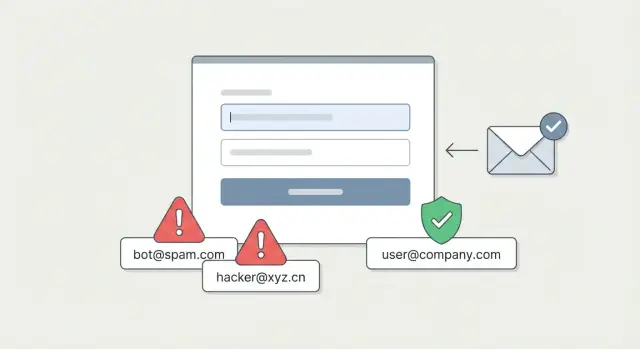
The goal is to reduce trap signups without turning your form into an obstacle course. The best approach is light friction applied at the right moments: quick checks before you accept an address, plus a confirmation step that proves the user can receive mail. An email validation API such as Verimail can filter obvious bad inputs in milliseconds, so legitimate users barely notice anything changed.
A quick primer on trap types and how they end up in forms
A spam trap email address is an inbox set up to catch senders who collect emails carelessly. When you hit one, mailbox providers may treat your mail like spam, even if most of your list is real.
There are two common trap types.
Pristine traps (created to catch bad collection)
These addresses are planted where only bots or low-quality list sources will find them. They show up on scraped pages, in sketchy lead lists, or in forms that are easy to automate.
Recycled traps (old addresses brought back as a test)
These were once real people. After an address is abandoned, some providers reuse it as a trap. If you keep mailing old lists that no longer engage, you’re more likely to hit these.
Traps usually enter systems through predictable paths: low-quality lead sources, scripted signups that bypass basic limits, typos that turn a real address into a dead one, and old lists reused without re-permissioning. Catch-all domains can add confusion too because they accept almost anything, which can hide bad entries until later.
You can’t detect every trap with certainty. What you can do is reduce how many risky addresses you accept, and stop suspicious signups from becoming active subscribers.
Over time, early warning signs are often visible: rising bounces, sudden drops in opens and clicks, bursts of signups from a narrow IP range, many signups sharing the same domain, or repeat signups that look like slight variations of the same username.
Acquisition sources that tend to attract spam traps
Some channels naturally bring in people who aren’t really trying to hear from you. That’s where spam trap email addresses and other bad data show up more often. Start by labeling these sources as higher risk, then apply stricter checks there.
Paid ads can work well, but risk rises when the promise is bigger than the product (like “free,” “instant,” or “limited time”). You’ll see rushed signups, mistyped emails, and addresses copied from old lists. Incentives like gift cards or “sign up to unlock” bonuses often increase disposable and recycled inbox use.
Affiliate and lead-gen partners are another common entry point. Quality varies, and you rarely control how they collect addresses. Watch for pre-filled forms, unclear consent language, and traffic that converts unusually fast. Those patterns often correlate with harvested or outdated emails.
Giveaways and sweepstakes are magnets for throwaway emails. People want the prize, not the relationship. You also see shared entries, repeated attempts, and copy-paste behavior that can include trap-like addresses.
Coupon gates and content lockers have similar tradeoffs. They can lift conversions, but they also train users to “pay” with any email that works.
For these sources, pair validation (syntax, domain, MX, disposable, blocklist signals) with a clear confirmation step before you send ongoing campaigns.
High-risk entry points beyond marketing campaigns
Spam traps don’t only arrive through ads or newsletter forms. They also sneak in through everyday product surfaces built for convenience, not scrutiny.
Public forms and comment fields are prime targets. Bots look for any endpoint that accepts an email address, then test addresses at scale. Even if the form isn’t meant for account creation, the captured emails can end up in a CRM or shared inbox, then get exported later and mailed.
Free trials and freemium signups are another hotspot because attackers want access, credits, or referral rewards. They use automation, rotated IPs, and low-quality emails. The risk grows when you grant value before an address is proven reachable.
Imports and migrations create a quiet backdoor. Old lists often contain dormant accounts, role addresses, and domains that later become traps. A “move everything over” migration can undo months of list hygiene in one afternoon.
Third-party sales lists and purchased data carry the most uncertainty. You usually can’t verify how the data was collected, whether consent exists, or how long it has been sitting. Even well-meaning vendors can include outdated or scraped addresses.
Match controls to the entry point:
- Public forms: rate limits, bot checks, and keep these emails out of marketing lists by default
- Trials: validate on entry and delay key perks until confirmation
- Imports: re-validate and suppress risky segments before the first send
- Third-party data: treat as untrusted until proven
An email validation API (for example, Verimail) can block disposables, syntax failures, and risky domains at the door, before they spread across tools and teams.
How to spot risky signups early with simple monitoring
You don’t need fancy tooling to catch trouble early. Break signup metrics down by source (campaign, partner, form, landing page, channel). Track three numbers side by side: signup rate, bounce rate, and complaint rate. A source that looks great on signups but quickly produces bounces or complaints is often a direct path to traps.
Patterns usually show up before the damage spreads. Watch for bursts at odd times (hundreds of signups in minutes) or clusters from a single IP range, hosting provider, or location that doesn’t match your normal audience. Repeated device fingerprints or identical browser versions across many “new” users are also worth a closer look.
Email details can be a quick signal too. Flag addresses that look auto-generated (long random strings, lots of digits), have domains you never see, or don’t match the context (a “company” signup using a free mailbox). None of these prove a trap, but they tell you where to zoom in.
Set simple thresholds so the team knows when to pause and check:
- bounce rate by source jumps well above baseline (for example, 2x)
- sudden signup spike (for example, 5x in 15 minutes)
- too many signups from one IP block in a short window
- complaint rate crosses a small fixed limit
When a threshold triggers, add friction only for that source: CAPTCHA, stricter confirmation, temporary IP blocks, or tighter rate limits. Pair this with validation (such as Verimail) to keep risky addresses out before they become stored users.
Step-by-step: a signup flow that reduces trap risk
A safer signup flow removes easy wins for bots and slows down only the signups that look suspicious. Done well, it protects deliverability without punishing real people.
Start with these layers, in this order:
- Stop obviously bad input at the door. Block empty emails, broken formats, and weird patterns (like 30 characters of random letters). Rate-limit rapid retries. Flag forms that receive many different emails from the same device or IP.
- Validate the email during signup. Check syntax, confirm the domain exists, verify MX records, and screen for disposable providers and known risky domains. An email validation API like Verimail can do these checks in one call and return a clear decision signal.
- Use confirmation when risk is higher. For many products, a simple click-to-activate is enough. Save strict double opt-in for newsletters and promotions, or for signups that look borderline.
- Apply source-based rules. Be stricter for giveaways, coupon popups, and low-quality affiliates. Keep it lighter for low-risk flows like invite-only signups.
- Quarantine borderline cases. Route them to a pending state: limited access, no marketing sends, and a second check after confirmation.
If a giveaway campaign suddenly drives 5x more signups, keep the form open, but require verification for that source and quarantine addresses that look disposable or fail domain checks.
Email validation: where it fits and what to check
Email validation works best as a gate at signup, before you create the account or send a welcome email. It’s one of the fastest ways to reduce trap exposure because it filters obvious bad addresses and many low-quality sources before they enter your database.
It also has limits. Real-time validation can tell you whether an address is well-formed and whether the domain is set up to receive mail. It usually can’t guarantee that a specific mailbox exists or that it belongs to a real person. That’s why validation and confirmation work best together.
The checks that matter most
A practical validation step includes a few core checks that catch most problems early:
- RFC-compliant syntax checks (catch missing @, invalid characters, extra dots)
- domain verification (confirm the domain is real)
- MX record lookup (confirm the domain can receive email)
- disposable email detection (flag known throwaway providers)
- blocklist matching (flag domains linked to abuse or high-risk patterns)
A service like Verimail combines these into a single API call, so you can decide while the user is still on the signup screen.
Disposable and blocklist results need a policy. For paid or high-trust products, it’s common to block disposable domains. For low-friction signups, a softer approach can work: warn the user and ask them to switch to a normal address.
What to do with “unknown” results
Sometimes validation fails for reasons outside the user’s control (DNS timeouts, temporary resolver issues). Keep the flow safe and predictable:
- if the domain clearly fails (no MX, invalid domain), block
- if the result is “unknown,” retry once after a short delay
- if it stays unknown, allow signup but require confirmation before activation
- log unknowns and watch for spikes (they often track bot waves)
Confirmation flows that actually work (without annoying users)
Confirmation is one of the simplest controls that also improves list quality. It helps when someone mistypes their email, a bot sprays random addresses, or a form gets fed recycled addresses.
Not every signup needs the same level of proof. Require confirmation when risk is higher: new acquisition channels you haven’t tested, promo spikes (giveaways, discounts, partner blasts), and first-time emails with no history in your product. For trusted sources (like an existing customer adding a teammate), you can make confirmation optional or delay it until they do something sensitive.
How to keep confirmation low-friction
Most users will do one extra step if you make it clear and fast.
- Tell them exactly what happens next: “Check your inbox to confirm and start.”
- Add a prominent “Resend email” option with a short cooldown.
- Tell them where to look (inbox, spam, promotions).
- When it fits, offer a short one-time code. On mobile it can be easier than opening a link.
- Keep the confirmation message short and recognizable so it doesn’t feel like marketing.
What to do with unconfirmed accounts
Treat unconfirmed signups as “not real yet.” Let them land on a simple screen that explains the next step, but limit actions that can be abused.
For example, allow browsing but block posting, invitations, or free credits until confirmed. Send one or two reminders, then expire the pending account after a set time (like 24 to 72 hours). This keeps your database cleaner and reduces deliverability risk.
A strong combo is: validate at the form (syntax, domain, MX, disposable checks) and then confirm ownership. If you use an email validation API like Verimail, confirmation becomes the final proof step instead of the only filter.
Common mistakes that let spam traps slip through
The quickest way to lose control is to bet on a single “magic” control. Teams either block too hard and lose real users, or keep the flow too loose and let bad addresses pile up.
Relying on just one layer is a frequent miss. Regex catches obvious typos, but it can’t tell you if a domain is real or mail-ready. Confirmation helps, but it doesn’t stop you from storing junk first, and plenty of real users never click. Combining validation (to stop junk at the door) with confirmation (to prove intent) works far better.
Another mistake is validating after you already created the account. If you store the address first and clean it later, you still end up with fake users, polluted metrics, and extra support work. Validation at the moment of entry prevents bad records from being created in the first place.
Treating all signups the same also backfires. A newsletter footer, a partner referral, and a giveaway page don’t attract the same risk. Segment by acquisition source and apply stricter rules only where you see abuse.
Imports and legacy lists are a major trap source too. Before you add any old CSV or third-party list, run a full validation pass and quarantine anything suspicious.
Mistakes that show up most often:
- blocking whole domains with no review, which rejects legitimate users
- using only regex or only confirmation instead of combining signals
- validating after signup instead of before creating the record
- applying the same rules to every acquisition source
- skipping validation on imports and older lists
Quick checklist: trap risk controls you can add this week
Start with small controls you can turn on fast, then tighten them where the risk is highest.
Log the acquisition source on every signup (form, campaign, partner, referral). Treat unknown or missing source as higher risk. Validate the email at the moment it’s typed or submitted, not hours later. Catch invalid domains, missing MX records, and known disposable providers before you create an account.
Add stricter rules when there’s an incentive (giveaways, coupons), an affiliate placement, or a sudden traffic spike. Trigger confirmation when risk is high or signals are borderline (for example: new source + disposable match + unusually fast form completion). Quarantine suspicious signups in a pending state, block outbound marketing, and review patterns weekly.
If a contest landing page starts converting 5x higher than usual, don’t assume it’s a win. Temporarily require confirmation for that form, tighten validation rules, and watch whether the same domains or IP ranges appear repeatedly.
Keep the main flow friendly and add friction only when needed. Many teams start with an email validation API (like Verimail) at signup, then add confirmation only for signups that look unusual. Pick one day each week to review top sources by volume, top rejection reasons, and any new disposable domains showing up. Small, consistent review beats big cleanups later.
Example scenario: cleaning up a giveaway signup spike
A small SaaS team runs a 7-day giveaway to grow their list. Signups jump from 200 a week to 6,000 in three days. It looks like a win until the first welcome email goes out and bounces climb fast. A few complaints come in too. The team suspects they attracted spam trap email addresses mixed in with real people.
They start by separating signal from noise. Every entry point gets clear source tagging: the giveaway landing page, partner posts, paid social, and embedded forms. Within a day, they see one paid ad set is driving most of the weird signups: repeated device types, odd time patterns, and many addresses failing basic checks.
Next, they tighten the front door without killing conversions:
- add a validation check at submit to block invalid domains, disposable providers, and obvious typos
- turn on double opt-in for giveaway signups only (not the main product waitlist)
- rate-limit repeats from the same IP/device and slow down suspicious bursts
- hold risky signups in a review queue instead of adding them to the marketing list
Over the next week, they track what matters: bounce rate on the first send, confirmation rate, the share of blocked disposable emails, and how many signups become “confirmed and engaged.” Raw signup count drops, but deliverability improves quickly. The list gets smaller and noticeably cleaner.
Next steps: keep source tags permanently, keep double opt-in for high-risk campaigns, and set thresholds (for example, pause an ad set if bounces spike above your normal range). For validation, Verimail runs multi-stage checks (RFC-compliant syntax, domain verification, MX lookup, and real-time blocklist matching) in milliseconds, which helps stop bad addresses before they hit your database and affect sender reputation.
Next steps: set your rules, measure results, and automate validation
Treat signup quality like a small operating system: clear rules, one owner, and a simple routine to see what’s changing.
Start by grouping acquisition sources by risk, then match each group to the right amount of friction. A partner referral form might be low risk, while sweepstakes traffic or coupon popups might be high risk.
A simple setup most teams can run:
- define 3 risk tiers (low, medium, high) and assign every signup source to one tier
- write down allow and deny rules (block disposable domains, require MX, rate-limit repeats) and who can approve changes
- decide what happens per tier (for example, high risk requires confirmation before activation)
- track key numbers by source: signup count, hard bounces, complaint rate, and confirmation completion
- hold a weekly 20-minute review to move sources between tiers, update rules, and note what changed
Keep the document short so it doesn’t turn into a pile of exceptions.
Once you have rules, automate enforcement so results don’t depend on someone noticing a problem. Real-time validation is the easiest win because it works at the moment of entry. Verimail (verimail.co) is one option teams use to check syntax, domain and MX records, and match against known disposable providers and blocklists in a single API call.
Treat automation as adjustable, not fixed. As sources change, your gates should change too, and the weekly review is where that happens.