Real-time vs batch email validation: when to use each
Real-time vs batch email validation: learn when to block bad emails at signup, clean CRM imports, and run periodic list hygiene without slowing users down.
Contents
- What problem are you solving right now?
- Real-time and batch validation in plain terms
- Use cases that fit real-time validation
- Use cases that fit batch validation
- What you can validate (and what you can’t)
- How to set up real-time validation step by step
- How to run batch validation step by step
- Common mistakes that cause bad data or lost signups
- Quick checklist: choose the right approach in 60 seconds
- Example: SaaS signup gating + CRM import cleanup
- Next steps: combine both without overcomplicating it
- FAQ
What problem are you solving right now?
Email validation is mostly a timing decision: do you need to stop bad emails before they enter your system, or do you need to clean up a list you already have?
If you validate in real time (during signup or checkout), you protect the front door. You catch typos, fake accounts, and disposable addresses before they become data problems. The trade-off is user experience: every delay, confusing error, or false block can cost you a real signup.
If you validate in batch (before a campaign or after a CRM import), you clean up what’s already inside. You can process a lot of addresses without worrying about form friction. The trade-off is that you might already have paid for leads, stored bad data, or taken deliverability damage from bounces.
A quick way to pick a starting point: if your pain is happening during signup, focus on real-time checks. If your pain shows up when you send email or import contacts, start with a batch cleanup.
Real-time and batch validation in plain terms
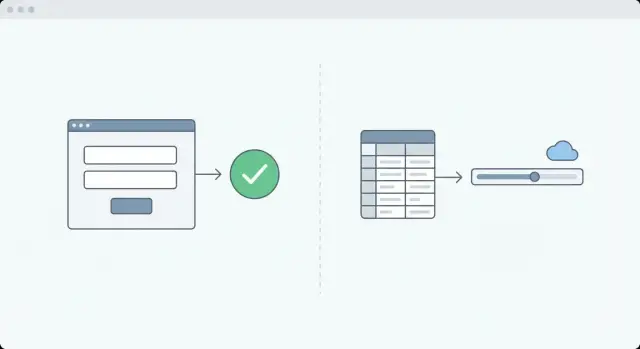
Real-time validation checks an email address while a person is entering it on a form. The goal is to catch obvious problems early (typos, missing domain, disposable addresses, non-existent domains) so you don’t store bad data in the first place.
Batch validation checks emails later, in bulk. This might be a CSV export, a CRM segment, or your full database. It’s meant for cleanup and maintenance: you already have the addresses, and you want to sort them into groups you can act on before your next campaign.
The key point is that the core checks can be the same in both cases. What changes is what “good enough” looks like.
In real time, speed and clarity matter. You usually need a fast decision and a message a normal person can understand.
In batch, accuracy and segmentation matter more. You can take a little longer and end with categories like “safe,” “risky,” and “invalid,” plus reasons you can use to filter or fix records.
Example: if someone enters [email protected], real-time validation should catch the typo so they can fix it immediately. If you find 5,000 old leads with that same typo in your CRM, batch validation helps you identify the pattern, suppress likely bounces, and protect your sender reputation.
Use cases that fit real-time validation
Real-time validation works best when you’re collecting an email address right now and the cost of a mistake is immediate: a lost signup, a missed lead, or a support issue later.
Common fits include:
- Account creation and trial signups, where typos and disposable addresses lead to fake or unreachable accounts.
- Lead forms (demos, newsletters, downloads), where bad emails waste sales and marketing time.
- Invite flows (team onboarding, shared workspaces), where failed invites create friction and support tickets.
- Critical notifications like password resets, receipts, and security alerts.
A practical example: someone signs up using [email protected]. A real-time check can flag the domain issue and prompt a fix on the spot. If you only clean lists later, that person never gets the verification email, assumes your product is broken, and leaves.
Real-time validation also gives you room for nuance. You can hard-block clearly broken addresses (invalid syntax, non-existent domain), but only warn on uncertain cases so you don’t reject real users by accident.
Use cases that fit batch validation
Batch validation is the right choice when you already have a list and want to reduce risk before you send or import.
It’s especially useful when data moves between tools. If you import contacts into a CRM without cleaning first, bad addresses end up in automations, scoring, routing, and reporting. It’s cheaper to validate a file before it enters your workflows than to chase errors later.
Batch validation is also a good step before a campaign to a fresh or newly combined list. Removing obvious invalids and separating risky addresses can reduce bounce rate and help you avoid deliverability problems early.
Typical batch situations:
- CRM imports and migrations (especially from older or mixed sources).
- Newsletter list uploads from partners, events, or past exports.
- Combined lists from multiple sources (webinars, marketplaces, sponsorships).
- Cleanup after an incident, like a spike in fake signups or a poor campaign.
One realistic scenario: a marketing team gets an event attendee list and wants to load it into their CRM. Before importing, they validate the file, remove invalid emails, flag disposable domains, and set aside unknowns for a smaller test send.
What you can validate (and what you can’t)
Whether you pick real-time vs batch email validation, the checks are mostly the same. The difference is when you run them and how you respond.
What validation can check reliably
Good validators focus on signals that are objective and repeatable:
- Syntax and RFC-compliant formatting: catches mistakes like missing
@, invalid characters, or broken domain parts. - Domain health: verifies the domain exists and responds to basic DNS checks.
- MX record lookup: checks whether the domain is set up to receive email.
- Disposable email detection: identifies known throwaway providers so you can block or warn, depending on your policy.
- Blocklist and known bad patterns: flags addresses or domains associated with high-risk sources.
What validation can’t guarantee
Some things sound simple, but email systems are designed to hide them:
- A specific inbox exists: many servers accept mail first and reject later.
- Your message will reach the inbox: filters, rules, quota limits, and temporary outages can still stop delivery.
- An address will stay valid: people change jobs, abandon inboxes, or accounts get disabled.
- A flagged address is definitely a spam trap: treat this as higher scrutiny, not a certainty.
A practical way to apply results is to use three outcomes: “accept,” “accept but monitor,” and “block.” For instance, you might block invalid syntax and disposable domains, but allow a risky address while requiring email verification.
How to set up real-time validation step by step
Start by deciding what “good enough” means for your signup. Some outcomes should stop the form (clear mistakes). Others should be warnings (uncertain cases). If you block too much, you’ll lose real users.
A simple real-time setup:
- Define outcomes: block obvious invalids, warn on risky-but-possible, allow clean passes.
- Validate at the right moment: usually on submit (or when the user leaves the email field). Avoid checking every keystroke.
- Show plain-language messages: make it easy to fix. “Looks like a typo in the domain” beats “invalid email.”
- Record what happened: store the result and the reason code so support and ops can explain failures and spot patterns.
- Have a fallback: when validation is unsure, let the user continue but require email confirmation or put the signup into a review flow.
Keep the experience tight. If someone types gmal.com and gets blocked with no hint, they may abandon. If they get a quick prompt suggesting gmail.com, they usually finish.
How to run batch validation step by step
Batch validation works best when you already have a list (CSV export, CRM dump, event leads) and want to clean it without affecting signups.
A reusable workflow:
-
Do quick cleanup first. Remove duplicates, empty rows, and clearly broken entries. This reduces cost and noise.
-
Validate in chunks and keep the full output. Save both a status and a reason for each email, not just pass/fail. “No MX records” and “disposable provider” lead to different actions.
-
Split into action groups. Keep buckets simple: safe to keep, risky (review or double opt-in), invalid (remove or suppress). This is where you usually get the biggest deliverability lift.
-
Re-import carefully with an audit trail. Store the validation status, reason, and date checked. Keep the original email value so you can explain why a record was suppressed.
-
Recheck on a schedule that matches your data. Validate after big imports, then run hygiene monthly or quarterly depending on how fast your list changes.
One caution: don’t run a huge scrub while you’re actively sending at full volume. If you remove nothing until after a send, you risk a bounce spike. If you suppress too aggressively mid-send, you can also create weird reporting and routing issues. Pause or throttle, then apply changes in a controlled way.
Common mistakes that cause bad data or lost signups
Mistake 1: Treating validation as a strict pass/fail gate
Some real addresses look unusual. People get frustrated when you tell them their email is wrong and it isn’t. A safer approach is to separate “definitely bad” from “uncertain.”
Rules many teams use:
- Block only when you’re confident the address can’t work (broken syntax, domain doesn’t exist, no MX).
- Warn or step-up verify when the email is risky (temporary issues, suspicious patterns).
- Decide how to handle disposable providers based on your product and abuse risk.
- Log the exact reason so your team can act on it.
Mistake 2: Validating too late, or storing results with no context
If you wait until after import or after the first campaign, bad emails are already inside automations and reports. Real-time checks prevent bad data from entering.
And don’t just store “invalid.” Store why it failed. “Domain does not exist” is actionable. “Invalid” isn’t.
Quick checklist: choose the right approach in 60 seconds
If you’re choosing between real-time vs batch email validation, start with what you need to protect today: the signup flow, or your existing list.
Use real-time when:
- You need to stop fraud or fake signups immediately.
- The user can fix the problem on the spot.
- A bad address would break onboarding, invites, or critical notifications.
Use batch when:
- You’re importing or migrating contacts.
- You’re about to email a new or combined list.
- You need reporting, tagging, and controlled cleanup.
A simple rule of thumb: real-time is for decisions in the moment. Batch is for cleanup and planning.
Example: SaaS signup gating + CRM import cleanup
A SaaS company launches a free trial and sees a spike in signups that never activate. Support tickets say, “We never got the welcome email.” Sales says the CRM is full of dead leads. Some addresses are typos, some are disposable, and a few look high-risk.
They split the work.
Real-time: protect the free trial form
At signup, the goal is to stop the worst addresses before they hit the database, without punishing real users.
Their rules:
- Block clearly invalid addresses (broken syntax, non-existent domain, no MX).
- Block disposable email domains for the free trial.
- Allow “risky but possible” cases and require email confirmation instead of hard-blocking.
That keeps new signups cleaner and reduces wasted activation emails.
Batch: clean the CRM before the next campaign
Before the next outbound push, they validate the existing CRM list in bulk.
They tag records into a few buckets (valid, invalid, disposable, unknown). Sales focuses on valid leads. Marketing suppresses invalid and disposable addresses, and tests the unknowns carefully.
Ongoing, they validate new signups in real time, run a monthly hygiene pass on older records, and recheck long-inactive addresses.
Success is measured with numbers: fewer bounces, fewer complaints, stronger deliverability, and a pipeline that isn’t padded with fake signups.
Next steps: combine both without overcomplicating it
The simplest setup is to use real-time checks to protect new data, then use batch validation to clean what you already have. Keep rules you can explain in one sentence. If a rule feels confusing internally, it’ll create support tickets and lost signups.
A practical combo: validate emails during signup to block obvious bad addresses (typos, invalid domains, disposable email detection when it matters), and run periodic cleanup on older records so your database doesn’t quietly degrade. For many teams, weekly or monthly hygiene is enough, especially after big imports.
Metrics worth tracking:
- Bounce rate (marketing and transactional)
- Complaint rate (spam complaints)
- Signup conversion rate (did stricter checks reduce it?)
- Fraud volume (fake signups, repeated attempts)
- Share of disposable or invalid emails caught
If you want to keep the same logic in both places, an API-based validator can help you apply consistent checks at signup and during list cleaning. Verimail (verimail.co) is one example: it runs syntax checks, domain and MX verification, and disposable and blocklist matching, so your real-time decisions and batch hygiene use the same underlying signals.
To reduce risk, test on a small sample first. Validate the next few hundred signups in real time, and batch-check a slice of your CRM. If bounce rate improves without hurting conversion, roll the same rules out more widely and put batch jobs on a schedule.
FAQ
What’s the difference between real-time and batch email validation?
Real-time validation runs while someone is filling out a form, so it stops bad addresses before they reach your database. Batch validation runs later on a file or database export, so it cleans up what you already collected before you send or import.
How do I choose which one to start with?
Start with real-time validation if bad emails are hurting signup, onboarding, invites, or important notifications right now. Start with batch validation if the pain shows up when you import contacts or send campaigns and you need to reduce bounces fast.
When does real-time validation make the most sense?
Use real-time validation when the user can fix the problem immediately, like a typo in the domain, and when a bad email breaks the next step (verification emails, password resets, receipts). Keep it fast and user-friendly so you don’t add form friction.
When should I run batch validation?
Use batch validation before CRM imports, migrations, or any campaign to a new or combined list. It’s also useful for periodic hygiene, so older records don’t quietly turn into bounces over time.
What can email validation reliably check?
Good validation can reliably check syntax formatting, confirm the domain exists, look for MX records, and flag known disposable providers and other high-risk patterns. These checks work well both in real time and in batch; the main difference is how you act on the results.
What can’t email validation guarantee?
Validation usually can’t guarantee a specific inbox exists or that your message will land in the inbox, because many mail servers don’t reveal that information upfront. It also can’t ensure an address will stay valid forever, since accounts and domains change.
Should I block users based on validation results?
Default to blocking only clear failures like broken syntax, non-existent domains, or missing MX records. For uncertain cases, it’s safer to allow the signup but require email confirmation or add a light review step, so you don’t reject real users.
How do I add real-time validation without slowing down my signup form?
Validate at submit or when the user leaves the email field, not on every keystroke. Use a short timeout and clear messages that help the user correct errors, like pointing out a likely domain typo.
What should I store from validation results?
Store a status, a reason, and the date checked for each address so you can explain decisions and re-check later. Avoid saving only “valid/invalid,” because you’ll lose the context you need to segment lists or fix systematic typos.
Can I use the same validator for both real-time and batch workflows?
A practical approach is to apply the same core checks in both places: real-time to keep new data clean, and batch to clean and segment what you already have. An API-based validator like Verimail can help you keep the logic consistent across signup gating and list hygiene.