RFC-compliant email syntax validation checklist for signups
Use this RFC-compliant email syntax validation checklist to catch parsing edge cases like quoted strings, plus addressing, and tricky subdomains before launch.
Contents
- Why email syntax validation causes so many bugs
- What RFC-compliant means (and what it does not)
- Know the parts of an email address before you validate
- Plus addressing and dots: common cases to support
- Quoted strings: the edge case most parsers miss
- Domains and subdomains: what to allow and what to block
- Common parsing mistakes that create false rejects
- Step-by-step: build a syntax validator you can trust
- Test cases to include in your validation suite
- Quick checklist and next steps
- FAQ
Why email syntax validation causes so many bugs
Email addresses look simple until you try to validate them. A lot of production bugs come from treating an email as “some letters, an @, and a dot,” then relying on a quick regex. Real addresses allow more variation than most forms expect, and small parsing choices can flip a valid address into an “invalid” error.
One common mix-up is confusing two different questions:
- What the standards allow (syntax rules)
- What your product wants to accept (your policy)
If you want to reduce risky signups, you might block certain patterns. If your goal is to avoid rejecting real users, you need to get the syntax right first, then apply your policy on top. Keeping those layers separate is the difference between a validator you can trust and one that quietly bleeds signups.
Rejecting valid emails breaks real things. Someone enters a perfectly valid address with plus addressing or a subdomain, your form says “invalid,” and they leave. You lose the signup and you never even collect enough data to debug what happened.
Accepting bad emails breaks different things. Invalid addresses increase bounces, which can hurt your sender reputation and deliverability. They also attract low-quality signups and fraud when attackers spray forms with junk.
Most failures in production come down to a few patterns: regexes that are too strict (or too loose), incorrect splitting around @, over-aggressive trimming or “normalization,” and mixing syntax checks with deliverability checks.
Example: someone signs up with [email protected]. A simplistic validator rejects it because it expects only one dot in the domain. The address might be completely fine, but the user never reaches confirmation.
This post stays focused on syntax: whether an address is written in a valid format. It doesn’t prove the mailbox exists or that the domain can receive mail. Those checks belong in later layers.
What RFC-compliant means (and what it does not)
“RFC-compliant” is mostly about syntax: can this string be parsed as an email address under the rules in RFC 5322? That’s useful, but it’s only the first gate. A syntactically valid address can still be undeliverable, unsafe, or low quality.
Syntax vs domain checks vs mailbox existence
Think of validation in layers:
- Syntax: Is the address formatted correctly (characters, separators, quoting rules)?
- Domain: Can the domain receive email (DNS, MX records)?
- Mailbox existence: Does that exact inbox exist? This is the hardest layer, because many mail servers won’t confirm it.
A practical pipeline looks like: parse syntax, verify domain basics, then apply your policy (block known disposable domains, spam traps, and other risk signals). Syntax alone should never pretend it guarantees deliverability.
What “RFC-compliant” means in practice
For signup forms, “RFC-compliant” usually means you accept common real-world formats (plus tags, subdomains, longer TLDs) and avoid rejecting valid addresses just because they look unfamiliar.
Some teams intentionally tighten the rules. That can be reasonable, but it should be a deliberate policy choice, documented and tested. For example, you might still reject:
- Missing
@or missing a local part or domain - Control characters, invisible whitespace, or pasted newlines
- Domain labels that start or end with a hyphen
- Unicode you don’t support end-to-end
- Extremely long inputs (set a max length to prevent abuse)
Scenario: [email protected] can be valid syntactically. If the domain has no MX records, you catch it in the domain layer. If it’s a known disposable provider, that’s policy.
Know the parts of an email address before you validate
Most email validation bugs happen because the validator is guessing. Before reaching for regex, keep the structure clear: a local part, a single @, and a domain part.
- The local part is everything before
@. It’s where tricky cases live: plus tags, dots, and sometimes quoted strings. - The domain part is everything after
@. It follows domain label rules and may be internationalized.
Keeping these pieces separate makes the logic easier to reason about and much easier to test.
ASCII vs internationalized addresses (high level)
Real addresses can include non-ASCII characters in the local part (EAI) and non-ASCII domains (IDN). Decide upfront what you support.
If you accept ASCII only, reject non-ASCII early with a clear message. If you accept IDNs, you’ll usually validate the domain in its ASCII-compatible form (punycode) internally.
Length limits to enforce
Length limits help avoid edge cases and protect your forms from abuse. Common limits used in practice:
- Total length: 254 characters
- Local part: 64 characters
- Domain part: 253 characters
- Each domain label: 63 characters
Do basic cleanup before parsing: trim leading and trailing whitespace, and reject addresses with internal spaces unless you intentionally support quoted local parts. Don’t lowercase the local part (it can be case-sensitive), but lowercasing the domain is usually safe.
Plus addressing and dots: common cases to support
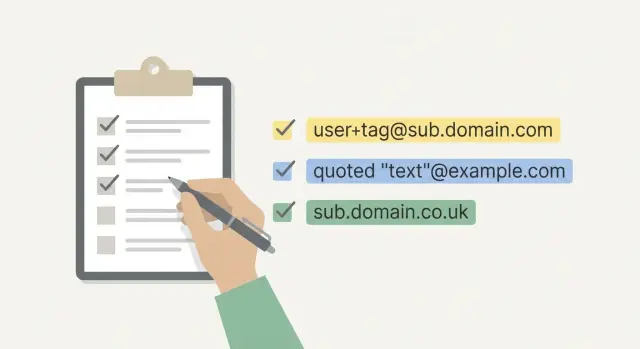
Plus addressing is when someone adds a tag after a plus sign, like [email protected]. People use it to filter mail and track signups, so rejecting it adds friction for no benefit.
Treat + as a normal character in the local part (outside quoted strings). Even if some providers ignore the tag for delivery, it’s still part of the address as written.
Local part characters: safe subset vs full set
Many teams accept a “safe subset” in the local part (letters, digits, and a few separators like ., _, -, +). That covers most real addresses and keeps implementation simpler.
RFC rules allow more punctuation, but expanding your accepted set only helps if you can do it correctly and keep solid tests around it.
Dots: what the syntax allows (and what providers do)
In the common unquoted form, dots are allowed in the local part, but not everywhere:
- No leading dot:
[email protected]is invalid - No trailing dot
- No consecutive dots:
[email protected]is invalid
Don’t bake provider-specific behavior into syntax. Some providers treat firstlast and first.last as the same mailbox, but that’s not a syntax rule.
A few quick cases worth testing:
[email protected](plus tag)[email protected](dot)[email protected](leading dot)[email protected](double dot)[email protected](plus tag with subdomain)
Quoted strings: the edge case most parsers miss
Quoted strings exist because email rules had to cover older systems and unusual mailbox names. They appear in the local part when the address needs characters that would otherwise be illegal or ambiguous.
A quoted local part is wrapped in double quotes, like "john smith"@example.com. Inside the quotes, spaces are allowed. If you need a literal double quote or a backslash inside the quotes, it must be escaped with a backslash.
The confusing part is that rules change inside quotes. Two dots in a row are normally invalid in an unquoted local part, but they’re allowed inside a quoted string. That means "a..b"@example.com can be valid even though [email protected] should be rejected.
For signups, you have a real choice:
- Fully support quoted strings (and test them thoroughly), or
- Reject them on purpose because they’re rare and can break downstream systems
Either is defensible. What causes bugs is rejecting them accidentally with a regex you didn’t mean to depend on.
Test cases that are syntactically valid:
"john smith"@example.com"a..b"@example.com"john\"smith"@example.com"back\\slash"@example.com"weird()[],:;<>@"@example.com
Quoted strings only affect the local part. You still need to validate the domain separately.
Domains and subdomains: what to allow and what to block
Many validators get the domain wrong. Subdomains are normal and common. [email protected] should not surprise your parser.
A simple approach is to validate the domain as labels separated by dots, then apply a few easy rules.
What to allow (and why)
For most consumer signups, these rules work well:
- Multiple labels (subdomains) are fine.
- Labels can contain letters and digits, and may include hyphens inside (not at the edges).
- Labels are 1 to 63 characters, and the full domain isn’t absurdly long (many systems cap at 253).
Requiring “at least one dot” is often a good typo filter for public addresses, but it can be a policy decision if you support internal domains.
What to block (common “looks fine” failures)
Dot placement is where bugs hide. These should be hard fails:
- Consecutive dots:
[email protected] - Leading or trailing dot:
[email protected],[email protected]. - Empty labels from bad splitting:
[email protected] - Label starts or ends with a hyphen:
[email protected],[email protected] - Invalid characters in a label (underscores are a common mistake):
a@sub_domain.example
Common parsing mistakes that create false rejects
Most “invalid email” errors come from validators that make assumptions instead of following consistent rules.
Whitespace is a big one. Copy/paste can add leading spaces, trailing spaces, tabs, non-breaking spaces, or a hidden newline. If you validate before trimming, you reject a valid address. If you “normalize” too aggressively (like removing all spaces anywhere), you can change the meaning of an address.
Another pitfall is splitting around @ naively. You want a clear rule: exactly one @ separator, with at least one character on each side. Don’t accept junk by splitting on the first @ and ignoring the rest, and don’t crash or generate confusing errors by splitting on every @.
Some libraries also partially support RFC features like comments (for example john.smith(comment)@example.com). Partial support can be worse than consistent rejection because it creates mismatches between frontend and backend.
Red flags to watch for:
- Trimming only ASCII spaces, but not tabs, non-breaking spaces, or trailing newlines
- Splitting on
@without enforcing “exactly one” - Accepting with a permissive regex, then failing later with a vague error
- Different results between environments (web vs mobile vs backend)
- Ignoring Unicode lookalikes (for example a Cyrillic “а” that looks like Latin “a”)
Unicode lookalikes are tricky. Even if you support internationalized addresses, it helps to log suspicious cases and show a clear error message when something looks off.
Step-by-step: build a syntax validator you can trust
A trustworthy validator isn’t one clever pattern. It’s a small set of rules applied in the right order.
1) Clean the input
Trim leading and trailing whitespace, then reject control characters (tabs, newlines, null bytes). Decide how you treat non-breaking spaces and other odd Unicode whitespace. Be explicit about whether you support non-ASCII.
2) Parse with an RFC-aware parser (not regex-only)
A regex-only approach often rejects valid addresses or accepts broken ones. Use a parser that understands local part vs domain, and knows how to handle quoted strings if you choose to support them.
Keep parsing separate from policy. Parsing answers “is it syntactically valid?” Policy answers “do we allow it in our product?”
3) Enforce limits and domain label rules
After parsing, apply hard limits and basic domain sanity checks (length limits, no empty labels, no leading or trailing hyphens, subdomains allowed when well-formed). This catches inputs that might technically parse but will cause problems later.
4) Choose your strictness policy and write it down
Decide intentionally about edge cases like quoted local parts. If you block them, say so and show a clear message. If you allow them, add tests for escaped characters and spaces.
Most importantly, keep the same rules across web, mobile, and backend so users don’t see inconsistent errors.
5) Log failures with reason codes
When support asks why an email was rejected, “invalid” isn’t helpful. Log a small set of reason codes (for example: CONTROL_CHAR, PARSE_FAIL, LENGTH, DOMAIN_LABEL). This makes spikes easier to diagnose and helps you find issues like an iOS keyboard inserting a hidden newline.
Test cases to include in your validation suite
A validator is only as good as the tests that lock its behavior. Keep a small “must pass” set based on real signups, a “must fail” set for universal rejects, and an edge-case set for parser traps.
Must pass examples:
Must fail examples:
- `` (empty string)
plainaddress(missing@)alex@(missing domain)@example.com(missing local part)[email protected](double dot in local part)
If you decide to support quoted strings, add explicit tests like "john..doe"@example.com and "john\"doe"@example.com. If you decide not to support them, keep the tests anyway, but mark them as policy rejects so the choice stays visible.
Don’t stop at pass/fail. Store expected reason codes so failures are actionable.
{ "input": "[email protected]", "expected": "fail", "reason": "LOCALPART_DOT_SEQUENCE" }
Run the same suite everywhere you validate: web, mobile, backend, and any third-party auth flow. That’s where mismatches usually show up.
Quick checklist and next steps
If you want fewer signup bugs and fewer “why won’t this email work?” tickets, keep your syntax rules short and consistent. A practical bar looks like this:
- Exactly one
@, with at least one character on each side - No spaces or control characters (unless you intentionally support quoted local parts)
- Length within common limits (local part up to 64, whole address up to 254)
- Domain is well-formed (no consecutive dots, no empty labels, no leading or trailing hyphen in a label)
- Plus tags and subdomains are allowed by default
Make one “decide once, document it” call early: whether you accept quoted local parts like "john smith"@example.com. They’re valid under RFC 5322, but rare in signups and often mishandled by downstream systems.
After syntax, add the checks syntax can’t cover: verify the domain exists, check MX records, and filter disposable email providers and known spam traps. If you’d rather not maintain those layers yourself, Verimail (verimail.co) is an email validation API that runs syntax checks alongside domain verification, MX lookup, and disposable and blocklist matching, so you can keep your signup logic consistent without piling everything into one regex.
FAQ
Why is validating email with a regex so error-prone?
Use a dedicated parser when you can. Regexes usually miss edge cases like quoted local parts, plus tags, and multi-label domains, so they either reject real users or accept broken input.
What’s the difference between syntax validation and acceptance policy?
Syntax asks, “Is this written in a valid email format?” Policy asks, “Do we want to allow it in our product?” Keep them separate so you don’t accidentally block valid addresses while trying to reduce risky signups.
Does “RFC-compliant” mean an email is deliverable?
No. RFC-compliant mainly means the string can be parsed as an email address. It doesn’t prove the domain exists, has MX records, or that the mailbox can receive mail.
What input cleanup should I do before validating an email?
Trim leading and trailing whitespace first, then reject control characters like tabs and newlines. Don’t “normalize” by removing internal characters, because that can change the address the user actually entered.
Should my signup form allow plus addressing (like [email protected])?
Allow it by default. [email protected] is a normal, widely used format, and blocking it tends to create unnecessary signup friction without improving security by itself.
Are subdomains like [email protected] valid?
Yes. Subdomains are common, and domains can have multiple dots like sub.example.co.uk. A validator that assumes “only one dot” in the domain will reject plenty of real addresses.
How should I handle multiple @ signs in an email input?
Enforce “exactly one @,” with at least one character on each side. Don’t split on the first @ and ignore the rest, and don’t accept inputs that contain multiple @ characters as-is.
Do I need to support quoted local parts like "john smith"@example.com?
Decide intentionally. They’re valid under the standard, but they’re rare and can break downstream systems that assume a simpler format. If you reject them, treat it as a policy choice and give a clear error message.
What length limits should I enforce for email addresses?
They catch abusive or dangerous inputs and reduce weird edge cases. Common practical limits are 254 characters total, 64 for the local part, 253 for the domain, and 63 per domain label.
How can I log validation failures so they’re actually useful?
Use reason codes that map to specific failures, like CONTROL_CHAR, PARSE_FAIL, LENGTH, or DOMAIN_LABEL. This makes support tickets and debugging much easier than a generic “invalid email.”