Signup email domain allowlist and denylist strategy that works
Create a signup email domain allowlist and denylist that blocks disposable domains without locking out real companies. Tips for ownership and upkeep.
Contents
- What problem domain lists actually solve
- Set the policy before you write rules
- When to use an allowlist, a denylist, or both
- How to build a good starter list (without guessing)
- Step by step: implement your domain rules safely
- How to avoid blocking legitimate corporate domains
- Ownership and change management
- Maintenance habits that keep lists accurate
- Common mistakes and traps
- Quick checklist before you ship changes
- Example: rolling out rules without hurting real signups
- Next steps: combine domain rules with email validation
- FAQ
What problem domain lists actually solve
Domain rules exist to protect signup from predictable problems: fake accounts, bounced emails, and abuse. If people can sign up with throwaway addresses, you end up with users you can’t reach, higher bounce rates, and a messier database. Disposable domains are also a common tool for bots and fraudsters because they make it easy to create thousands of accounts.
A signup email domain allowlist and denylist is a blunt but useful control. It works best when you’re clear about what you’re trying to stop. Blocking known disposable providers, for example, can reduce low-quality signups quickly, even before you send a verification email.
It helps to separate two ideas:
- Blocking an address targets one specific email (for example, a known bad actor).
- Blocking a domain targets everyone using that domain (for example, a disposable email provider).
That difference matters because the tradeoff is real. Stricter rules usually mean fewer bad signups, but they also create more false rejections. If you block too broadly, you’ll turn away real users who are trying to sign up in good faith.
So what counts as a legitimate corporate domain in your context? Usually it’s a domain owned by a real organization that can receive messages reliably. That might include a company’s main domain (like name.com), regional domains (name.co.uk), or a vendor-managed domain they use for staff. The goal is to block risky domains without punishing normal business email.
Set the policy before you write rules
A domain list isn’t a feature. It’s a policy decision that affects revenue, support load, and trust. Before you build a signup email domain allowlist and denylist, get specific about what you’re preventing.
Most teams have one primary goal (and a couple secondary ones): stop disposable addresses, reduce signup fraud, or protect deliverability by keeping bad data out. The goal matters because it changes what you block and how strict you are. Blocking disposable domains is usually safe. Blocking “free email” domains is risky and often blocks legitimate users.
Also write down what you will not block, even if it looks suspicious. Common examples include paying customers, invited users, partners, and internal staff accounts. A simple rule like “We allow these flows, but we may flag them for review” prevents a lot of accidental lockouts.
Decide where enforcement happens so rules stay consistent across your product: self-serve signup forms, public APIs that create users, admin-created users in your back office, invite flows (often more lenient), and sensitive actions like password reset and email change (avoid surprising existing users).
Finally, set expectations for support. If someone is blocked, what do they see, and how do they fix it? A good block message includes a plain reason (“This email provider is not allowed”), a safe next step (use a work email or contact support), and a clear appeal path.
When to use an allowlist, a denylist, or both
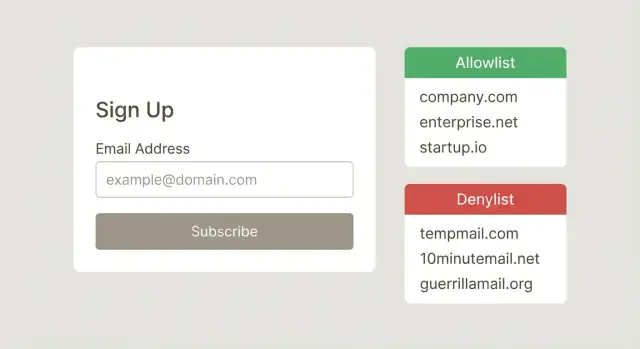
An allowlist is the strict option. You only let people sign up if their email domain matches a set you trust. This works best when you already know who should have access.
Common allowlist cases include internal tools for employees, private betas where invites go to specific companies, or B2B customer portals where each account maps to a known business domain. In these setups, blocking a real person is less risky because the right domains are predictable and support can add missing ones.
A denylist is the flexible option. You let most domains through, but block domains that are clearly low-quality or abusive. This is where you typically block disposable email domains, domains tied to repeated abuse, and obvious throwaway patterns.
A hybrid approach is often the safest for growth: use a denylist as your baseline, then add targeted allowlist overrides for important edge cases. For example, a large customer might use a less common corporate domain, or a legitimate partner might sign up from a subdomain that looks suspicious at first.
Keep the rule language simple so it’s easy to review and hard to misread. Match exact domains (for example, example.com) whenever you can. Decide upfront whether subdomains are treated as the same (whether mail.example.com should count). If you use temporary exceptions, give them an owner and an expiry date, and prefer small, clear rules over clever patterns that can block the wrong people.
How to build a good starter list (without guessing)
A good starter list isn’t something you download and paste. It should be based on what’s actually happening in your signup flow. That’s how you build a signup email domain allowlist and denylist that reflects real risk, not assumptions.
Start with your own data. Pull the last 30 to 90 days of signup attempts, confirmed users, email bounces, spam complaints, and any fraud or abuse reports. Group by domain and look for patterns like high volume with very low activation, repeated hard bounces, or the same domain creating many accounts in a short window.
If you have internal reporting, look for repeat offenders. A practical rule of thumb: domains that drive high volume but near-zero engagement deserve review, not an automatic block. Pick a small number, investigate a few addresses, and confirm the behavior before you add the domain.
Build the “good” side from internal knowledge too. Ask Sales and Customer Success for a short list of top customer domains and active prospects. These can become your initial allowlist (or at least a “never block without review” list), which helps you avoid accidental friction for real companies.
Whatever you add, write down why it’s there. Keep the note short and useful: the source (report, ticket, fraud case, bounce data), date added, who approved it, what you observed, and when you’ll review it.
Example: you see 400 signups from a single domain in one week, but zero confirmations and many identical IP ranges. You log the evidence, add it to the denylist, and set a 30-day review in case the pattern changes.
Step by step: implement your domain rules safely
Treat the email domain like untrusted input. Small formatting differences can break your rules.
Normalize every address the same way before you compare it to any list: trim spaces, convert to lowercase, and remove a trailing dot (some systems treat example.com. as valid). Do this once, close to where the email first enters your system, so every downstream check sees the same value.
Next, decide how matching works and write it down. “Exact domain only” is safer for most teams because it avoids surprises. “Include subdomains” can be useful (for example, blocking mail.disposable.com along with disposable.com), but it can also block legitimate setups if a company uses unusual subdomains.
Pick one tie-break rule and apply it everywhere. Many products choose “allowlist wins” so a reviewed exception can unblock real users immediately, even if a broader deny rule exists. If you choose “denylist wins,” expect more support tickets and slower unblocking.
A safe rollout usually looks like this:
- Log domains first (no blocking) to see what would be affected.
- Add rules in small batches and require an owner to approve changes.
- Store the reason and evidence for each new entry.
- Test against a recent sample of real signups, and estimate how many good users you would block.
- Release with a fast rollback switch and monitor signups and complaints.
How to avoid blocking legitimate corporate domains
The fastest way to lose real signups is to block with broad patterns. Avoid rules like “deny all country TLDs” or “deny anything with a dash.” Many real companies use domains like company.co.uk, company.com.au, or regional setups like eu.company.com.
Treat subdomains as normal, not suspicious. A large business may route email through subdomains for different teams, regions, or acquisitions. If your rule checks only the “main” domain, make sure it correctly handles cases like company.co.uk vs company.com, and doesn’t flag mail.company.com as “unknown.”
Be careful with email routing providers. Some legitimate businesses send and receive mail through services that look generic, and their MX records can resemble those used by disposable or marketing-only setups. Domain rules alone can’t tell intent.
A simple safety checklist before adding a deny rule:
- Check whether the domain is used by universities, government, or large ISPs.
- Confirm it’s a known disposable provider, not just “free email.”
- Test common corporate variants (regional domains and subdomains).
- Review recent successful signups from that domain before blocking.
- Add an expiry date to temporary blocks so they don’t live forever.
Finally, create an exception process for high-value accounts. After mergers, one customer might have five to ten active domains. Make it easy for support or sales to request a temporary allow exception while you verify ownership and update your rules safely.
Ownership and change management
Domain rules fail most often for a boring reason: nobody owns them. Give one team or role clear responsibility for approving changes and handling appeals. This isn’t about control. It’s about speed and consistency when a real customer gets blocked.
A basic workflow is enough:
- Support collects the request and user impact (who is blocked, how many signups, business value).
- Security or Product decides (approve, reject, or time-box a temporary block).
- Engineering implements and deploys (with a rollback plan).
- The owner reviews results after release (did abuse drop, did signups recover).
Every change should be logged so you can explain it later. Keep the log small: who requested it, who approved it, what changed (domain and rule type), why (evidence), when it went live, and when to re-check it.
Set an SLA for disputed blocks so legitimate users aren’t stuck. For example: acknowledge within 4 business hours and resolve within 1 business day, with an emergency path for paid customers.
Before denylisting a domain, require evidence, not vibes. Typical proof includes high signup volume with clear abuse patterns, repeated hard bounces, spam complaints, or a high match rate to known disposable providers.
Example: Support reports that users from acme-partners.com can’t sign up. The owner checks the log, sees it was blocked due to 30 spam signups in an hour, and switches to a temporary rule plus stricter checks, then reviews again in 48 hours.
Maintenance habits that keep lists accurate
A domain list isn’t a one-time setup. The moment you stop tending it, it drifts: old abuse patterns disappear, new disposable domains pop up, and a single bad entry can quietly block good users.
Set a review rhythm that matches risk. Weekly for the denylist is a common starting point, since attackers move fast. Monthly for the allowlist usually works because legitimate domains change more slowly.
To prevent list rot, make temporary decisions expire by default. If you add a domain because of a short spam wave, attach an expiry date and a note about why it was added. Do the same for exceptions (“allow this domain for Partner X until the contract ends”). When the date hits, the rule drops unless someone renews it with fresh evidence.
Track a few metrics so you can see whether the list is helping or hurting: block rate, appeal rate, false positives (confirmed legitimate users you blocked), bounce rate, and domain concentration (how much traffic comes from one domain).
Watch for two signals in particular: new disposable domains and sudden spikes in a single domain. If “examplemail.co” goes from 2 signups a day to 400 in an hour, investigate before you blanket-block. Look at geography, IP patterns, and whether addresses are syntactically valid and have real mail routing.
Finally, retire entries aggressively. If a domain hasn’t produced abuse in a while, or it keeps triggering false blocks for real companies, remove it or replace a hard block with a softer control like rate limits, extra verification, or manual review.
Common mistakes and traps
The fastest way to break trust with real users is to block email domains based on hunches. A signup email domain allowlist and denylist only works if it’s based on evidence, reviewed often, and applied the same way everywhere.
One common trap is blocking too broadly. Teams sometimes deny whole top-level domains or a big email provider because of a short-term spike in bad signups. That almost always catches legitimate people, especially contractors, students, and international users.
Another trap is labeling a domain as disposable just because it’s new, uncommon, or looks “random.” Many real companies use small hosted domains, rebrands, or regional providers. If you don’t have proof (fraud rate, bounce rate, abuse reports), treat “unfamiliar” as “unknown,” not “bad.”
Here are the patterns that cause the most damage:
- Adding broad blocks without data, then forgetting why they were added.
- Letting the list grow with no notes, no owner, and no review date.
- Having different rules in different places (web signup, mobile, API, admin invites).
- Blocking a domain that looks similar to a disposable provider but isn’t the same.
- Treating a one-time attack as a permanent rule.
Even a correct block can create problems if the user experience is unclear. If someone hits a block, they need to understand what happened and what to do next. Log the exact reason and rule that triggered the block, show a plain message (avoid vague “invalid email”), and keep a fast exception path for known customers or partners.
Quick checklist before you ship changes
Before you push an update to your signup email domain allowlist and denylist, do a safety pass. Most damage comes from small inconsistencies, missing context, or changes that have no way back.
Start with matching rules. Decide if you match exact domains only (example.com) or include subdomains (mail.example.com). Then normalize input the same way every time: lowercasing, trimming spaces, and converting international domains to a consistent format. If your system treats Gmail.com and gmail.com differently, you’ll miss cases and create confusing behavior.
Make sure every rule is explainable. Each entry should have a short reason, the date it was added, and a clear owner who can answer questions later. “Bad domain” isn’t a reason. “Seen in 1,200 fraud signups last week” is.
Keep the appeal path simple, but real. Put a time-bound review on disputed entries so mistakes don’t live forever. And don’t let temporary exceptions become permanent by accident: if you allow a risky domain for a partner rollout or an event, set an expiry and remove it unless someone renews it with a reason.
After the change goes live, watch impact. Track false positives and handle them fast. Monitor bounce rate and deliverability shifts for newly allowed domains. Sample recent signups to confirm the rules behave as intended.
Example: rolling out rules without hurting real signups
A B2B SaaS notices a sudden spike in new accounts using lookalike domains (like "acme-corp-support.com" instead of the real company) and a wave of disposable providers. Sales complains about junk leads, and support sees more chargeback attempts. The team already has a signup email domain allowlist and denylist, but it hasn’t been touched in months.
The rollout
They start with a measured response, not a big purge. First, they add one targeted denylist rule for the worst disposable domain showing up in logs. They also set a temporary rate limit on signups that look risky (same IP range, high velocity, repeated similar usernames). That reduces abuse while they learn, instead of blocking whole categories of domains.
Two days later, a real customer gets blocked. A large enterprise uses a regional subdomain for email (for example, "[email protected]"). A broad rule meant to catch lookalike subdomains accidentally matches it. Support escalates with evidence: the prospect has a signed order form, consistent IP history, and messages are bouncing because the account never completed signup.
The fix isn’t to remove the denylist entry. Instead, they add a narrow allowlist exception for the verified corporate domain, document why it exists, and set an expiry date so it’s reviewed later.
After two weeks, the team reviews results: blocked signups rise to 6% (from 1%), but support appeals stay low at 0.2% of total signups. Bounce rate on welcome emails drops from 3.4% to 1.1%, and sales reports fewer fake demos booked. The key win is confidence: every rule now has an owner, a reason, and a rollback path.
Next steps: combine domain rules with email validation
Domain allowlists and denylists are useful, but they’re a blunt tool. Pair them with email validation so you catch bad addresses even when the domain looks normal, and avoid blocking real users just because they use an unfamiliar company domain.
Start by writing your policy in plain language: what you block, what you allow, and what gets manual review. That keeps support, product, and engineering aligned when someone asks why a signup was rejected.
A practical flow is: check syntax, verify the domain can receive mail (DNS and MX checks), screen for known disposable providers and spam traps, then apply your allowlist and denylist rules (including exceptions). Log the outcome so you can learn and adjust.
If you want to keep the rules simple while still getting strong signals at signup, Verimail (verimail.co) is one option teams use to validate emails with RFC-compliant syntax checks, domain and MX verification, and disposable-provider matching in a single API call. Used this way, your lists stay a policy layer, and validation does the heavy lifting of deciding whether an address looks real and reachable.
FAQ
Should I use an allowlist or a denylist for signup email domains?
Default to a denylist that blocks known disposable email domains and domains tied to repeated abuse. Add an allowlist only when access is supposed to be limited (like employee tools or a customer portal for specific companies).
How do I build a starter denylist without guessing?
Start with your own signup data from the last 30–90 days. Look for domains with high signup volume but near-zero activation, repeated hard bounces, or clear abuse reports, then review a few samples before blocking anything.
What’s the safest way to match domains in code?
Normalize the email domain first: trim spaces, lowercase it, and remove any trailing dot. Then match exact domains by default, because broad pattern matching is the easiest way to accidentally block legitimate users.
If a domain is on both lists, which rule should win?
A good default is “allowlist wins,” so a reviewed exception can unblock real users quickly even if a broader deny rule exists. If you choose “denylist wins,” plan for more support tickets and slower recovery when you make a mistake.
How do I avoid blocking legitimate corporate domains?
Avoid broad rules like blocking country TLDs, domains with dashes, or anything “uncommon.” Before you denylist a domain, check whether it’s used by real organizations (universities, government, large ISPs), and review recent successful signups from that domain.
What should users see when they’re blocked by a domain rule?
Show a plain reason and a clear next step. For example: “This email provider isn’t allowed. Please use a work email or contact support to request an exception,” and make sure support can see which exact rule triggered the block.
How do I roll out new domain rules without hurting signups?
Run the rules in “log-only” mode first to measure impact, then roll out in small batches with a quick rollback switch. Test against a recent sample of real signups to estimate how many good users you would block before enforcing anything.
Who should own the allowlist/denylist, and how should changes be tracked?
Assign a clear owner for approvals and appeals, and log every change with a short reason and a review date. Without ownership, lists drift and you end up with permanent blocks nobody can explain or confidently remove.
How often should I review and clean up the domain lists?
Review the denylist weekly and the allowlist monthly as a practical baseline. Add expiry dates to temporary blocks and exceptions so they automatically drop unless someone renews them with fresh evidence.
Are domain allowlists/denylists enough, or do I still need email validation?
Domain lists are a policy layer, not proof an address is real. Pair them with email validation that checks syntax, domain and MX records, and disposable-provider signals so you block fewer legitimate users while still catching bad signups.