Strict email validation vs soft warnings at signup: choose well
Strict email validation vs soft warnings: compare impacts on conversion, fraud, and deliverability, with warning-copy templates and escalation paths.
Contents
- What you are really choosing at signup
- How the choice changes outcomes (conversion vs risk)
- Common email problems you can detect early
- When strict blocking is the right call (and when it is not)
- Step-by-step: build a block-warn-escalate policy
- Warning and block message templates (ready to paste)
- Escalation paths that do not annoy good users
- Common mistakes and traps
- Quick checklist before you ship
- A realistic example: freemium signup under bot pressure
- Next steps: choose a policy and set up validation
- FAQ
What you are really choosing at signup
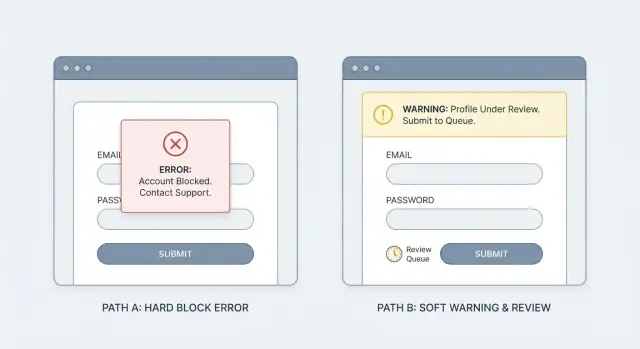
Strict blocking means the signup stops. If the email looks invalid or risky, the form won’t submit until the person fixes it or uses a different address. It’s a clear gate: no pass, no account.
A soft warning is the opposite. You still let the signup go through, but you mark the account as higher risk and decide what happens next. That might mean asking for email verification sooner, limiting a few features, or watching for abuse. It’s not “do nothing.” It’s “accept now, control later.”
So the real decision isn’t just about UX tone. It’s where you want to pay the cost: upfront friction for everyone, or ongoing risk handling after the account exists.
Email quality matters because bad addresses create real problems: bounces that hurt deliverability, support tickets (“I never got the confirmation email”), fake signups using disposable inboxes, wasted time chasing dead leads, and more paths for fraud.
This isn’t only a product decision. Marketing cares because list quality affects every campaign. Support and ops care because low-quality signups create manual work. Security and risk teams care because disposable emails often show up in bot-driven signup fraud.
A practical way to frame it: strict blocking is a promise that every new account has a reachable email. Soft warnings are a promise that you can handle some uncertainty with follow-up controls. Tools like Verimail (verimail.co) can flag invalid addresses, missing MX records, and known disposable providers in real time, but your policy decides what you do with that signal.
How the choice changes outcomes (conversion vs risk)
The tradeoff is simple: do you want fewer signups today, or more risk and cleanup work tomorrow? Most teams underestimate how much the “cleanup work” costs.
Strict blocking usually increases drop-off at signup, especially when people mistype (gamil.com), use a work alias, or are on a flaky mobile connection. But it also stops a large share of low-quality accounts at the door. That can improve activation and retention even if raw signups dip.
Soft warnings keep conversion high because the user still gets in. The risk is that bad emails pile up quietly: disposable addresses, bot-created accounts, and one-time inboxes that never read onboarding. Weeks later, it shows up as lower email engagement, higher bounces, and a slow slide in sender reputation. Once that reputation slips, even good users may stop receiving your messages.
Over time, the pattern tends to look like this:
- Strict blocking: lower signup completion, fewer fake accounts, cleaner CRM, better deliverability
- Soft warnings: higher signup completion, more unreachable users, more spam-trap exposure, noisier attribution
Support overhead is where the difference becomes painfully real. With more invalid or throwaway emails, you’ll see more “I never got the code” tickets, more password reset loops, more manual account merges, and (in paid products) more chargebacks and fraud follow-ups.
Data quality also takes a hit when you allow too much uncertainty. If your CRM fills with bad emails, campaigns get skewed, lead scoring becomes unreliable, and attribution starts crediting the wrong channels because bots and disposable signups behave differently than real people.
A practical middle ground is to validate in real time and only block when the risk is high (for example, a disposable provider or a clearly invalid domain), while warning for likely typos. That way you protect conversion without inviting avoidable risk.
Common email problems you can detect early
It helps to separate what you can know for sure at signup from what’s just a risk hint.
Common problems you can catch immediately include disposable inboxes, obvious typos and malformed addresses (missing the @, extra spaces, double dots), domains that don’t exist, domains that can’t receive mail because they have no valid MX records, and role addresses like info@ or support@. Some teams also look at “risky” patterns like odd domain names or certain TLDs, but those are weak signals and easy to get wrong.
Some checks are black-and-white. If the address fails basic syntax rules, or the domain lookup fails, the user can’t receive your confirmation email. Blocking here usually prevents frustration later.
Other checks are about intent. Disposable email detection, role inboxes, and suspicious patterns correlate with low-quality signups and fraud, but they can also catch real people. A consultant might sign up with [email protected] simply because it’s the address they have handy.
A workable approach is to bucket results: clear invalid (block), likely deliverable but risky (warn or escalate), and clean (allow). Many validators can return these signals quickly using syntax checks, domain verification, MX lookup, and matching against known disposable providers.
When strict blocking is the right call (and when it is not)
Strict checks at signup aren’t just a UX choice. They decide who gets through when your form is under pressure from bots, throwaway emails, and careless typos.
Strict blocking makes the most sense when the cost of a bad signup is high. If you run paid trials, offer credits, or ship anything that can be abused quickly, blocking obvious bad addresses saves money and support time. It’s also a safer default for regulated or sensitive flows (finance, health, education), where account recovery and audit trails matter.
Soft warnings fit when your main goal is low friction. Early-stage growth, freemium products, invite loops, and community signups often benefit from letting a user continue, then fixing deliverability later with verification. Blocking too early can turn a simple typo into a lost user.
A useful middle ground is to split by signal strength:
- Block: invalid syntax, non-existent domain, no MX records
- Warn: looks deliverable but risky (possible disposable provider, suspicious patterns)
- Escalate: repeated attempts, high velocity, unusual device or IP behavior
- Allow: clean signals and normal behavior
Segment rules help you be strict without punishing loyal users. You can treat brand-new accounts more strictly than existing users updating their email. You can also tune by geography, device reputation, or signup speed (a human taking 30 seconds is different from a bot firing 30 attempts).
Decide what happens after a warning. Options that work well: continue but require email verification before key actions, add a lightweight challenge, or route the riskiest cases to manual review.
Example: a SaaS with a free plan might warn on disposable email detection but still let the signup complete. A paid trial, on the other hand, can block disposable domains outright (for example, via an API like Verimail) and offer a clear path to retry with a work or personal inbox.
Step-by-step: build a block-warn-escalate policy
A good policy separates “can this email work?” from “how risky is this signup?” That’s how you avoid treating honest typos the same as throwaway addresses.
Start by choosing checks you’ll run during signup. Keep it focused on signals that are fast and clear: syntax (is it even shaped like an email), domain existence, MX records (can the domain receive mail), and disposable or known risky providers. Tools like Verimail bundle these into one call, but the key is how you use the results.
Next, turn signals into simple risk tiers that everyone on the team can understand. Aim for three tiers, with written thresholds you can point to later.
A simple mapping to begin with:
- Green: valid syntax, domain ok, MX present, not disposable -> allow signup
- Yellow: looks real but uncertain (temporary DNS issue, “accept-all” domain, new domain) -> allow, show a warning, and verify later
- Red: clearly unusable or abusive (invalid domain, no MX, known disposable, spam trap signals) -> block or require a challenge
Then define the actions. “Warn” should still let a good user continue, but it should also reduce risk. Common options are requiring email verification before activating key features, limiting invitations, or delaying trial credits.
Make logging part of the policy, not an afterthought. Store a small set of reason codes and context so support and engineering can debug patterns without guessing. For example: SYNTAX_INVALID, DOMAIN_NXDOMAIN, MX_MISSING, DISPOSABLE_PROVIDER, plus a timestamp and the signup source.
Roll it out carefully. Start with warnings only, then tighten.
Track a small set of metrics as you phase in changes:
- Signup completion rate
- Email verification completion rate
- Bounce rate on first send
- Fraud or abuse rate (chargebacks, spam, bot signups)
- Support tickets about signup issues
Warning and block message templates (ready to paste)
Good signup copy does three things fast: says what looks wrong, tells the user how to fix it, and offers one clear next step. Keep the tone neutral. Don’t hint at “fraud” or “abuse,” even if you’re doing disposable email detection behind the scenes.
Below are ready-to-paste templates. Each one assumes a primary button like Edit email and an optional secondary action like Continue anyway (only when you truly allow it).
Soft warning templates (allow signup)
Use these when the risk is moderate or when you can verify later.
- “This email might not receive messages.” Please double-check for typos (example: [email protected]). Primary: Edit email. Secondary: Continue anyway.
- “We couldn’t confirm this domain yet.” The address may still work. Try a different email if you have one. Primary: Edit email. Secondary: Continue anyway.
- “This looks like a temporary email address.” Temporary inboxes often miss important account emails. Use a personal or work email ([email protected]). Primary: Edit email. Secondary: Continue anyway.
- “Please check the spelling of your email.” Common issues: missing @, extra spaces, or .con instead of .com. Primary: Edit email. Secondary: Continue anyway.
- “You may not get our verification email.” If you don’t receive it, you won’t be able to reset your password later. Primary: Edit email. Secondary: Continue anyway.
Make the warning accessible: show it near the email field, use clear text (not color only), and set focus on the message so screen readers announce it.
Strict block templates (stop signup)
Use these when you must trust the address now (for receipts, password resets, or account limits).
- “Enter a valid email address to continue.” Example: [email protected]. Primary: Edit email.
- “That email address can’t receive mail.” Please use a different address that can receive messages. Primary: Edit email.
- “We can’t accept this email provider.” Use a personal or work email so you can verify your account. Primary: Edit email.
- “This email domain isn’t set up to receive email.” Try another email address ([email protected]). Primary: Edit email.
- “Email verification failed.” Please correct your email and try again. Primary: Edit email.
If you use an API to decide warn vs block, map the result to plain language (deliverable vs risky) and avoid technical terms like “MX record” in user-facing messages.
Escalation paths that do not annoy good users
The worst outcome is punishing real people for the behavior of bots. A good escalation path should feel like a normal security check, not a dead end.
Match friction to risk. If the email looks valid but slightly suspicious (new domain, disposable provider, mismatch with past patterns), nudge first. If the traffic looks automated (high speed, repeated attempts), escalate faster.
Escalation options that keep the flow moving
One approach is to verify the email before anything important happens. Let the user create an account, then require a code or click-to-confirm before they can continue. This catches typos and most fake signups without a harsh block.
If the pattern looks bot-like, step up the challenge instead of blocking the email. A CAPTCHA, a short rate limit, or a cooldown after repeated attempts can cut automated signups while barely touching normal users.
Another option is “allow, but restrict.” Let signup complete, but lock high-impact actions (inviting teammates, exporting data, starting a trial, sending messages) until the email is verified. For many products, this is the best balance.
For high-value or high-risk accounts (enterprise domains, large orders, admin roles), consider a manual review queue. Use it sparingly and keep the promise clear: what you need, how long it takes, and what the user can do meanwhile.
Timeouts, fallbacks, and support that feel fair
A smooth escalation path has clear limits and a way out:
- Verification codes: allow resends, but cap them (for example, 3 resends, then a short wait).
- Cooldowns: after repeated attempts, pause new signups from the same IP/device for a few minutes.
- Safe alternative: offer “use a different email” and accept common providers without extra steps.
- Human help: provide a simple support path for blocked or stuck users (especially paid intent).
- Clear expiry: tell users when the code expires and how to request a new one.
If you use an email validation service like Verimail, treat the result as a risk signal, not a verdict. The goal is to stop bad traffic early while letting good users finish signup with minimal hassle.
Common mistakes and traps
The fastest way to create signup pain is to block everything that looks even slightly risky. Disposable email detection is useful, but some real people use temporary inboxes for privacy. If you hard-block all of them, you’ll lose legitimate users and they won’t tell you why - they’ll just leave.
Another common trap is the vague message: “Invalid email.” That’s not guidance, it’s a dead end. A good message tells the user what to do next (fix a typo, try a different address, check inbox access). If you can’t explain the problem in one sentence, use a generic message and offer a simple path (retry, verify, or contact support) rather than guessing.
Teams also sometimes apply strict rules only to free signups, then quietly allow low-quality emails for paid plans to protect conversion. That can backfire later with failed receipts, account takeover attempts, refund requests, and support costs. If payment, invoices, or password resets depend on email, treat email quality as part of the transaction, not just the signup form.
A quieter but costly mistake is not tracking reason codes. Without them, you can’t tune your policy. You end up arguing opinions instead of looking at data. If your validator can return outcomes like syntax error, no MX records, disposable provider match, or blocklist match, store that reason and review it weekly.
Finally, avoid treating every user the same without evidence. A consumer newsletter signup and a B2B trial aren’t the same risk. Neither are countries, domains, or traffic sources. Start with a baseline, then adjust based on what you see.
Common gotchas to watch for:
- Blocking typo-like domains (gmial.com) instead of helping users fix them
- Flagging a whole domain because one address looked suspicious
- Using one rule set for all plans and all funnels
- Measuring only conversion, not bounces and support tickets
- Ignoring repeat attempts from the same device/IP
Treat your approach as an experiment: ship clear messages, log the reason, and review outcomes. The policy that feels “safe” can be the one that quietly bleeds real users.
Quick checklist before you ship
Before you turn on email rules at signup, decide what you will stop immediately and what you will simply flag. Most teams get better results when they block only the cases that are almost certainly broken, and handle the gray area with warnings plus follow-up.
Must-block (clear failures)
These are safe to block because they aren’t deliverable addresses.
- Bad syntax (missing @, invalid characters, extra spaces)
- Domain does not exist
- No MX records (or mail cannot be routed)
- Known spam trap patterns you never want in your database
If you’re using a validator like Verimail, these checks map to the basics: RFC-compliant syntax, domain verification, and MX lookup. Keep the rule simple: if mail can’t be delivered, don’t let the signup proceed.
Warn + allow (safe follow-up)
For anything that might be a real person, let them continue but add a safety step that protects you.
- Suspected disposable email detection
- Role-based addresses (like info@) if they matter to your product
- Typos that look fixable (gmal.com, hotnail.com)
Warnings should always come with a path forward, like email verification, a resend option, or a “use a different email” choice.
Operational checks to ship with the UX:
- Add rate limits for repeated attempts from the same IP/device to reduce bot retries.
- Track the metrics that tell you if your policy works: signup conversion, verification completion, and bounce rate.
- Make sure support and sales know what each message means, what users see, and the recommended fix (for example: “try a work email” vs “check the spelling”).
A good final test is to run five real signups yourself: one correct email, one typo, one disposable, one role address, and one clearly invalid domain. If any outcome surprises you, your rules aren’t ready yet.
A realistic example: freemium signup under bot pressure
A freemium SaaS app wakes up to a problem: signups doubled overnight, support tickets rose, and the email list is full of addresses that never open a message. A quick look shows a pattern of disposable domains and typos.
Approach 1: Strict block at signup
On screen, the user enters an email and hits Create account. If the address looks disposable or invalid, the form stops them right there.
What the user sees:
- "Please use a real email address. Disposable emails are not allowed."
- "We could not deliver to this address. Check for typos and try again."
What the business sees: fewer fake accounts, fewer bot-created workspaces, and a cleaner user database. Deliverability improves because you’re not sending to dead inboxes. The downside is that real people sometimes get blocked (for example, students using a forwarding address they trust).
Approach 2: Soft warn + verification
On screen, the user can continue, but they get a clear warning and an extra step.
A simple flow:
- Warn: "This email may be temporary or undeliverable."
- Continue: "You can sign up, but you must verify your email to activate."
- Verify: send a code or link before enabling key features.
What the business sees: higher signup completion, but less long-term damage because unverified accounts can’t do much. Bounce rates drop because you stop sending to addresses that fail verification.
A common decision point is the upgrade moment. Many freemium teams allow soft warnings for free accounts, then require a verified, non-disposable email before starting a trial, adding a payment method, or inviting teammates. That keeps growth friction low while protecting revenue and support time.
If you use an email validation API like Verimail during signup, you can trigger either path instantly based on disposable detection, domain checks, and mailbox risk signals, without guessing.
Next steps: choose a policy and set up validation
Start simple: pick a tiered policy you can explain in one sentence, then tune it using real signup data. Most teams do best with three outcomes: allow, warn, and block. When you try to design the perfect policy on day one, you usually end up with confusing rules and inconsistent messages.
Choose a validation method that catches problems you can reliably detect at signup: syntax issues, domain checks, MX record lookup, and disposable risk. More signals make it easier to be strict only when it’s justified.
A practical setup plan:
- Define your tiers: what gets blocked, what gets a warning, what passes quietly.
- Standardize message copy for web and mobile so users don’t feel whiplash between devices.
- Decide the fallback: if validation is slow or unavailable, do you allow and verify later, or pause signup?
- Log outcomes and review weekly: conversion rate, bounce rate, spam complaints, support tickets, and fraud reports.
- Write down escalation rules for support and fraud teams (who can override, what proof is needed, what gets banned).
Keep your copy consistent across the whole flow. Inline error, banner warning, and email verification screens should all use the same terms (for example, always say “work or personal email” if that’s what you want). Consistency reduces repeat attempts and angry tickets.
If you want a single-call approach, Verimail provides an email validation API with RFC-compliant syntax checking, domain verification, MX record lookup, and real-time blocklist matching against known disposable email providers. The tool helps, but the policy you wrap around it matters more: measure results, adjust thresholds, and keep the experience predictable.
FAQ
What’s the real difference between strict blocking and a soft warning at signup?
Strict blocking stops the signup until the person enters an email that meets your rules. Soft warnings let the signup finish, but you treat the account as higher risk and add follow-up controls like earlier verification or feature limits.
What email issues are safe to block immediately?
Block when you’re confident the address can’t receive mail, because letting it through just creates support tickets and failed verification later. A good default is to block invalid syntax, non-existent domains, and missing MX records, then warn on the gray-area signals.
When should I use a soft warning instead of blocking?
Soft warnings work best when you can still protect the product after signup. Let the user in, but require email verification before key actions, and keep unverified accounts from doing high-impact things like sending messages, exporting data, or starting a trial.
Should I block disposable email providers or just warn?
Disposable detection is a strong signal for low-quality signups, but it’s not perfect. Many teams block disposable emails for paid trials or abuse-prone flows, and warn (then verify) for low-risk flows so legitimate privacy-focused users still have a path forward.
What checks should I run during signup to validate emails in real time?
Focus on signals that are fast and reliable at signup: RFC-compliant syntax, domain existence, MX lookup, and disposable provider matching. Services like Verimail bundle these checks into one API response so you can consistently decide allow, warn, or block without building every check yourself.
How do I build an “allow / warn / block” policy that’s not overly complicated?
Start with three tiers: allow, warn, and block, with written rules anyone on the team can understand. Keep the first version simple, then tune thresholds based on data like bounces, verification rates, and abuse patterns so you don’t over-correct and hurt real users.
What should the warning or block message actually say to users?
Say what’s wrong in plain language and give one clear next step, usually “edit email” or “use a different email.” Avoid technical terms like DNS or MX records in user-facing copy, and avoid implying wrongdoing even if your system is reacting to risk signals.
What should I log so we can improve the policy over time?
Store a small set of reason codes for every decision, along with timestamp and signup context, so you can debug patterns quickly. When conversion drops or tickets rise, reason codes let you see whether the cause is typos, disposable emails, domain issues, or something else.
How can I escalate risk without annoying legitimate users?
Use escalation that keeps the flow moving: verify the email before sensitive actions, add light rate limits for repeated attempts, and reserve harder challenges for clearly automated behavior. This reduces bot signups while minimizing friction for normal users who simply made a typo.
What metrics should I track, and what if validation fails or times out?
Default to “allow and verify later” when validation is slow or unavailable, unless your product truly requires a deliverable email immediately. Separately track signup completion, verification completion, first-send bounce rate, abuse rate, and support tickets so you can see the real cost of each policy choice.