Unusual MX records: handling corporate email gateways safely
Learn why unusual MX records are common in enterprises, how gateways change DNS patterns, and how to validate emails without rejecting real company domains.
Contents
- Why valid enterprise domains can look odd
- A plain-English view of MX records (and what they do)
- How corporate email gateways change what you see in DNS
- Common “unusual” MX setups that are still valid
- DNS quirks that can make a good domain look broken
- Step-by-step: a safer way to validate domains with odd MX
- Common mistakes that cause false rejections
- How to avoid over-rejecting enterprises in real signups
- Example scenario: the “big company domain” that got blocked
- Quick checklist for reviewing your validation rules
- Next steps: tighten rules without blocking real customers
Why valid enterprise domains can look odd
Most email validation rules are built around what looks normal: one domain, a couple of MX records, and a familiar mail provider. The problem is that many real companies do not look normal in DNS. Their setup is shaped by security, compliance, mergers, and old infrastructure that still has to keep working.
That’s where teams get burned by unusual MX records. A perfectly valid domain can point to a third-party gateway, publish MX hosts that don’t resemble the company name, or route mail through a chain of providers and regions. If your rules expect neat patterns, you end up rejecting real customers.
Over-rejecting usually shows up fast: lower signup conversion (especially for larger accounts), “I never got the confirmation email” tickets, sales saying a known company was blocked, and users switching to personal emails, which makes account matching harder.
The fix isn’t “accept everything.” It’s treating domain checks as a risk signal, not a final verdict.
Domain-level validation can answer questions like “Is this domain configured to receive mail?” and “Does it match known disposable patterns?” It cannot guarantee a mailbox exists or will accept your message. Many enterprises block recipient probing, catch-all behavior is common, and some gateways respond in ways that look suspicious.
A safer mindset is to pass likely-good domains even when they look odd, and reserve strict blocking for clear cases (invalid syntax, non-existent domain, or known disposable domains).
A plain-English view of MX records (and what they do)
MX records are DNS entries that tell senders where to deliver email for a domain. If you send mail to [email protected], the sender looks up company.com’s MX records to find the servers that handle inbound mail.
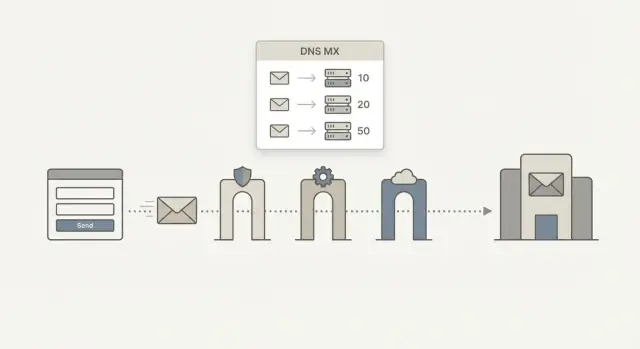
Each MX record has a priority number (sometimes called preference). Lower numbers are tried first. It’s common to see multiple MX hosts for backups, load sharing, or regional routing.
One important detail gets missed in a lot of validators: DNS tells you where to try, not whether your specific message will be accepted.
A domain can have clean MX records and still reject a particular address because the mailbox doesn’t exist, the sender is blocked, or strict anti-spam rules trigger. The reverse is also true: a domain can look odd in DNS and still accept mail just fine.
Sometimes a domain has no MX records at all. Email standards allow a fallback where the sender tries the domain’s A or AAAA record (its main IP address). Many modern systems don’t rely on this, but some older or custom setups still do.
How corporate email gateways change what you see in DNS
Many large companies don’t send inbound mail straight to their mailbox provider. They put a gateway in front, so email is filtered and inspected before it reaches inboxes.
That gateway layer is why unusual MX records are so common for enterprise domains. The MX hostname you see in DNS is often owned by a security vendor, a shared service team, or a legacy system that has nothing to do with the public brand.
One domain, multiple responsibilities
In a typical setup, inbound filtering and final mailbox hosting are split. The gateway handles spam and malware scanning, then relays clean mail onward to the mailbox system (cloud-hosted or on-prem).
Because the gateway is a separate system, the MX target might look like a generic filtering cluster (for example, something like "mx1.mailfilter.someprovider.net") rather than "mail.company.com". That’s normal, and it’s not a sign the domain is fake.
You’ll often see things like regional redundancy, tenant-based hostnames that don’t include the company name, mixed routing for different business units, or old MX records kept during a migration. Acquisitions and multi-brand groups add even more noise, especially when mail systems are merged gradually.
The practical takeaway: judge whether the domain can receive mail, not whether the hostname looks familiar.
Common “unusual” MX setups that are still valid
Some domains look strange during MX record verification even when email works perfectly. If your rules assume “one domain, one mail server, one vendor,” you’ll create false rejections.
Hosted email that doesn’t look like the brand
Many companies outsource mailbox hosting. The MX hosts can point to provider-owned domains, not the company’s domain. That looks suspicious only if you assume the MX host must share the same root domain as the email address.
Security and filtering services add another layer. A company may route all inbound mail through a gateway first, then pass it to the mailbox provider. In DNS, you only see the gateway.
More than one MX can be normal
Multiple MX records aren’t a red flag by themselves. They’re often used for failover and regional routing. Temporary migrations can also make DNS look messy, with old and new MX records living side-by-side while a cutover is tested.
A good rule of thumb is simple: “odd-looking” should mean “needs smarter checks,” not “reject.”
DNS quirks that can make a good domain look broken
DNS looks simple from the outside: you ask for MX records, you get an answer. In practice, many legitimate companies can look “broken” for short periods.
Big domains may publish several MX hostnames, and those hostnames can rotate as providers shift traffic or replace nodes. If your validation expects a stable set of names, normal changes can get mislabeled as suspicious.
Low TTL values also make results look inconsistent. TTL is how long a resolver should cache an answer. Some enterprises keep TTLs short so they can reroute mail quickly. Two lookups seconds apart can disagree if different resolvers have different cached answers.
You’ll also hit grey-area failures that don’t mean “domain is invalid,” such as SERVFAIL from a struggling resolver, timeouts from network hiccups, partial responses, intermittent NXDOMAIN during propagation issues, or truncated replies that need a TCP retry.
The key point is that a single lookup is rarely enough for a confident decision. Treat temporary DNS failures as “unknown,” not “invalid,” and retry before you block a signup.
Step-by-step: a safer way to validate domains with odd MX
When you run into unusual MX records, the biggest risk is rejecting a real company because their mail setup doesn’t look like a typical small-business domain. Validate in layers and keep “uncertain” separate from “bad.”
Start with what you can know without the network. A strict, RFC-aware syntax check catches obvious typos and broken formats before you spend time on DNS.
Next, confirm the domain exists. If DNS returns NXDOMAIN, that’s a hard failure. If the domain is internationalized, make sure you handle IDNs correctly (often via punycode) so you query the real DNS name.
Then look up MX, but don’t treat “no MX” as an automatic rejection. Some legitimate domains publish no MX on purpose. If you choose to support a fallback, check A/AAAA and treat the result as lower confidence.
A practical sequence that avoids most false rejections:
- Validate address syntax first.
- Check whether the domain exists; treat NXDOMAIN as a hard fail.
- Resolve MX; if missing, optionally check A/AAAA and mark the result as lower confidence.
- Separate temporary DNS errors (timeouts, SERVFAIL) from hard failures, and retry.
- Return a graded outcome (pass, risky, unknown) instead of a single yes/no.
Common mistakes that cause false rejections
False rejections usually happen when rules assume every domain looks “normal.” Enterprise email often runs through gateways and outsourced infrastructure, so unusual MX records aren’t automatically a red flag.
A common mistake is auto-failing when MX hostnames don’t include the same domain name. Many companies use MX hosts that have no visual connection to the brand. Another is rejecting domains because the MX points to a third-party provider. That blocks a lot of legitimate organizations.
Timeouts are also misunderstood. Treating a single timeout as a permanent failure is a fast way to lose valid signups. Retry with backoff and, if possible, use more than one resolver.
Be careful with “SMTP check or reject” logic too. Hard-blocking all catch-all domains or all “unknown” results causes damage because many enterprises intentionally disable SMTP-level probing or use gateways that make it unreliable.
Example: a buyer tries [email protected]. The MX points to a security gateway, DNS times out once, and your system rejects it. In reality, the domain is fine and the timeout was transient.
How to avoid over-rejecting enterprises in real signups
Enterprise email setups often sit behind gateways and routing layers. That can make a real company domain look suspicious if your rules expect a simple, consumer-style MX. The goal is to catch junk without blocking real buyers.
Avoid blanket allowlists. They’re useful for a single high-value customer domain you’ve verified through other channels, but they shouldn’t be your default. They also create a quiet bypass that attackers can aim at.
When you see unusual MX records, treat uncertainty as a product decision, not only a technical one. Build a soft-fail path so the user can continue, but you verify later. For example, allow account creation but delay invites until the email is confirmed, or restrict high-risk actions until you get a cleaner signal.
It also helps to tune strictness by flow. Signup should prioritize low friction with confirmation. Team invites can be stricter because they’re easy to abuse. Lead forms often need higher acceptance with better flagging. Password reset should prioritize confirmed accounts and deliverability.
Logging matters more than most teams expect. Store the reason you made the decision (syntax issue, NXDOMAIN, timeout, no MX, disposable match) so support can explain what happened and you can improve rules without guessing.
Example scenario: the “big company domain” that got blocked
A sales prospect from a large company signs up with a real work address: [email protected]. Your validator checks DNS and sees MX records pointing to a third-party gateway. That’s common for enterprises, but your rule says “MX must match the domain” and marks it suspicious. Then one DNS lookup times out. Your system combines “third-party MX” plus “timeout” and rejects the signup.
The fix is to handle uncertainty safely:
- Retry DNS once or twice with a short delay (and ideally a different resolver).
- If MX exists but is third-party, treat it as normal for corporate email gateways.
- If the second attempt still times out, don’t reject. Mark the domain as unknown and allow signup with safeguards (email verification, rate limits, or manual review for high-risk flows).
Unusual MX records are often a sign of mature IT, not fraud.
Quick checklist for reviewing your validation rules
If your rules treat anything “odd” as wrong, you’ll block real customers. Use these checks to stay strict where it matters and flexible where it should be.
A safer order of checks
- Start with RFC-style syntax, then confirm the domain exists. Only then judge mail routing.
- When an MX lookup fails, record the failure type. NXDOMAIN usually means the domain isn’t real. Timeout or SERVFAIL often means “try again.”
- When MX is present, treat third-party providers and gateways as normal.
- Block only on signals you can stand behind: invalid syntax, a domain that doesn’t exist, or a known disposable provider.
- For borderline cases, do a second pass asynchronously instead of hard-failing signup.
What “secondary check” can mean
A second pass can include retrying DNS, rechecking disposable lists, or running deeper validation in a separate flow.
Next steps: tighten rules without blocking real customers
Start with your own data. Pull a sample of recently rejected signups and group them by domain. Look for patterns: large corporate domains, repeated DNS timeouts, and the same gateway hostnames showing up again and again.
Add visibility before you add stricter blocks. If your system only stores “pass/fail,” you can’t learn from mistakes. Capture reason codes (syntax_fail, nxdomain, no_mx_found, dns_timeout, disposable_detected) and introduce a third outcome for borderline cases: unknown or review. That lets real enterprise users through with a little friction instead of a hard stop.
If you don’t want to maintain these rules yourself, Verimail (verimail.co) is one option teams use for enterprise email validation. It combines RFC-aware syntax checking, domain and MX verification, and real-time matching against known disposable email providers in a single API call, which can help you be more precise without punishing normal corporate gateway setups.